Choosing the right 16-pad MIDI controller can make beat programming faster, finger drumming more expressive, and live triggering far more intuitive. The best models balance pad feel, workflow controls, software support, and portability.
In this roundup, we focus on options that suit beginners, producers, and performers alike—whether you want a compact desktop pad controller, a wireless model, or a more performance-ready setup.
Best 10 16-Pad Midi Controller Picks for 2026
Portable MPC Pad Controller

- 16 MPC pads with 3 banks
- 18 assignable knobs for control
- Includes Ableton Live Lite and MPC Beats
Best For: Beat makers who want a portable MPC-style controller
Wireless Studio Pad Controller

- Bluetooth MIDI with low latency
- 16 RGB pads with aftertouch
- Rechargeable battery lasts up to 16 hours
Best For: Mobile producers who need wireless control and battery power
Integrated Production Pad Controller
PreSonus ATOM Performance Pads

- 16 RGB pads with 8 banks
- 20 assignable buttons and 4 encoders
- Includes Studio One Artist and Ableton Live Lite
Best For: Producers who want deep DAW integration and expressive pads
Portable Bluetooth Beat Maker
EMP16 16-Pad MIDI Controller With OLED Display

- 16 RGB velocity-sensitive pads
- Bluetooth 5.0 plus USB/MIDI in-out
- OLED display with assignable controls
Best For: Beat makers who want portable wireless control and broad MIDI connectivity
Sequencer Hybrid Pick
Arturia BeatStep 16-Pad MIDI Controller and Sequencer
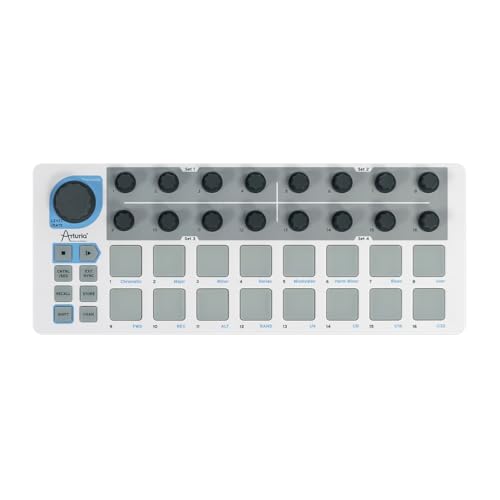
- Controller mode and step sequencer in one
- 16 pressure-sensitive pads and 16 encoders
- USB, MIDI, CV, and Gate connectivity
Best For: Producers who want a compact controller that also sequencers
Wireless Performance Choice
Synido TempoPAD C16 Wireless MIDI Pad Controller

- Bluetooth and USB with rechargeable battery
- 16 RGB velocity-sensitive pads and aftertouch
- 8 knobs, 12 buttons, and 16-step sequencer
Best For: Portable producers who want wireless MIDI and performance features
Sequencing Powerhouse
Arturia BeatStep Pro 16-Pad Controller & Sequencer

- 16 velocity- and pressure-sensitive pads
- 2 melodic sequencers plus 16-track drum sequencer
- CV/Gate, MIDI, USB, and drum gate outputs
Best For: Producers who need a controller/sequencer hybrid for hardware and DAW control
DAW Beat Creator

- 8 banks of 16 RGB velocity- and pressure-sensitive pads
- 1:1 MPC2 software integration with LCD display
- Assignable touch strip and included MPC2 suite
Best For: Beat makers who want MPC-style pads and bundled software
Color Pad Performer
Donner STARRYPAD 16-Pad Beat Maker

- 16 backlit silicone pads with 3 banks for 48 pads
- 2 faders, 2 knobs, and 3 buttons for extra control
- USB-C plus MIDI in/out for external gear
Best For: Compact beat makers who want colorful pads and extra hands-on controls
Portable MPC Pad Controller – Akai MPD218 16-Pad Beat Maker
If you want a compact 16-pad midi controller for beat production, the Akai MPD218 keeps the focus on hands-on performance. It combines 16 thick MPC pads with three banks, 18 assignable knobs, and note repeat/full level controls, so you can build drum parts and tweak parameters without reaching for the mouse.
Best For: Beat makers and producers who want a portable, USB-powered MPC-style pad controller with deep assignable control.
Pros:
- 16 thick MPC pads with three pad banks for up to 48 assignable pads
- 18 fully assignable knobs for DAW and plugin control
- Note Repeat and Full Level buttons support expressive performance
- Includes Ableton Live Lite, Drum Synth 500, and MPC Beats software
Cons:
- No built-in sound engine, so it requires software or external apps to make sound
- Uses USB power and is aimed at computer-based workflows
The MPD218 is a straightforward choice if you want the classic Akai pad feel and a lot of control in a small footprint. Its software bundle and iOS connectivity add value for producers who need a flexible starter controller.
Color-Coded Portable Pad Controller – Synido TempoPAD RGB
The Synido TempoPAD is a practical 16-pad midi controller for producers who want portability, easy setup, and clear visual feedback. Its 16 velocity-sensitive RGB pads, three banks, and four assignable knobs make it useful for beat creation, recording, and live performance, while the included carry case helps keep it mobile.
Best For: Producers and performers who want a compact RGB pad controller with a carry case and simple USB-C setup.
Pros:
- 16 velocity-sensitive RGB pads with customizable colors
- 3 banks provide 48 total assignments
- USB-C plug-and-play design with no additional drivers required
- Includes a carrying case for travel and mobile sessions
Cons:
- Only 4 assignable knobs, so hands-on control is more limited than some rivals
- Pad 14 does not light up in Keyboard Mode
TempoPAD is a good fit if you want a lightweight controller that is easy to drop into a backpack and start using quickly. The RGB pads and editor support make it especially appealing for players who like clear, customizable layouts.
Wireless Studio Pad Controller – M-VAVE Bluetooth Drum Pad
The M-VAVE wireless MIDI controller pads stand out if you want a 16-pad midi controller that can work without being tied to a cable. It combines 16 RGB velocity-sensitive pads with aftertouch, eight rotary encoder sets, note repeat, and a rechargeable battery, giving you a flexible setup for studio work or making music on the go.
Best For: Mobile producers who want Bluetooth MIDI, battery power, and plenty of assignable controls.
Pros:
- Wireless Bluetooth MIDI with low-latency, stable transmission
- Built-in rechargeable battery offers up to 16 hours of use
- 16 RGB velocity-sensitive pads with aftertouch
- 8 assignable knob sets plus 3.5mm MIDI out for expanded setups
Cons:
- Wireless features may not be necessary if you only work at a fixed desk
- Setup is more feature-rich than basic pad controllers, which may be more than some users need
This controller is a strong option for creators who want freedom from USB-only workflows. Between Bluetooth, battery power, and broad DAW compatibility, it is designed for producers who move between devices and locations.
Integrated Production Pad Controller – PreSonus ATOM Performance Pads
The PreSonus ATOM is a capable 16-pad midi controller for users who want tight software integration and expressive pad performance. Its 16 full-size RGB pads, multiple pad banks, selectable velocity curves, and pressure thresholds give you room to shape how the controller responds, while the included Studio One Artist and Ableton Live Lite help you get started quickly.
Best For: Producers who want a software-friendly pad controller with detailed response customization and strong DAW integration.
Pros:
- 16 full-size velocity- and pressure-sensitive RGB pads with 8 pad banks
- Tight integration with Studio One Artist and Ableton Live Lite
- 20 assignable buttons and 4 endless rotary encoders for added control
- Selectable pad velocity curves and pressure thresholds for custom response
Cons:
- Best experience depends on supported software integration
- Some advanced features are application dependent
ATOM makes sense if you want a controller that stays focused on production workflow rather than just pad triggering. Its software bundle, assignable controls, and edit-friendly functions make it a practical studio companion.
Portable Bluetooth Beat Maker – EMP16 16-Pad MIDI Controller With OLED Display
If you want a 16-pad midi controller that can move easily between studio, laptop, and mobile setups, the EMP16 is built around flexibility. It combines 16 velocity-sensitive RGB pads, wireless Bluetooth 5.0 support, and both USB MIDI and standard MIDI in/out, so it can handle modern DAW work and external hardware without much setup fuss.
Best For: Beat makers and performers who want portable wireless control plus broad MIDI connectivity.
Pros:
- 16 RGB pads with velocity sensitivity, 16-level, full/half level, and aftertouch support
- Bluetooth 5.0 plus USB power, with optional AA battery use for portable sessions
- Includes 4 assignable faders, 5 buttons, 4 endless knobs, and OLED feedback
- USB MIDI and standard MIDI in/out for software and hardware integration
Cons:
- AA batteries are not included
- Wireless use depends on compatible devices and DAW setups
- Some users may prefer a larger controller for more hands-on controls
Overall, the EMP16 is a strong pick if you want a feature-packed pad controller that stays portable. Its mix of pads, assignable controls, and wireless options makes it especially practical for mobile beat production and live triggering.
Sequencer Hybrid Pick – Arturia BeatStep 16-Pad MIDI Controller and Sequencer
The Arturia BeatStep stands out if you want a 16-pad midi controller that also works as a sequencer. Its 16 velocity- and pressure-sensitive pads, 16 encoders, and MIDI/USB/CV connectivity make it a compact option for triggering clips, finger-drumming, and shaping sequences across software or hardware setups.
Best For: Producers who want one compact controller that can function as both a pad controller and a step sequencer.
Pros:
- Combines controller mode and sequencer mode in one compact unit
- 16 velocity- and pressure-sensitive pads plus 16 assignable encoders
- MIDI, USB, CV, and Gate connections support a wide range of gear
- Includes creative software such as Ableton Live Lite, Analog Lab Intro, and MIDI Control Center
Cons:
- Focuses on performance and sequencing rather than large pad counts
- Best software benefits are centered on the included Arturia ecosystem
- Compact layout may feel limited for users wanting many dedicated controls
For producers who like sequencing as much as pad playing, BeatStep is a practical hybrid. It is especially appealing when you need a portable controller that can switch between clip launching, beat making, and step sequencing without changing gear.
Wireless Performance Choice – Synido TempoPAD C16 Wireless MIDI Pad Controller
The Synido TempoPAD C16 is aimed at users who want a 16-pad midi controller with wireless freedom and onboard control. With Bluetooth and USB connectivity, a built-in rechargeable battery, 16 RGB pads, and a 16-step sequencer, it is designed for mobile beat-making and performance-focused production.
Best For: Portable producers who want wireless MIDI, rechargeable power, and hands-on performance features.
Pros:
- Bluetooth and USB connectivity for wireless or wired setups
- Built-in rechargeable battery supports portable use without external power
- 16 RGB velocity-sensitive pads with aftertouch and note repeat
- Includes 8 endless knobs, 12 assignable buttons, and a 16-track, 16-step sequencer
Cons:
- Requires DAW software to actually compose and hear music
- At 1.74 kg, it is less minimal than some ultra-compact controllers
- Wireless functionality depends on compatible devices and software
As a travel-friendly controller, the TempoPAD C16 balances portability with a strong feature set. If you want a wireless pad controller that still offers sequencing, onboard setup, and plenty of real-time controls, it is an easy model to shortlist.
Sequencing Powerhouse – Arturia BeatStep Pro 16-Pad Controller & Sequencer
If you want a 16-pad midi controller that does more than trigger clips, the BeatStep Pro is built for hands-on sequencing. It combines 16 velocity- and pressure-sensitive pads with two melodic step sequencers, a 16-track drum sequencer, and deep MIDI/CV/Gate connectivity for studio or hardware-based setups.
Best For: Producers and performers who want a controller/sequencer hybrid for hardware, modular, and DAW control.
Pros:
- 16 velocity- and pressure-sensitive pads for expressive playing.
- Two independent melodic sequencers plus a 16-track drum sequencer.
- CV/Gate, MIDI In/Out, drum gate outputs, clock sync, and USB support.
- Includes creative software such as Ableton Live Lite and Analog Lab Intro.
Cons:
- More of a sequencer-focused device than a simple pad controller.
- Likely more complex than basic beat pads for newcomers.
Overall, the BeatStep Pro is the most performance-oriented option here, especially if you need sequencing depth alongside pad control. It makes the most sense when you want to drive multiple instruments and keep everything tightly synced.
DAW Beat Creator – Akai Professional MPC Studio
The MPC Studio is a strong pick if you want a 16-pad midi controller centered on beat making and tight software integration. It offers 8 banks of 16 RGB velocity- and pressure-sensitive pads, an assignable touch strip, and an LCD display for hands-on control inside the included MPC2 software.
Best For: Beat makers who want a compact controller with MPC workflow and bundled production software.
Pros:
- 8 banks of 16 RGB velocity- and pressure-sensitive pads with aftertouch.
- 1:1 integration with MPC2 software for a focused workflow.
- Assignable ribbon touch strip for effects and Note Repeat control.
- Includes MPC2 software, plugins, FX, and Splice trial access.
Cons:
- It is software-centric, so it depends on MPC2 and a connected computer.
- Less suited to hardware MIDI setups than controllers with dedicated CV or gate I/O.
For producers who build beats on a computer, the MPC Studio delivers a familiar pad feel with plenty of software power. Its value is strongest when you want a compact controller and a full production suite in one purchase.
Color Pad Performer – Donner STARRYPAD 16-Pad Beat Maker
The Donner STARRYPAD is a practical 16-pad midi controller for users who want compact drum-pad control with extra hands-on shaping tools. It features 16 backlit silicone pads, three pad banks for 48 assignable pads, adjustable velocity sensitivity curves, plus two faders, two knobs, and three buttons for expanded control.
Best For: Mobile and desktop beat makers who want a compact pad controller with customizable lighting and extra controls.
Pros:
- 16 soft silicone backlit pads with 3 banks for 48 assignable pads.
- Adjustable velocity sensitivity curves for more tailored response.
- Two faders, two knobs, and three buttons add useful control.
- USB-C connectivity and extra MIDI in/out for external gear.
Cons:
- It requires DAW software to produce sound on its own.
- Editor-focused lighting setup does not include recording or arranging functions.
The STARRYPAD stands out if you want a budget-friendly, highly visual pad controller with flexible mappings. It is best when paired with a DAW and used as a compact beat-making surface rather than an all-in-one workstation.
How We Picked the Best 16-Pad Midi Controllers
We prioritized pad responsiveness, velocity sensitivity, build quality, software compatibility, and useful performance features such as note repeat, full-level mode, knobs, faders, and transport-style control. We also looked at portability and value, since many buyers want a 16-Pad Midi Controller that works well both in the studio and on the go.
Quick Comparison
Some models lean toward simple beat-making and finger drumming, while others add sequencer tools, Bluetooth, OLED screens, or bundled software. If you want a straightforward controller, choose a compact pad unit with a clean layout. If you want deeper production control, look for extra knobs, sequencer functions, and stronger DAW integration.
Key Buying Factors for a 16-Pad Midi Controller
Pad Feel and Sensitivity
The pads should respond evenly to light and hard hits. Velocity sensitivity matters if you want more natural dynamics when programming drums or triggering samples.
Controls Beyond the Pads
Extra knobs, faders, buttons, and performance modes can speed up editing, mixing, and live triggering. These are especially useful if your 16-Pad Midi Controller doubles as a hands-on production surface.
Software and DAW Compatibility
Make sure the controller works smoothly with your preferred DAW. Bundled software can be a bonus, but reliable MIDI mapping and stable connection matter more in everyday use.
Connectivity and Portability
USB-powered models are simple for studio setups, while Bluetooth or rechargeable options may suit mobile creators. If you travel often, size and weight can matter as much as the feature list.
Who Should Buy Which 16-Pad Midi Controller?
Beginners usually do best with a simple, affordable controller that includes software and easy setup. Producers who want more tactile control should look for models with knobs, faders, and sequencing tools. Performers and mobile beatmakers may prefer a wireless or highly portable design, while advanced users may want deeper integration and more expressive control for drums, samples, and live patterns.
In short, the best choice depends on how you create. A good 16-Pad Midi Controller should feel immediate, support your workflow, and give you enough control to stay focused on the music rather than the setup.