The right video switcher can make a multi-camera event look polished, organized, and easier to manage. Whether you are producing a conference, concert, worship service, class, or livestream, the best choice depends on inputs, output formats, switching speed, and portability.
Our roundup compares 10 video switchers for events across compact HDMI models, hybrid HDMI/SDI systems, and higher-capacity production hardware, so you can match features to your venue and workflow.
Best 10 Video Switcher for Events Picks for 2026
Best All-in-One Streamer

- Four HDMI inputs with multiview
- Built-in streaming and recording
- Integrated audio mixer and keying
Best For: Compact multicamera livestreaming and presentations
Best for Large HDMI Setups

- Eight HDMI inputs
- Built-in multiview monitor and AUX output
- 18-channel audio mixer with effects
Best For: Complex HDMI event productions and presentations
Best Budget-Friendly Compact Mixer

- Four 1080p HDMI inputs
- USB 3.0 webcam-style streaming output
- Compact design for solo operators
Best For: Small events and straightforward computer streaming
Best for Solo Event Operators

- Four HDMI inputs and 14-channel audio mixer
- Automatic switching assistance
- Effects, keying, and eight memory presets
Best For: Portable live events managed by one operator
Professional Production Pick
Tenveo PC500 4K60 Video Switcher

- Four HDMI, four SDI, USB, and NDI|HX3 inputs
- PTZ control plus browser-based production control
- Streams and records while supporting 1080p60 output
Best For: Professional multi-camera events and live productions
High-Capacity Event Choice
Osee GoStream Omni 12 ISO Switcher

- 12-channel HDMI, SDI, IP, webcam, and media input flexibility
- Records program plus up to eight ISO channels
- Four assignable outputs for IMAG and venue displays
Best For: Large events needing ISO recording and advanced routing
Compact HDMI Pick
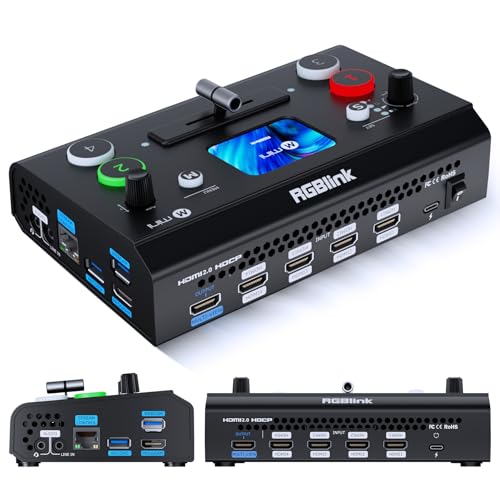
- Portable four-input HDMI design with touchscreen and T-bar
- Dual HDMI outputs plus UVC webcam mode
- Optional recording, PTZ, chroma key, and logo features
Best For: Small events and mobile multi-camera streaming
Best with Extra Features
FEELWORLD L3 PRO Multi-Format Switcher

- Accepts HDMI, SDI, and USB UVC sources
- Includes keying, PIP, PTZ, recording, and audio tools
- Streams via RTMP or USB-C UVC
Best For: Complex multi-camera events and professional live production
Portable Event Pick
SUOFEIXIANG Dual-Channel HDMI Switcher

- Switches two HDMI sources at 1080p60
- Adds PIP, split-screen, audio mixing, and AFV
- Offers lightweight, power-bank-friendly UVC streaming
Best For: Compact two-source events and mobile broadcasting
Built-In Monitoring Pick
CINETREAK Mixer Plus 4-Channel Switcher

- Four HDMI inputs with a built-in 4-inch multi-view screen
- Adds PTZ control, keying, PIP, DSK, and logo overlay
- Includes scene presets and customizable AUX output
Best For: Portable four-camera HDMI productions with on-device monitoring
Best All-in-One Streamer – Blackmagic ATEM Mini Pro
The Blackmagic Design ATEM Mini Pro is a practical video switcher for events that need multicamera HDMI production, built-in streaming, recording, and multiview monitoring. Its four HDMI inputs, audio mixer, and Ethernet connection suit presentations, training, esports, and livestreams.
Best For: Small event teams that want integrated switching, streaming, recording, and audio control.
Pros:
- Four HDMI inputs with 4-camera multiview support
- Built-in streaming, recording, and 6-input, 2-channel audio mixer
- Includes multiple transitions, upstream keys, and a downstream keyer
Cons:
- Limited to HDMI source inputs
- Provides one HDMI output
With its compact design and broad feature set, the ATEM Mini Pro is a strong choice when you want to reduce the number of separate devices in an event streaming setup.
Best for Large HDMI Setups – Roland V-8HD
The Roland V-8HD is a video switcher for events that use multiple HDMI cameras, computers, or playback sources. It combines eight HDMI inputs, a built-in multiview monitor, AUX output, automated switching, and an 18-channel digital audio mixer for more involved productions.
Best For: Event productions requiring many HDMI sources, flexible routing, and advanced visual or audio control.
Pros:
- Eight HDMI inputs support larger source setups
- Built-in preview monitor and optional external display support
- Includes five-layer effects and keying, still storage, macros, and preset memories
- 18-channel audio mixer includes effects and sync delay
Cons:
- Heavier and larger than more basic compact switchers
- Its extensive feature set may be more than a simple event requires
The V-8HD is a capable step-up option for productions that need numerous HDMI connections and repeatable, professionally organized switching workflows.
Best Budget-Friendly Compact Mixer – FEELWORLD LIVEPRO L1 V1
The FEELWORLD LIVEPRO L1 V1 is a compact video switcher for events with up to four 1080p HDMI sources. Its USB 3.0 output appears as a webcam to streaming software, while the small display provides real-time views of the program, preview, and input signals.
Best For: Solo operators and smaller events needing straightforward multicamera switching and computer-based streaming.
Pros:
- Four HDMI inputs and 1080p support
- USB 3.0 webcam-style output works with streaming software
- Compact design supports tripod mounting and single-person operation
- Offers real-time monitoring, transitions, and LAN-based XPOSE control
Cons:
- Fewer inputs and features than larger professional switchers
- USB streaming output may be less flexible than a dedicated broadcast workflow
For basic event streaming on a limited setup, the LIVEPRO L1 V1 keeps switching and computer connectivity simple without taking much space.
Best for Solo Event Operators – Roland V-1HD+
The Roland V-1HD+ is a portable video switcher for events that also need substantial audio control. It combines four HDMI inputs, a 14-channel audio mixer, automatic switching assistance, effects and keying, memory presets, and remote-control support for efficient operation.
Best For: Single operators handling live events, livestreams, and audio from one compact unit.
Pros:
- Combines HD switching with a 14-channel audio mixer
- Four-layer effects and keying engine supports graphics and lower thirds
- Technology-assisted automatic switching can simplify operation
- Eight memory presets enable quick layout recall
Cons:
- Limited to four HDMI inputs
- Remote control requires the separate V-1HD+ Remote application
The V-1HD+ is well suited to operators who value an efficient interface and integrated audio, especially when event setup speed and portability matter.
Professional Production Pick – Tenveo PC500 4K60 Video Switcher
For demanding productions, the Tenveo PC500 is a feature-rich video switcher for events with HDMI and SDI connectivity, PTZ and NDI support, multiview monitoring, streaming, and recording built into one workflow. Its 5.5-inch display and flexible outputs make it suitable for operators managing multi-camera productions from a central console.
Best For: Churches, conferences, stage shows, sports, weddings, studios, and other professional multi-camera events.
Pros:
- Combines four HDMI, four SDI, USB, and NDI|HX3 input options.
- Supports up to 4K60 input and 1080p60 output.
- Offers PTZ camera control, browser control, dual-platform streaming, and USB/SD recording.
- Includes configurable program, auxiliary, and multiview outputs.
Cons:
- Its extensive feature set may require more setup and operator training.
- 1080p60 is the stated maximum output resolution.
The PC500 stands out when an event team needs broad input compatibility, integrated PTZ management, streaming, and recording rather than a basic HDMI-only switcher. It is best suited to organized productions that can take advantage of its advanced routing and control features.
High-Capacity Event Choice – Osee GoStream Omni 12 ISO Switcher
The Osee GoStream Omni 12 is a high-capacity video switcher for events built around hardware FPGA processing, extensive input routing, and ISO recording. It can combine HDMI, SDI, IP, USB webcam, and media-player sources while handling live switching, streaming, graphics, and replay-oriented workflows.
Best For: Sports, churches, concerts, conferences, webinars, and productions needing multiple camera feeds and isolated recordings.
Pros:
- Provides 12-channel input flexibility with HDMI, SDI, NDI, SRT, RTMP, webcams, and media players.
- Records the program and up to eight ISO channels to SSD or CFexpress.
- Routes sources to four assignable HDMI/SDI outputs for displays, projectors, or IMAG.
- Includes multiview layouts, keying, graphics support, PTZ-oriented IP inputs, and a 16-channel audio mixer.
Cons:
- Power cord is not included.
- The large feature set may be more than smaller events require.
- Its stated workflow is centered on 1080p60 SDI, while HDMI inputs support up to 4K60.
Choose the Omni 12 when recording flexibility and routing capacity matter as much as live switching. Its hardware-based design and ISO workflow are especially useful for event teams that need dependable operation and separate camera files for editing or replay.
Compact HDMI Pick – RGBlink Mini V3 4K Switcher
The RGBlink Mini V3 is a compact video switcher for events that prioritizes portability and straightforward HDMI-based production. It provides four HDMI inputs, a 2.1-inch touchscreen, T-bar control, dual HDMI outputs, UVC webcam mode, and optional features such as recording, chroma key, and logo overlays.
Best For: Small events, presentations, classrooms, mobile streaming setups, and entry-level multi-camera productions.
Pros:
- Compact 0.49 kg design with four HDMI inputs and a built-in touchscreen.
- Offers dual 1080p HDMI outputs for program and preview workflows.
- Supports UVC webcam operation for platforms such as YouTube and Facebook.
- Includes PIP layouts and 15 transition effects, with optional recording and creative features.
Cons:
- Some advanced functions, including recording, PTZ control, chroma key, and logo overlays, require TAO Cloud activation.
- It is HDMI-focused and does not provide the SDI and broader routing options of larger switchers.
- A 35W-or-higher USB-C power adapter is recommended for stable operation.
The Mini V3 is a practical choice when space, weight, and ease of deployment matter more than extensive event infrastructure. Check the licensing requirements before purchase if recording or advanced overlays are essential to your production.
Best with Extra Features – FEELWORLD L3 PRO Multi-Format Switcher
For demanding live productions, the FEELWORLD L3 PRO is a video switcher for events that combines HDMI, SDI, and USB UVC inputs with monitoring, recording, streaming, and audio mixing. Its broad connectivity and production tools make it suitable when a simple two-camera switcher is not enough.
Best For: Event teams, churches, educators, AV technicians, and multi-camera productions requiring SDI, HDMI, PTZ, and direct streaming support.
Pros:
- Supports 4 HDMI, 4 3G-SDI, and USB UVC sources.
- Includes PIP, chroma key, logo overlay, scaling, cropping, and up to 16 transition effects.
- Offers RTMP streaming, USB-C UVC output, MP4 recording, audio mixing, and PTZ control.
- Supports horizontal or vertical streaming and up to four simultaneous RTMP platforms.
Cons:
- Its extensive feature set may require more setup and operator experience than a basic switcher.
- 3G-SDI sources are limited to 1080p60, while HDMI inputs support up to 4Kp60.
The L3 PRO is the most capable option here for complex event workflows. Choose it when format flexibility, built-in production features, and multiple streaming paths matter more than keeping the system minimal.
Portable Event Pick – SUOFEIXIANG Dual-Channel HDMI Switcher
The SUOFEIXIANG dual-channel unit is a compact video switcher for events where two HDMI sources, simple layouts, and direct computer streaming are the priority. It combines 1080p60 switching with PIP, split-screen display, audio mixing, and driver-free Type-C UVC output.
Best For: Small conferences, outdoor events, online teaching, game streaming, and mobile productions using two HDMI cameras or devices.
Pros:
- Handles two HDMI inputs and two 1080p60 outputs.
- Provides four PIP modes, side-by-side and top-bottom layouts, and one-click switching.
- Mixes embedded HDMI audio with external MIC/LINE input and supports AFV.
- Compact 185g design can run from a power bank and connects to OBS through Type-C UVC.
Cons:
- Only supports two HDMI input sources.
- Its video workflow is limited to 1080p rather than higher-resolution production.
This is a practical choice when portability and straightforward operation outweigh the need for SDI, recording, or advanced broadcast control. The built-in preview and OSD also help operators verify sources during a live event.
Built-In Monitoring Pick – CINETREAK Mixer Plus 4-Channel Switcher
The CINETREAK Mixer Plus is a video switcher for events that puts four HDMI inputs and a 4-inch built-in display in one portable unit. Its multi-view screen, customizable AUX output, scene presets, and production effects help an operator manage several cameras without relying on a separate preview monitor.
Best For: Multi-camera streaming, online classes, presentations, YouTube production, Zoom events, and portable HDMI-based setups.
Pros:
- Supports up to four HDMI inputs with zero-latency switching.
- Built-in 4-inch screen provides multi-view monitoring with PGM, PVW, resolution indicators, and audio meters.
- Includes 30 transition effects, four scene presets, PIP, chroma key, luma key, DSK, and logo overlay.
- Offers VISCA-over-IP PTZ control and a flexible AUX HDMI output.
Cons:
- Uses HDMI connectivity rather than offering SDI inputs.
- Its listed workflow is centered on HDMI production, so users needing direct RTMP or recording should verify their overall setup.
The built-in display is the standout advantage for mobile crews and small event desks. It is a strong middle ground for users who need four-camera control and broadcast-style monitoring without assembling a larger rack of equipment.
How We Picked the Best Video Switcher for Events
We evaluated these switchers by the features that matter most during real event production: input count and type, maximum resolution and frame rate, live switching controls, audio handling, monitoring, recording and streaming support, portability, and ease of setup. We also considered whether each model suits a small presentation, a multi-camera stage production, or a more demanding broadcast-style workflow.
HDMI-focused models are generally easier to transport and pair well with consumer or mirrorless cameras. SDI-equipped units are better suited to longer cable runs and larger venues, where reliable signal distribution matters. Features such as multiview, picture-in-picture, USB webcam output, onboard recording, and ISO capture can reduce the amount of additional equipment required.
Quick Comparison
| Best For | What to Prioritize | Recommended Type |
|---|---|---|
| Small meetings and presentations | Simple controls, two to four HDMI inputs, USB output | Compact HDMI switcher |
| Hybrid events and livestreams | Multiview, audio mixing, UVC output, recording | HDMI production switcher |
| Stage events and larger venues | SDI inputs, longer cable support, robust monitoring | HDMI/SDI hybrid switcher |
| Advanced broadcast workflows | More channels, ISO recording, flexible routing | Professional multi-input system |
Key Buying Factors for a Video Switcher for Events
Inputs and Camera Compatibility
Count your cameras, computers, playback devices, and spare sources before buying. Leave at least one open input when possible. HDMI is common for nearby cameras and laptops, while SDI is preferable for long runs and permanent installations. Check connector types, supported resolutions, and frame rates to avoid mismatches.
Resolution, Frame Rate, and Output
A switcher may accept 4K sources but output only 1080p, so verify the complete signal path. For most live events, dependable 1080p60 output is more useful than an unsupported headline resolution. Confirm whether the unit can feed a projector, confidence monitor, recorder, streaming computer, or venue distribution system at the same time.
Monitoring and Control
Multiview lets an operator see every source, preview, program output, audio levels, and status information in one place. A built-in screen improves portability, while larger external monitoring is better for a production desk. Physical buttons are often faster under pressure; software or cloud control can add flexibility.
Audio and Streaming Features
Look for embedded HDMI or SDI audio support, microphone inputs, delay and mixing controls, and a clean way to send audio to the stream. USB UVC output can let a switcher appear as a webcam in OBS, Zoom, or another streaming platform. Recording, playback, and direct streaming features may simplify smaller crews.
Portability and Reliability
For mobile events, weigh the switcher, power supply, cabling, and monitoring equipment together. Test every camera and cable before show day, and choose a model with controls your crew can operate quickly. For critical events, keep a spare input, adapter, cable, and backup presentation source ready.
Who Should Buy Which Video Switcher for Events?
Choose a compact HDMI model if you run small presentations, online classes, interviews, or simple two- to four-camera streams. It is usually the fastest option to learn and transport.
Choose a midrange HDMI switcher with multiview, audio controls, recording, or USB output if you produce recurring conferences, worship services, school events, or hybrid meetings. These features can reduce reliance on separate capture and audio hardware.
Choose an HDMI/SDI hybrid model if your event uses long cable runs, stage cameras, or a mix of professional and consumer sources. For larger productions with many cameras or a need for isolated recordings, prioritize channel capacity, ISO functionality, and dedicated monitoring over the smallest footprint.