Looking for midi interfaces under 300 that won’t bottleneck your studio or live setup? The right interface can tighten timing, simplify routing, and make your gear easier to expand.
Below, we’ve rounded up 10 strong options for beginners, hybrid producers, and hardware-heavy rigs, with a focus on practical value, dependable connectivity, and the features that matter most.
Best 10 Midi Interfaces Under 300 Picks for 2026
Ultra-Flexible 3x3 Routing
CME U6MIDI Pro 3-in-3-out MIDI Interface

- Standalone 3-in-3-out MIDI routing
- Plug-and-play USB-C on major OS
- Low-latency support for MPE, sysex, clock
Best For: Hybrid setups needing compact routing and filtering
High-Density Rack MIDI
midiplus MIDI 16x16 MIDI Interface

- Large 16x16 MIDI port count
- Class-compliant for Mac and PC
- USB bus powered for desktop use
Best For: Bigger MIDI rigs that need lots of ports
USB Host Flexibility
CME H2MIDI Pro Compact USB Host MIDI Interface

- Standalone USB host for class-compliant devices
- USB-C mode with 2-in/2-out virtual MIDI
- Routing, filtering, mapping, and splitting tools
Best For: Hybrid rigs mixing USB MIDI gear with 5-pin DIN hardware
Most Versatile Starter Pick
Arturia MiniFuse 1 USB Audio & MIDI Interface

- 5-pin MIDI in/out for hardware gear
- Compact USB interface with plug-and-play use
- 5-year warranty and included software bundle
Best For: Home-studio users who want audio and MIDI in one compact interface
Best Multi-Port MIDI Hub
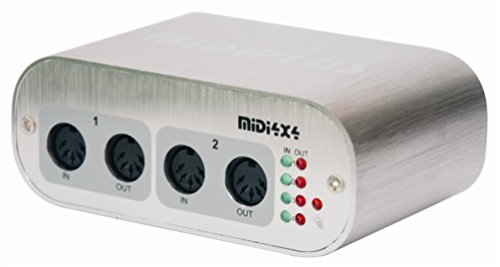
- 4-in/4-out MIDI with 64 channels
- USB powered and driver-free
- Port activity indicators for easy monitoring
Best For: Users who need a dedicated multi-port MIDI connection hub
Best High-Channel Studio Interface
Behringer UMC1820 USB Audio/MIDI Interface

- 18 inputs and 20 outputs
- 8 MIDAS-designed mic preamps
- ADAT I/O for system expansion
Best For: Large recording setups that need many audio channels and MIDI support
Compact MIDI Hub
Midiplus 2x2 USB MIDI Interface

- 2 MIDI inputs and 2 MIDI outputs
- USB powered with no external adapter
- Works on Mac OSX and Windows XP and above
Best For: Simple MIDI routing on a laptop or desktop
Studio-Ready Hybrid
Yamaha URX22C 2-in/2-out USB-C Interface

- 2 x 2 analog I/O with MIDI I/O
- 32-bit/192 kHz support and USB-C connectivity
- DSP monitoring with reverb, channel strip, and amp effects
Best For: Compact home studios that need audio plus MIDI
Portable Recording Pick
Mackie Onyx Producer 2X2 with MIDI

- 2 in x 2 out recording with MIDI I/O
- Bus-powered with no power adapter
- 24-bit/192 kHz support and direct monitoring
Best For: Mobile recording setups that need MIDI support
Ultra-Flexible 3×3 Routing – CME U6MIDI Pro 3-in-3-out MIDI Interface
If you want midi interfaces under 300 that are built for more than basic note passing, the CME U6MIDI Pro stands out for its routing and filtering tools. It works as a plug-and-play USB-C interface on computers, but it also functions as a standalone 3-in-3-out MIDI router for hybrid setups.
Best For: Players and producers who need compact MIDI routing, merge, split, and filter control across modern and legacy gear.
Pros:
- Standalone 3-in-3-out design with router, filter, merge, split, and thru functions
- Supports all major OS, including macOS, iOS, Windows, Android, Linux, and Chrome OS
- Handles notes, controllers, clock, sysex, MIDI timecode, and MPE with close to zero latency
- Free UxMIDI Tools software for advanced configuration on Win/Mac
Cons:
- No audio inputs or outputs, since it is MIDI-only
- Advanced routing depends on the companion software for setup
- Limited to 3-in-3-out physical MIDI connections
The U6MIDI Pro is a strong pick if your priority is precise MIDI management rather than general recording features. For streamlined studios and performance rigs, it offers unusually deep control in a small package.
Audio Plus MIDI Recording – Behringer UMC204HD USB Audio/MIDI Interface
For musicians comparing midi interfaces under 300 that also handle audio recording, the Behringer UMC204HD is a practical two-in, four-out option. It combines MIDI I/O with dual combo XLR/TRS inputs, so it can serve as both a recording interface and a MIDI hub for keyboards and control surfaces.
Best For: Home studios that need audio inputs plus built-in MIDI connectivity in one box.
Pros:
- Includes built-in MIDI I/O for keyboards and outboard MIDI hardware
- Two combo XLR/TRS inputs add flexibility for microphones, instruments, or line-level sources
- 24-bit/192 kHz converters and Midas-designed mic preamps
- USB 2.0 connection for Mac or Windows recording setups
Cons:
- Only 2 channels of input, so larger tracking sessions may need more I/O
- Operating system details in the notes are limited to Windows for the device listing
- MIDI is included, but audio recording is the main focus of the unit
If you need one device for microphone recording and basic MIDI connectivity, the UMC204HD is an easy recommendation. It is less specialized than a dedicated MIDI router, but it covers more studio ground overall.
High-Density Rack MIDI – midiplus MIDI 16×16 MIDI Interface
If you are shopping midi interfaces under 300 for a larger hardware setup, the midiplus MIDI 16×16 is aimed at users who need lots of physical connections. It offers a class-compliant USB interface with 16×16 MIDI capacity for Mac and PC, making it a straightforward choice for bigger rigs.
Best For: Users with multiple MIDI devices who want a high-port-count interface for computer-based workflows.
Pros:
- 16×16 MIDI connectivity for expansive hardware setups
- Class-compliant USB operation for Mac and PC
- Works with all MIDI software according to the supplied notes
- USB bus powered for simpler desktop installation
Cons:
- Larger and heavier than compact interfaces
- No advanced routing or filtering features are listed
- Operating system support is not fully specified in the notes
This model makes the most sense when port count matters more than portability. If you are wiring several synths or controllers at once, the 16×16 layout can be a major advantage.
USB Host Flexibility – CME H2MIDI Pro Compact USB Host MIDI Interface
Among midi interfaces under 300, the CME H2MIDI Pro is especially useful if you need to connect USB MIDI gear without a computer. It works as a standalone USB host for class-compliant devices, while also offering USB-C computer connectivity and virtual MIDI ports for hybrid studios.
Best For: Keyboardists, guitarists, and producers who want a compact USB host interface for modern and legacy MIDI hardware.
Pros:
- Standalone USB host mode connects class-compliant USB MIDI devices directly to 5-pin DIN gear
- USB-C computer mode provides 2-in/2-out virtual MIDI ports
- Supports routing, filtering, mapping, and splitting with free HxMIDI Tools
- Compact design with dual power mode and support for up to 8 USB device ports via hub
Cons:
- Only one 5-pin DIN MIDI input and output are listed
- Advanced setup may require the companion software
- USB host expansion depends on using an external hub
The H2MIDI Pro is a strong choice if your workflow mixes USB controllers with traditional MIDI hardware. Its small size and host capability make it more versatile than a basic interface.
Most Versatile Starter Pick – Arturia MiniFuse 1 USB Audio & MIDI Interface
If you’re shopping for midi interfaces under 300 and want one box that handles recording plus MIDI gear, the Arturia MiniFuse 1 is a practical all-rounder. It combines a compact USB audio interface with 5-pin MIDI in and out, so it works well for voices, guitars, synths, and controllers without adding extra clutter.
Best For: Home-studio users, beginners, and creators who want audio recording and MIDI connectivity in one compact interface.
Pros:
- Includes 5-pin MIDI input and output for synths, controllers, and drum machines
- Compact USB interface with a plug-and-play workflow
- 1 combo mic/inst/line input plus 2 TRS instrument/line inputs
- Backed by a 5-year warranty and extensive reliability testing
Cons:
- Only one mic combo input, so it is not built for multi-mic recording
- Single-channel design may feel limited for larger setups
- MIDI support is useful, but it is not a multi-port MIDI hub
The MiniFuse 1 makes sense if you want a compact interface that covers the essentials and keeps setup simple. Its included software bundle and strong warranty add value, especially for first-time buyers building a small but flexible studio.
Best Multi-Port MIDI Hub – MIDI 4×4 USB MIDI Interface
For buyers comparing midi interfaces under 300, the MIDI 4×4 USB MIDI interface stands out when you need more MIDI ports than a typical audio interface provides. It gives you 4 inputs and 4 outputs with low-latency USB operation, making it a straightforward way to connect several MIDI devices from one computer.
Best For: Players and producers who need a compact dedicated MIDI interface with multiple in/out ports.
Pros:
- 4-in, 4-out MIDI design for up to 64 MIDI channels
- Low-latency, high-speed USB connection to PC or Mac
- USB powered, so no external power supply is required
- Activity indicators on each port help with monitoring
Cons:
- Dedicated MIDI-only design, so it does not add audio inputs or outputs
- Uses USB-B connection to the host computer
- Basic feature set compared with more expensive hybrid interfaces
This is a good fit if your main goal is to route multiple MIDI devices cleanly and without extra complexity. It is especially appealing for compact rigs where a powered, driver-free MIDI hub is more useful than an all-in-one audio interface.
Best High-Channel Studio Interface – Behringer UMC1820 USB Audio/MIDI Interface
If you need midi interfaces under 300 with serious input count, the Behringer UMC1820 is aimed at larger recording setups. It pairs USB audio and MIDI connectivity with ADAT I/O, 8 MIDAS-designed mic preamps, and 18 inputs / 20 outputs, making it far more expandable than a basic desktop interface.
Best For: Recording studios and multi-source setups that need lots of audio channels plus MIDI support.
Pros:
- 18 inputs and 20 outputs with USB 2.0 audio/MIDI connectivity
- 8 MIDAS-designed mic preamps with +48V phantom power
- ADAT I/O adds expansion potential for bigger rigs
- 24-bit/96 kHz resolution for professional audio quality
Cons:
- Large rack-style unit takes more space than compact interfaces
- More capability than many small home studios need
- Better suited to complex setups than simple plug-and-play use
The UMC1820 is the strongest pick here if your priority is channel count and expandability. It is a more studio-focused option than the other two, so it makes the most sense when you are building a larger recording system that still needs MIDI integration.
Compact MIDI Hub – Midiplus 2×2 USB MIDI Interface
If you want one of the more straightforward midi interfaces under 300, the Midiplus 2×2 keeps things simple and practical. It gives you 2 MIDI inputs and 2 MIDI outputs, runs on USB power, and works with Mac OSX and Windows XP and above without needing a driver.
Best For: Players and producers who need a no-fuss 2-in/2-out MIDI connection for a desktop or laptop setup.
Pros:
- 2 MIDI inputs and 2 MIDI outputs for flexible routing.
- USB powered, so no external power supply is required.
- Driver-free operation on Mac OSX and Windows XP and above.
- Includes USB cable in the package.
Cons:
- Focused on MIDI only, with no audio interface features.
- Basic feature set compared with more advanced hybrid interfaces.
This is a sensible pick if your priority is a compact, powered-by-USB MIDI interface rather than extras. The 2×2 layout and broad OS support make it an easy fit for everyday MIDI sequencing and hardware control.
Studio-Ready Hybrid – Yamaha URX22C 2-in/2-out USB-C Interface
For buyers comparing midi interfaces under 300 that also handle audio, the Yamaha URX22C stands out as a hybrid option. It combines 2 analog inputs, MIDI I/O, and 32-bit/192 kHz support with DSP-powered monitoring tools, making it a strong all-in-one choice for small recording setups.
Best For: Musicians who want a compact USB-C interface with audio, MIDI, and onboard monitoring effects.
Pros:
- 2 x 2 analog I/O plus MIDI I/O in one unit.
- 32-bit/192 kHz support for high-resolution recording.
- DSP-powered monitoring with REV-X reverb, Channel Strip, and Guitar Amp Classics.
- Cross-platform support for Windows, macOS, and iOS.
Cons:
- Only 2 channels, so it is not built for larger multitrack setups.
- Requires more of a studio workflow than a simple MIDI-only box.
This is the most feature-rich option in the group if you need both audio and MIDI. The combination of USB-C connectivity, included software, and onboard DSP makes it especially appealing for compact home studios.
Portable Recording Pick – Mackie Onyx Producer 2X2 with MIDI
Mackie Audio Interface, Onyx Producer 2X2 USB Audio Interface with MIDI (Onyx Producer 2-2)
Check Price On AmazonIf you are shopping for midi interfaces under 300 and want recording features as well, the Mackie Onyx Producer 2X2 is built for that middle ground. It offers 2 in x 2 out recording at up to 24-bit/192 kHz, MIDI I/O, and bus-powered operation, so it stays portable without needing a power adapter.
Best For: Mobile musicians and small studios that want MIDI plus a bus-powered audio interface.
Pros:
- 2 in x 2 out recording with MIDI I/O.
- 24-bit/192 kHz support for high-resolution audio capture.
- Bus-powered design with no power adapter required.
- Onyx mic preamps and zero-latency direct monitoring.
Cons:
- Only 2 channels, so it is limited for larger sessions.
- USB 2.0 connectivity is less current than USB-C models.
This is a practical pick if portability matters and you still want solid audio features alongside MIDI. Its bus-powered build and direct monitoring make it well suited to quick recording setups and travel-friendly rigs.
How We Picked the Best Midi Interfaces Under 300
We focused on Midi Interfaces Under 300 that offer real-world value: stable USB performance, enough ports for common setups, and useful extras like DIN I/O, USB host support, or integrated audio when it makes sense. We also weighed compatibility, build quality, and whether each model fits a specific workflow instead of trying to do everything at once.
Quick Comparison: What Stands Out
Some buyers need simple 1-in/1-out or 2×2 connectivity for a compact desktop rig, while others need 4×4, 16×16, or USB host capability for larger hardware setups. Audio/MIDI combo interfaces are best if you want one device to handle both recording and MIDI duties; dedicated MIDI boxes are often the smarter choice if your main priority is routing and synchronization.
Key Buying Factors for Midi Interfaces Under 300
Port Count and Expansion
Start with how many instruments, controllers, and modules you actually use now, then leave room for growth. A small setup may be fine with two ports, but a drum machine-heavy or multikeyboard rig will benefit from more ins and outs.
USB Host Vs. Computer-Based Routing
If you want to connect class-compliant MIDI gear without a computer, USB host support is a major advantage. If your workflow is DAW-centered, a standard USB MIDI interface is usually enough and often more affordable.
Audio Needs
Many buyers comparing Midi Interfaces Under 300 also need microphone or instrument inputs. In that case, an audio/MIDI interface can save desk space and simplify setup. If you already own an audio interface, a dedicated MIDI box may be the cleaner choice.
Timing, Drivers, and Compatibility
Stable drivers and low-latency performance matter more than flashy specs. Look for interfaces with strong Windows and macOS support, reliable MIDI sync, and proven compatibility with your DAW and hardware.
Who Should Buy Which Midi Interfaces Under 300?
Choose a compact 2×2 or 3×3 model if you’re a solo producer, songwriter, or keyboard player who only needs a few connections. Go for 4×4 or larger if you run multiple synths, drum machines, or outboard MIDI gear. Pick a combo audio/MIDI interface if you record vocals or instruments too. And if you mainly need hands-on control of hardware without a computer, prioritize a MIDI interface with USB host functionality.
In short, the best Midi Interfaces Under 300 are the ones that match your port needs, routing style, and recording setup without forcing you to pay for features you won’t use.