When every cue, patch change, and sync signal has to land on time, the right interface can make a live rig feel effortless. This roundup focuses on dependable, practical options for performers who need stable MIDI routing on stage.
Whether you’re controlling hardware synths, software instruments, lighting, or a hybrid setup, these picks are built to help you choose the right fit without overbuying features you won’t use.
Best 10 Midi Interfaces for Live Performances Picks for 2026
Stage Foot Control
Blackstar Live Logic 6-button MIDI Footcontroller

- 6-button foot controller for live MIDI control
- Two expression pedal inputs for hands-free changes
- Compact metal design with USB MIDI support
Best For: Guitarists and live performers needing pedalboard MIDI control
All-in-One Interface
Focusrite Scarlett 4i4 4th Gen USB-C Audio Interface

- Audio interface with built-in MIDI I/O
- Two mic preamps, two Hi-Z inputs, and four line outputs
- 120dB dynamic range with included software bundle
Best For: Musicians needing audio and MIDI connectivity in one interface
MIDI Splitter
CME MIDI Thru5 WC 1-in-5-out MIDI Thru

- 1-in-5-out MIDI routing for hardware setups
- Low-latency transmission with support for many MIDI messages
- Compact unit powered by USB-C
Best For: Live setups that need one MIDI source split to five devices
Expandable MIDI Hub
ESI M4U eX 8-Port USB 3.0 MIDI Interface

- Eight configurable MIDI ports for flexible setups
- Standalone routing and merging without a computer
- Built-in USB 3.0 hub with three connectors
Best For: Performers needing multiple MIDI ports and standalone routing
Standalone MIDI Routing Hub
CME U6MIDI Pro 3-in-3-out MIDI Interface

- 3-in-3-out standalone MIDI routing with split, merge, and thru
- Close to zero latency with support for clock, sysex, timecode, and MPE
- USB-C compatibility across major desktop and mobile operating systems
Best For: Live performers who need a compact MIDI routing and filtering hub
Hands-On DAW Control
Akai Professional MIDImix USB MIDI Mixer Controller

- 8 faders and a master fader for live mix control
- 24 knobs and 16 buttons for EQ, sends, mute, solo, and record arm
- Instant 1:1 Ableton Live mapping with included Lite software
Best For: Live DAW performers who want a compact tactile mixer controller
Networked MIDI Bridge
RTP MIDI Network Interface MR-1 PoE
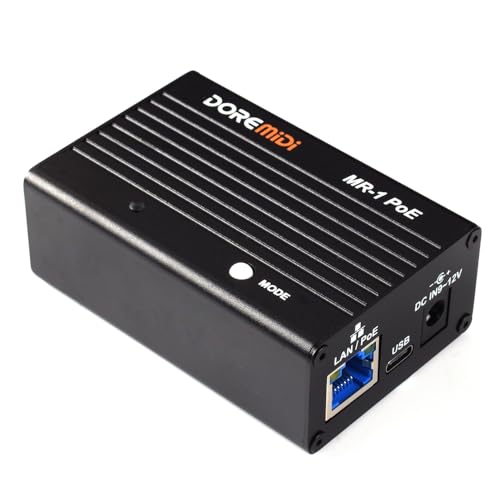
- RTP-MIDI compliant network interface over Ethernet
- Connects 5-pin MIDI gear to a LAN without a computer
- Low-delay design with minimum latency under 1 ms
Best For: Ethernet-based live MIDI setups needing network transport
Live MIDI Splitter

- Splits one MIDI input to six outputs
- USB-powered with no batteries needed
- Supports standard MIDI 16-channel commands
Best For: live players routing one controller to multiple synths
Hybrid USB Host Router
Compact USB Host MIDI Interface

- Works standalone or over USB-C
- Routes, filters, maps, and splits MIDI
- Supports complex messages like clock and MPE
Best For: hybrid live rigs combining USB and 5-pin MIDI gear
Audio + MIDI Interface

- Combines 4x4 audio with 1 MIDI I/O
- 24-bit/192 kHz audio resolution
- Rugged metal chassis with MIDAS preamps
Best For: small live rigs that need audio and MIDI together
Stage Foot Control – Blackstar Live Logic 6-button MIDI Footcontroller
If you need midi interfaces for live performances that keep hands free and foot control simple, the Blackstar Live Logic focuses on stage-ready switching and expression control. It offers 6 foot buttons, MIDI over USB, two expression pedal inputs, and customizable MIDI messages for practical performance use.
Best For: Guitarists and live players who want a compact footcontroller for triggering MIDI commands on stage.
Pros:
- 6-button layout gives direct foot control for performance changes.
- Two expression pedal inputs add extra hands-free control.
- Supports Program Change, Control Change, Note, Clock, and customizable MIDI messages.
- Compact metal build is suited to pedalboard-style setups.
Cons:
- Uses USB MIDI rather than traditional 5-pin DIN connectivity.
- Designed around control duties, not audio interfacing.
This is a focused choice if your live setup centers on MIDI control from the floor. The feature set is practical rather than complex, which makes it easy to integrate into performance rigs.
All-in-One Interface – Focusrite Scarlett 4i4 4th Gen USB-C Audio Interface
For buyers comparing midi interfaces for live performances, the Focusrite Scarlett 4i4 4th Gen stands out as an audio interface that also includes MIDI I/O. It pairs two mic preamps, two Hi-Z inputs, four line inputs, and four line outputs with MIDI connectivity, making it a flexible center for small performance rigs.
Best For: Musicians who want an audio interface with built-in MIDI I/O for recording or performing with multiple sources.
Pros:
- Includes MIDI I/O alongside a broad mix of mic, instrument, and line connections.
- Two 4th Gen mic preamps and two Hi-Z inputs support common live sources.
- Four line outputs provide flexible routing options.
- 120dB dynamic range and included software bundle add value for production use.
Cons:
- It is an audio interface first, not a dedicated MIDI controller.
- Only one MIDI I/O implementation is listed, so heavy multi-device MIDI setups may need more expansion.
If your live setup needs both audio and MIDI in one unit, this is a practical all-in-one option. It is best suited to streamlined rigs where interface quality matters as much as MIDI support.
MIDI Splitter – CME MIDI Thru5 WC 1-in-5-out MIDI Thru
When the goal is clean signal distribution in midi interfaces for live performances, the CME MIDI Thru5 WC is built for simple 1-in-5-out routing. It is designed for accurate transmission, low latency, and support for standard MIDI messages, making it useful when multiple devices need the same clock or note data.
Best For: Live rigs that need one MIDI source split to several hardware devices with minimal delay.
Pros:
- 1-in-5-out design is ideal for expanding a live MIDI chain.
- Claims no data error, no bleeding MIDI, and no signal dropout.
- Supports notes, controllers, clock, sysex, timecode, and MPE.
- Compact, lightweight housing fits tight pedalboard or rack spaces.
Cons:
- USB-C is for power only, not MIDI data.
- Requires standard MIDI cables and devices with 5-pin DIN ports.
This is a routing tool rather than a full interface, so it makes sense when reliability and distribution matter more than software features. For stage setups with several MIDI devices, it keeps the signal path straightforward.
Expandable MIDI Hub – ESI M4U eX 8-Port USB 3.0 MIDI Interface
For musicians shopping midi interfaces for live performances, the ESI M4U eX offers a lot of routing flexibility in a compact USB 3.0 design. It provides 8 adaptable MIDI ports, standalone routing and merging, and a built-in USB hub, which can simplify more complex stage or rehearsal setups.
Best For: Players and rigs that need multiple MIDI ports, flexible routing, and standalone operation.
Pros:
- Eight adaptable MIDI ports can be configured as inputs or outputs.
- Standalone mode supports routing and merging without a computer.
- Built-in USB 3.0 hub adds three extra connectors for peripherals.
- Class-compliant, plug-and-play operation supports Windows and macOS.
Cons:
- More feature-rich than a simple single-purpose live MIDI box.
- Best suited to users who actually need multiple ports and routing options.
This interface makes sense when one device has to handle several MIDI tasks at once. It is a strong choice for flexible performance systems where timing and expandability both matter.
Standalone MIDI Routing Hub – CME U6MIDI Pro 3-in-3-out MIDI Interface
If you need midi interfaces for live performances that can handle routing, filtering, and tight timing, the CME U6MIDI Pro is built for that kind of job. It works as a 3-in-3-out standalone MIDI interface and also connects by USB-C to computers and mobile devices, making it flexible for keyboard rigs, drum modules, and synth setups.
Best For: Players who want a compact MIDI router/interface for multi-device live setups.
Pros:
- Standalone 3-in-3-out design with MIDI split, thru, merge, and filter functions.
- Supports notes, controllers, clock, sysex, MIDI timecode, and MPE with close to zero latency.
- USB-C plug-and-play compatibility across macOS, iOS, Windows, Android, Linux, and Chrome OS.
- High-precision wired transmission is designed to avoid data errors and signal dropout.
Cons:
- Advanced routing and filtering are configured through the free UxMIDI Tools software.
- It is MIDI-only, so it does not add audio inputs or outputs.
For live use, this model stands out when you need reliable MIDI distribution more than controller-style hands-on control. Its strength is clean routing and broad compatibility, which makes it a practical centerpiece for performance rigs built around external MIDI gear.
Hands-On DAW Control – Akai Professional MIDImix USB MIDI Mixer Controller
For midi interfaces for live performances that lean toward real-time control rather than signal routing, the Akai Professional MIDImix is a compact option. It gives you faders, knobs, and buttons for mixing and parameter control, with instant 1:1 mapping for Ableton Live and broad use as a DAW controller.
Best For: Performers who want tactile mixer-style control over software instruments and effects.
Pros:
- 8 faders plus a master fader provide direct level control for tracks and instruments.
- 24 assignable knobs and 16 buttons support hands-on control of EQ, sends, mute, solo, and record arm.
- Compact, lightweight, and portable for small live rigs or travel setups.
- Instant 1:1 mapping with Ableton Live, and Ableton Live Lite is included.
Cons:
- It is a controller, not a MIDI interface for connecting multiple DIN MIDI devices.
- Best fit is software control; it does not provide standalone routing features.
This is the right choice if your live set is built around DAW mixing and parameter tweaks. It is less about interfacing hardware synths and more about giving you a physical surface for performance control.
Networked MIDI Bridge – RTP MIDI Network Interface MR-1 PoE
If your live setup depends on sending MIDI across a network, this RTP MIDI Network Interface is a specialized option worth considering. It is fully compliant with the RTP-MIDI open protocol and connects five-pin MIDI gear to a local area network, with listener/initiator mode switching and operation without a computer.
Best For: Network-based MIDI setups that need low-delay transport between MIDI gear.
Pros:
- RTP-MIDI compliant for network-based MIDI communication over Ethernet.
- Can connect five-pin MIDI devices to a LAN and work without a computer.
- Listener/initiator mode switching adds flexibility in different network setups.
- Metal shell and low delay design are aimed at stability, with minimum delay under 1 ms.
Cons:
- It is a niche network interface, so it is less general-purpose than a standard USB MIDI unit.
- Best suited to users already working with RTP-MIDI and Ethernet-based workflows.
For live performers who already route MIDI over a network, this interface focuses on stability and low delay rather than broad controller features. It makes the most sense in installed systems or advanced rigs where Ethernet-based MIDI is part of the design.
Live MIDI Splitter – 1-in 6-out USB MIDI Thru Box
If you need a straightforward option among midi interfaces for live performances, this 1-in 6-out MIDI Thru box is built to duplicate one controller’s data to multiple devices with no batteries or computer setup. It’s a practical choice when you want clean MIDI signal distribution on stage and broad compatibility with standard MIDI commands.
Best For: Players who want to send one MIDI source to up to six synths or modules during live setups.
Pros:
- 1 MIDI input and 6 MIDI outputs for easy device splitting
- No interference or delay stated for smooth signal transmission
- Supports standard MIDI 16 channels and standard MIDI commands
- USB-powered, so there are no batteries to manage
Cons:
- Only handles MIDI thru splitting; it is not a full audio interface
- Requires 5V DC USB power
This is a focused routing tool rather than an all-in-one studio box, but that simplicity is exactly what can help keep live MIDI rigs reliable and uncluttered.
Hybrid USB Host Router – Compact USB Host MIDI Interface
For midi interfaces for live performances that need to bridge modern USB gear and older 5-pin hardware, this compact host interface is especially flexible. It can work standalone without a computer, or connect over USB-C for virtual MIDI ports, making it useful for hybrid rigs that change from rehearsal to stage.
Best For: Performers who need USB-to-DIN MIDI routing with preset switching and hardware control.
Pros:
- Standalone USB host mode connects class-compliant USB MIDI devices to 5-pin DIN gear
- USB-C client mode adds 2-in-2-out virtual MIDI ports for computer-based use
- Supports routing, filtering, mapping, splitting, and up to 4 saved presets
- Compact design with support for complex messages like clock, sysex, MTC, and MPE
Cons:
- Advanced setup depends on the HxMIDI Tools software
- USB hub expansion is needed to reach up to 8 USB MIDI device ports
This is the most adaptable pick in the group if you need one box that can handle both modern USB controllers and traditional DIN hardware without tying your stage rig to a computer.
Audio + MIDI Interface – 4×4 USB Audio/MIDI Interface
If your live setup needs both audio I/O and MIDI in one box, this 4×4 interface is a practical all-around option. Among midi interfaces for live performances, it stands out for adding four analog inputs, four outputs, and one MIDI I/O while keeping a compact USB connection to the computer.
Best For: Performers who want a budget-friendly audio interface with built-in MIDI for recording or small live rigs.
Pros:
- 4×4 audio interface plus 1 MIDI I/O in a single unit
- 24-bit/192 kHz resolution for high-quality audio
- Includes four MIDAS-designed mic preamps with +48 V phantom power
- Metal chassis built for a rugged, road-ready feel
Cons:
- Only one MIDI I/O, so it is not a multi-device MIDI routing hub
- Windows support is listed in the supplied details; platform flexibility is narrower than the other options
This is the right pick if your live or rehearsal rig needs audio recording features first and MIDI as part of a broader interface package.
How We Picked These Midi Interfaces for Live Performances
We prioritized reliability, low-latency operation, straightforward setup, and the kind of connectivity that actually matters on stage. That means looking for class-compliant USB support, solid MIDI throughput, standalone routing where useful, and enough ports to avoid daisy-chain bottlenecks.
We also weighed portability, power options, and whether each unit suits simple control, multi-device routing, or more complex rigs that mix computers and hardware.
Quick Comparison
If you need a compact foot-controlled solution, a pedalboard-style controller is often the cleanest choice. For routing multiple keyboards or sound modules, multi-port interfaces and MIDI thru boxes are better. If your setup includes both audio and MIDI, a hybrid audio interface can simplify the entire rig.
For larger stage systems, Midi Interfaces for Live Performances should favor stable clocking, dependable USB connection, and minimal setup friction over feature-heavy software bundles.
Key Buying Factors for Midi Interfaces for Live Performances
Port Count and Routing Flexibility
Count your actual devices, then add headroom. A 1-in/5-out thru box may be ideal for splitting one controller to multiple destinations, while a 3-in/3-out or 8-port interface is better for multi-source performance rigs.
Standalone Vs. Computer-Dependent Use
If you play with a laptop, USB connectivity matters most. If you need fail-safe operation, look for standalone functionality so the interface can still route MIDI without a computer in the chain.
Latency and Stability
Live rigs need consistent timing more than flashy extras. Favor devices known for stable drivers, class-compliant operation, and robust hardware connections that won’t interrupt a set.
Form Factor and Power
Pedalboard-friendly units, rack-style boxes, and compact desktop interfaces each serve different stages and touring needs. Consider whether you need bus power, external power, or PoE for network-based setups.
Compatibility
Make sure the interface works cleanly with your OS, DAW, hardware synths, and any DIN MIDI, USB host, or network MIDI gear in your rig.
Who Should Buy Which Midi Interfaces for Live Performances?
Solo performers and keyboard players usually benefit from a simple interface with dependable control and minimal setup. Multi-synth users should lean toward higher-port MIDI hubs or thru boxes. If you’re building a laptop-centered stage rig, choose a class-compliant USB unit with proven driver support.
If your priority is easy expansion and clean signal distribution, pick from the more flexible Midi Interfaces for Live Performances in this roundup rather than forcing one small device to do everything.