A cluttered microphone setup can distract from your content, limit desk space, and leave cables hanging where they can snag. The best microphone boom arms with cable management keep your mic positioned securely while creating a cleaner, more flexible workstation.
We compared 10 options across mounting style, reach, adjustability, load capacity, thread compatibility, and cable organization to help you find the right arm for your microphone and desk.
Best 10 Microphone Boom Arm with Cable Management Picks for 2026
Best Overall
InnoGear Mic Arm with Cable Channels

- Built-in cable channels with protective rubber covers
- 3.5-pound capacity for heavier microphones
- Up to 37.4 inches of vertical reach
Best For: Streaming, podcasting, and recording with larger microphones
Best Low-Profile Design

- Space-saving arm extends from below the screen
- Built-in cable management for a tidy workspace
- Includes multiple thread adapters
Best For: Compact podcasting, gaming, and home-office setups
Best Value
MOUNT-IT! Adjustable Mic Boom Arm
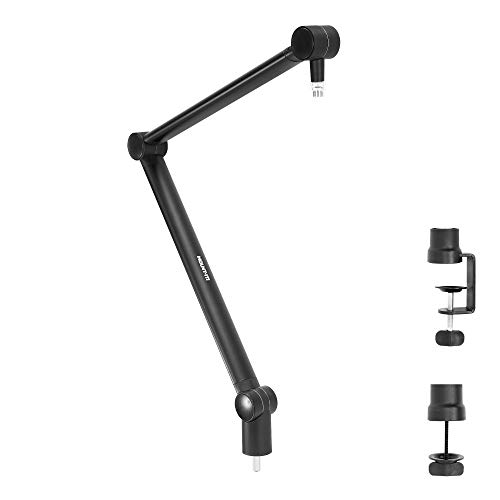
- Compatible with 3/8-inch and 5/8-inch microphones
- Nearly 360-degree spring-assisted movement
- Includes tube-style cable management
Best For: Blue Yeti, Blue Snowball, and everyday studio setups
Best Magnetic Cable Management

- Magnetic snap-on channel hides and organizes cables
- Low-profile 3.35-inch design saves desk space
- 3.3-pound capacity with two screw adapters
Best For: Minimalist desks and compact streaming workstations
Best All-Around Pick

- Supports up to 4.4 pounds
- 360-degree horizontal rotation
- Includes adapters and cable ties
Best For: Flexible streaming, podcasting, and home-office setups
Best for Heavy Microphones

- 6.6-pound maximum load
- Gear-lock design helps prevent sagging
- Deep channels manage multiple cables
Best For: Heavy studio microphones and low-profile desk setups
Best Space-Saving Option
Slim 30-Inch Cable-Managed Arm
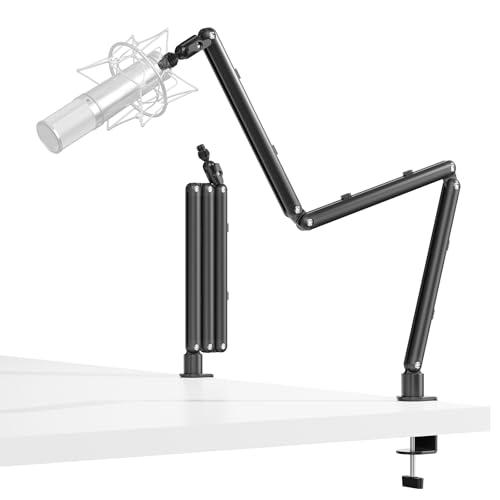
- Foldable design reduces desk clutter
- Supports up to 3 pounds
- Tucks behind a monitor
Best For: Compact gaming, streaming, and podcasting desks
Premium Stability Pick

- All-metal arm supports up to 800g
- 360° rotation and multi-angle adjustment
- Hidden cable organizer with included ties
Best For: Streamers and creators using popular USB or studio microphones
Space-Saving Lightweight Pick

- Slim low-profile design extends up to 29 inches
- Fold-away construction saves desk space
- Cable channel keeps routing neat
Best For: Gamers and streamers with lightweight microphones
Heavy-Duty Low-Profile Pick

- Supports microphones up to 3.3 pounds
- 360° rotation and 180° vertical adjustment
- Built-in cable organizer and protected desk clamp
Best For: Heavy microphones, podcasting, and studio-style setups
Best Overall – InnoGear Mic Arm with Cable Channels
For shoppers seeking a dependable microphone boom arm with cable management, the InnoGear MU-PSA28 combines built-in cable channels with a sturdy, highly adjustable design. Its extended reach and 3.5-pound capacity make it suitable for larger microphones and monitor-spanning setups.
Best For: Streaming, podcasting, and recording setups using heavier microphones such as the Blue Yeti or Shure SM7B.
Pros:
- Built-in channels and removable rubber covers keep cables neat and protected.
- Supports up to 3.5 pounds with thickened alloy steel construction and internal springs.
- Offers up to 32.3 inches of horizontal reach and 37.4 inches of vertical reach.
- Includes a 6.3-inch extension riser and fits desks up to 2 inches thick.
Cons:
- The shock mount is not included.
- Its larger reach and 1.6 kg weight may be more than compact desks require.
With strong load support, broad positioning range, and integrated cable channels, this is a well-rounded choice for users who want a clean workspace without sacrificing microphone stability.
Best Low-Profile Design – FIFINE BM88W Boom Arm
The FIFINE BM88W is a practical microphone boom arm with cable management for users who want a discreet setup. Its low-profile design extends from below the screen, while the metal build and broad adjustment range help keep the workspace clear during recording or streaming.
Best For: Compact podcasting, gaming, and home-office setups where a low-profile arm is important.
Pros:
- Low-profile design helps preserve an unobstructed workspace.
- Built-in cable management keeps wires organized.
- Extends up to 29 inches and adjusts vertically by 220 degrees and horizontally by 360 degrees.
- Includes adapters for 1/4-inch, 3/8-inch, and 5/8-inch connections.
Cons:
- Its maximum recommended load is 1.5 kg, lower than some full-size arms.
- The section near the C-clamp cannot be adjusted vertically.
- The microphone is not included.
The BM88W emphasizes clean desk integration and flexible positioning. It is a strong fit when a discreet arm matters more than maximum reach or load capacity.
Best Value – MOUNT-IT! Adjustable Mic Boom Arm
The MOUNT-IT! MI-7610 is a straightforward microphone boom arm with cable management for common studio and gaming microphones. Its spring-balanced scissor arm provides nearly 360-degree movement, while the included screw adapter and tube-style cable management simplify setup.
Best For: Blue Snowball, Blue Yeti, and other microphones using 3/8-inch or 5/8-inch threads.
Pros:
- Supports most microphones with 3/8-inch and 5/8-inch threads.
- Spring-based suspension helps reduce shaking, dipping, and unwanted movement.
- Nearly 360-degree articulation allows flexible desk positioning.
- Includes a screw adapter, instructions, and tube-style cable management.
Cons:
- Maximum recommended load is 2.2 pounds.
- The microphone is not included.
- The supplied notes list the included components as the unit only, so accessory details may be limited.
This arm focuses on essential functionality: broad compatibility, spring-assisted movement, and simple cable organization. It is a sensible option for standard microphones and uncomplicated desk setups.
Best Magnetic Cable Management – InnoGear LP98 Low-Profile Arm
The InnoGear LP98 offers a microphone boom arm with cable management designed for minimalist desks. Its magnetic cable channel snaps wires into place, while the low-profile structure, smooth movement, and 3.3-pound capacity suit compact streaming and recording stations.
Best For: Small workstations and minimalist streaming setups that need hidden, easy-access cable organization.
Pros:
- Magnetic snap-on cable channel keeps wires hidden and tangle-free.
- Low-profile arm sits just 3.35 inches above the desk.
- Provides 360-degree base rotation, 180-degree swivel, and 170-degree tilt.
- Supports up to 3.3 pounds and includes 3/8-to-5/8-inch and 3/8-to-1/4-inch adapters.
Cons:
- The maximum height is only 3.35 inches, so it is not intended for tall, over-monitor positioning.
- The clamp fits flat-edged desktops up to 2.36 inches thick.
- The shock mount is not included.
The LP98 stands out for its magnetic cable system and compact profile. Choose it when desk space and a clean appearance are higher priorities than extended vertical reach.
Best All-Around Pick – Premium Cable-Managed Mic Arm
If you want a microphone boom arm with cable management for a flexible home recording or streaming setup, this aluminum model offers broad adjustability and useful included accessories. It supports microphones up to 4.4 pounds and fits desks from 0.8 to 2.4 inches thick.
Best For: Streamers, podcasters, gamers, and home-office users who want versatile positioning and wide microphone compatibility.
Pros:
- Supports microphones weighing up to 4.4 pounds.
- 360-degree horizontal rotation enables low, mid, or high positioning.
- Built-in cable management helps prevent tangles and accidental pulls.
- Includes adapters, a phone clip, cable ties, and a padded C-clamp.
Cons:
- The included clamp is limited to desks 0.8 to 2.4 inches thick.
- Its standard design may occupy more visible desk space than a low-profile arm.
This is a well-rounded choice if you need one arm for several microphones and recording positions. The 4.4-pound capacity and included thread adapters make it especially practical for varied setups.
Best for Heavy Microphones – Gear-Lock Low-Profile Mic Arm
For heavier microphones, this microphone boom arm with cable management combines a 6.6-pound load capacity with a gear-lock mechanism designed to resist sagging. Its low-profile form and 780 mm reach suit desks where you want the arm to stay unobtrusive.
Best For: Users mounting heavier models such as the Shure SM7B, SM7dB, MV7, RODE PodMic, or Blue Yeti.
Pros:
- Supports up to 6.6 pounds, making it suitable for heavy microphones.
- Gear-lock construction is designed for stability without long-term sagging.
- Deep cable channels route multiple cables neatly.
- Offers 360-degree horizontal and 120-degree vertical adjustment.
Cons:
- At 1.63 kg, it is heavier than more basic boom arms.
- Its 3/8-inch and 5/8-inch thread support does not include a listed 1/4-inch thread.
This arm stands out when stability under a heavier microphone matters more than minimum weight. The long reach, low-profile design, and locking adjustment system make it a strong fit for serious desk-based recording.
Best Space-Saving Option – Slim 30-Inch Cable-Managed Arm
This microphone boom arm with cable management is designed for compact desks and monitor-focused setups. Its foldable 30-inch arm can tuck behind a monitor, while the all-metal construction supports microphones up to 3 pounds.
Best For: Gamers, streamers, and podcasters who want a compact arm with low- and high-profile positioning.
Pros:
- Foldable, space-saving design helps reduce desk clutter.
- 30-inch reach can fit larger desks while remaining relatively compact.
- 360-degree hinge supports precise microphone positioning.
- Integrated cable channel keeps the microphone wire organized.
Cons:
- Its 3-pound capacity is lower than the other arms in this roundup.
- It is not compatible with Blue Yeti ORB, Yeti X, Shure MV7i, or Beta58A models.
- Positioning adjustments may require the included hex wrench.
This arm is a practical pick when preserving monitor visibility and desk space is a priority. Check the compatibility exclusions before buying, particularly if you use a Yeti X or one of the listed Shure microphones.
Premium Stability Pick – FULAIM X37
The FULAIM X37 is a strong choice if you want a microphone boom arm with cable management and an all-metal build. Its aluminum construction supports microphones up to 800g, while the rotating base, adjustable arm, and included adapters make it suitable for streaming, recording, and content creation.
Best For: Streamers, podcasters, and creators using microphones such as the HyperX QuadCast, Blue Yeti, or Shure SM7B.
Pros:
- All-aluminum construction supports up to 800g.
- 360° base rotation, 180° arm movement, and 270° adapter adjustment provide flexible positioning.
- Hidden cable organizer, cable ties, and non-slip desk pads help maintain a tidy setup.
- Includes 3/8-inch and 5/8-inch thread compatibility.
Cons:
- Its 800g capacity may not suit heavier studio microphones.
- The supplied notes do not specify the maximum desk-clamp thickness.
Choose the X37 when stability and a clean appearance matter most. Its metal construction and broad adjustment range make it a well-rounded option, particularly for users who want integrated cable routing without sacrificing microphone support.
Space-Saving Lightweight Pick – TODI Mic Arm
The TODI mic arm is a practical microphone boom arm with cable management for compact desks and lightweight microphones. Its slim, fold-away design can extend up to 29 inches, and the low-profile configuration helps keep the arm behind a computer screen during gaming or streaming.
Best For: Gamers, streamers, and podcasters using lighter microphones on large or space-conscious desks.
Pros:
- Low-profile, fold-away design saves desk space.
- Extends up to 29 inches for larger desktops.
- Integrated cable management helps reduce cable pulling and clutter.
- Includes 3/8-inch and 5/8-inch mount threads plus a hex wrench.
Cons:
- Designed for lightweight microphones and is not intended for heavy-duty studio mics.
- Not compatible with several listed 1/4-inch microphones, including Blue Yeti ORB, Yeti X, Shure MV7i, and Shure Beta58A.
The TODI stands out for its compact profile and storage-friendly design, but compatibility and microphone weight should be checked carefully before buying. It is best suited to users prioritizing unobstructed screen space over heavy-load capacity.
Heavy-Duty Low-Profile Pick – Aluminum Boom Arm
This aluminum microphone boom arm with cable management is built for users who need higher load capacity and a low-profile desk setup. It supports microphones up to 3.3 pounds, clamps to desks up to 2.55 inches thick, and offers 360° rotation with 180° vertical adjustment.
Best For: Podcasters, studio users, streamers, and creators working with heavier dynamic or condenser microphones.
Pros:
- Aluminum construction supports up to 3.3 pounds without sagging or shaking.
- Reinforced clamp includes a silicone pad to help protect the desk surface.
- 360° rotation, 180° adjustment, and a 6.69-inch height rod support flexible positioning.
- Built-in cable organizer and included 3/8-inch-to-5/8-inch adapters simplify setup.
Cons:
- The listed 2.55-inch clamp opening may not fit thicker desks.
- Its maximum height adjustment is limited to 6.69 inches.
The HY-mic arm is the strongest capacity choice in this group, making it suitable for heavier microphones and more demanding setups. Its clamp protection, foldable design, and integrated cable organizer add practical convenience for permanent or semi-permanent workstations.
How We Picked the Best Microphone Boom Arm with Cable Management
We focused on practical features that affect daily use: desk-clamp stability, arm range, smooth positioning, weight support, thread compatibility, and how effectively each design manages microphone cables. We also considered whether an arm suits compact desks, low-profile setups, heavier microphones, or lightweight USB models.
Because microphone mounting hardware varies, compatibility matters as much as advertised strength. The included 3/8-inch and 5/8-inch adapters, clamp design, and available clearance can determine whether an arm works immediately or needs additional hardware.
Quick Comparison
| Best For | What to Prioritize |
|---|---|
| Streaming and gaming | Quiet adjustment, cable storage, and a wide range of motion |
| Podcasting | Stable construction, comfortable positioning, and reliable load support |
| Heavy microphones | High weight capacity, reinforced joints, and a strong desk clamp |
| Small desks | Low-profile geometry, compact folding, and minimal clamp depth |
| USB microphones | Thread adapters, sufficient reach, and simple cable routing |
Key Buying Factors for a Microphone Boom Arm with Cable Management
Weight Capacity and Stability
Match the arm’s rated capacity to your microphone, shock mount, pop filter, and any added accessories. A heavier setup needs firm joints and a clamp that resists twisting or sagging. Capacity ratings are not always directly comparable, so a margin above your actual equipment weight is preferable.
Desk Clamp and Clearance
Measure your desk thickness before buying. Check whether the clamp opens wide enough and whether its padding protects the surface. A stable clamp is especially important when the arm is extended toward you, since leverage can amplify movement at the mounting point.
Reach, Rotation, and Profile
Choose an arm long enough to place the microphone comfortably without blocking your monitor. Low-profile arms work well beneath screens and shelves, while longer scissor arms offer more positioning flexibility. A 360-degree rotating design can make switching between recording and storage easier.
Cable Routing and Thread Compatibility
Look for integrated channels, clips, or hidden cable paths that keep the USB or XLR lead close to the arm. Confirm whether your microphone uses a 3/8-inch or 5/8-inch mount and whether the necessary adapter is included.
Who Should Buy Which Microphone Boom Arm with Cable Management?
Choose a low-profile arm if you want a discreet setup that preserves monitor visibility or desk space. A heavier-duty model is the safer choice for broadcast-style microphones, shock mounts, and pop filters. Streamers and gamers should prioritize smooth repositioning and accessible cable management, while podcasters may value rigidity and long-session comfort over maximum reach.
For lightweight microphones or occasional recording, a compact adjustable arm can provide the needed flexibility without taking over the desk. Before ordering, verify microphone weight, mounting thread, desk thickness, and the arm’s folded dimensions. Those four checks will prevent most compatibility and stability problems.