A 4K pen display can make fine linework, texture, color grading, and interface details easier to see while you draw. The right model depends on more than resolution, though: screen size, color coverage, pen performance, ergonomics, and connectivity all affect the experience.
We compared 10 drawing tablets with 4K displays across compact, mid-size, and large professional formats to help you find a screen tablet that fits your workspace, software, and budget.
Best 10 Drawing Tablets with 4K Display Picks for 2026
Best Color Accuracy

- 18.4-inch 4K display with 1.07 billion colors
- Calman-verified wide-gamut color coverage
- Includes dual styluses and wireless keydial
Best For: Color-critical illustration, photography, and design
Best OLED Touchscreen

- 15.6-inch 4K OLED panel with under-1 ms response
- Wide-gamut, Calman-verified color performance
- Custom touch gestures and palm-rejection area
Best For: Illustration, retouching, and animation with touch workflows
Best for Compatibility
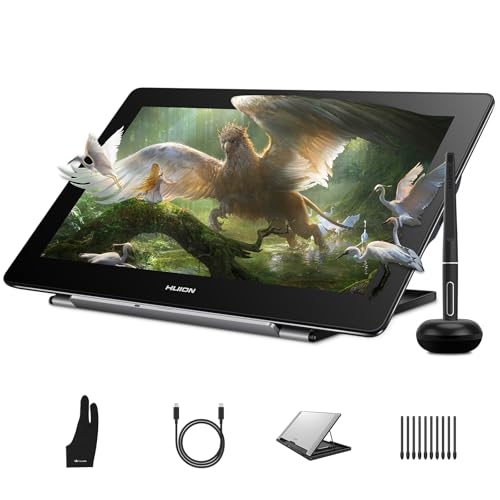
- 15.6-inch fully laminated 4K display
- Works with Windows, Mac, Linux, and Android
- Battery-free pen and adjustable stand included
Best For: Mixed-device creative work, study, and hobby use
Best Large Workspace

- Spacious 23.8-inch 4K UHD drawing display
- Calman-verified coverage across major color spaces
- Includes dual styluses, wireless keydial, and adjustable stand
Best For: Studio-based professionals and multitasking creators
Best Large-Screen Value

- 18.4-inch laminated 4K UHD display
- Up to 16,384 pressure levels with PenTech 4.0
- Broad sRGB, Adobe RGB, and DCI-P3 coverage
Best For: Artists wanting a spacious, portable 4K pen display
Best Studio Workflow

- 23.8-inch 4K IPS display with 99.43% Adobe RGB
- Two battery-free pens with 8,192 pressure levels
- 40 programmable functions per application
Best For: Professional creators building a color-focused studio setup
Best for Smooth Motion
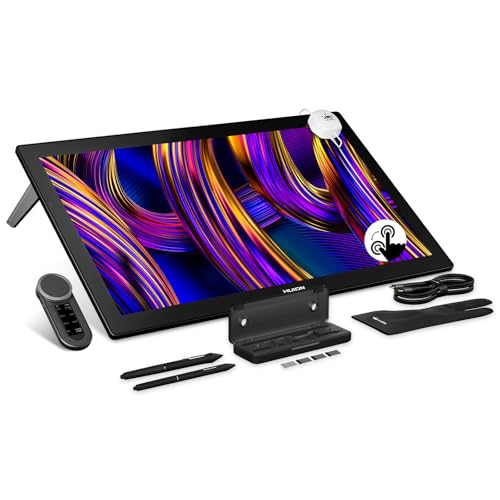
- 27-inch 4K display with a 144Hz refresh rate
- Hardware-calibrated color with stated Delta E below 1
- PenTech 4.0 stylus with up to 16,384 pressure levels
Best For: Artists and animators needing a large, fluid professional workspace
Best Value 4K Pick

- 18.4-inch 4K UHD laminated display
- 99% sRGB and factory-rated ΔE<1.5
- 16,384-pressure battery-free pen
Best For: Creators wanting a large, accurate display in a compact format
Best Large Studio Canvas

- Expansive 27-inch 4K workspace
- sRGB, Adobe RGB, and DCI-P3 modes
- Hardware calibration rated ΔE<1.5
Best For: Professionals needing a spacious, color-focused studio display
Best Multitasking Display

- 23.8-inch 4K UHD creative workspace
- 140% sRGB gamut volume with HDR
- Keydial Mini and integrated stand included
Best For: Desk-based creators balancing artwork with timelines and tool panels
Best Color Accuracy – XPPen Artist Pro 19 Gen2
The XPPen Artist Pro 19 Gen2 is a strong choice among drawing tablets with 4k display technology for artists who need a large, highly accurate workspace. Its 18.4-inch 4K panel, wide gamut coverage, full lamination, and included shortcut keydial suit detailed illustration, design, photography, and other color-sensitive work.
Best For: Professional artists, illustrators, photographers, and designers who prioritize color accuracy and a spacious display.
Pros:
- 4K UHD resolution on a large 18.4-inch screen with 1.07 billion colors.
- Calman-verified color performance with 99.8% sRGB, 96% Adobe RGB, and 98% Display P3 coverage.
- Includes two 16,384-level styluses, a wireless shortcut keydial, and a full-laminated anti-glare display.
- Supports reversible USB-C connections, HDMI input, and VESA mounting.
Cons:
- Its large footprint may require a dedicated desk setup.
- It is a display tablet that needs a compatible computer or device rather than functioning independently.
Choose this model if you want a generously sized, color-focused drawing display with flexible accessories and mounting options. The dual styluses and keydial add useful workflow flexibility for demanding creative sessions.
Best OLED Touchscreen – XPPen Artist Ultra 16
The XPPen Artist Ultra 16 combines a 15.6-inch 4K OLED screen with touch interaction, making it one of the more versatile drawing tablets with 4k display options. Its strong contrast, fast response, wide color coverage, and customizable gestures are useful for illustration, retouching, animation, and video-related work.
Best For: Creative professionals who want OLED image quality and touch-based canvas navigation.
Pros:
- 4K OLED display offers a 100,000:1 contrast ratio and under-1 ms response time.
- Calman-verified color performance with 99% Adobe RGB, 99% sRGB, and 98% Display P3 coverage.
- Supports multi-point gestures, customizable three-, four-, and five-finger controls, and a palm-rejection area.
- Includes two 16,384-level styluses and an ACK05 remote with up to 40 customizable shortcut keys.
Cons:
- It must be connected to a computer or laptop and is not a standalone tablet.
- OLED and touch features may be more than casual sketchers need.
This is the most compelling pick when visual contrast and direct touch control matter as much as pen performance. Its computer-dependent setup is worth noting, but the OLED panel and gesture customization can make a modern creative workflow feel more immediate.
Best for Compatibility – HUION Kamvas Pro 16 4K
The HUION Kamvas Pro 16 4K is a practical option among drawing tablets with 4k display resolution for users who want detailed visuals without giving up broad device support. Its 15.6-inch fully laminated screen, adjustable stand, battery-free pen, and compatibility with Windows, Mac, Linux, and Android make it adaptable for creative and study setups.
Best For: Students, hobbyists, designers, and professionals who need flexible operating-system and software compatibility.
Pros:
- 4K UHD resolution provides sharp detail for digital painting, retouching, and 3D modeling.
- Fully laminated anti-glare display reduces parallax and reflections.
- Battery-free PW517 stylus offers 8,192 pressure levels and reported ±0.3 mm accuracy.
- Supports Windows, macOS, Linux, and compatible Android devices, plus major creative software.
Cons:
- Its 16.7 million display colors and 120% sRGB gamut are less expansive than some newer premium alternatives.
- It is not standalone and must connect to a computer, laptop, or compatible Android device.
The Kamvas Pro 16 4K stands out for versatility rather than extra controls or OLED technology. It is a sensible fit for mixed-device households and creators who value a comfortable, fully laminated display with a dependable battery-free pen.
Best Large Workspace – XPPen Artist Pro 24 Gen2
The XPPen Artist Pro 24 Gen2 is designed for creators who want a very large canvas in the drawing tablets with 4k display category. Its 23.8-inch 4K screen provides room for multiple windows and detailed work, while professional color calibration, dual styluses, a wireless keydial, and an adjustable stand support extended creative sessions.
Best For: Professional illustrators, photographers, designers, and game or VR creators who want maximum on-screen workspace.
Pros:
- 23.8-inch 4K UHD display offers high pixel density and space for multitasking.
- Calman-verified color with 99% Adobe RGB, 99% sRGB, and 98% P3 coverage.
- Includes two 16,384-level, 60-degree tilt styluses with different designs and nib options.
- Wireless keydial, anti-glare glass, full lamination, and a 16-to-72-degree adjustable stand support efficient workflows.
Cons:
- The 23.8-inch size demands substantial desk space.
- The optional height-adjustable ACS15 stand is not included.
- It is a pen display that requires connection to a computer.
If your priority is seeing more artwork, palettes, and reference material at once, this is the standout choice in the group. Its size and accessory ecosystem favor a permanent studio setup, while the calibrated display is suited to color-sensitive professional work.
Best Large-Screen Value – HUION Kamvas Pro 19 4K
The HUION Kamvas Pro 19 is a strong choice among drawing tablets with 4k display for artists who want a large, detailed workspace without giving up portability. Its 18.4-inch laminated 4K screen combines anti-glare etched glass, touch support on Windows, and broad color-gamut coverage for illustration, design, video, and animation work.
Best For: Artists and designers who want a spacious, color-accurate 4K pen display with touch gestures and a portable design.
Pros:
- 18.4-inch 4K UHD display with full lamination and paper-like etched glass.
- Strong color coverage, including 99% sRGB, 96% Adobe RGB, and 98% DCI-P3.
- PenTech 4.0 styluses provide up to 16,384 pressure levels, tilt support, and enhanced accuracy.
- Includes a customizable Bluetooth keypad, foldable stand, and USB-C connectivity.
Cons:
- Multi-touch is supported on Windows, while macOS touch support is still in beta.
- The large display may require considerable desk space despite its relatively light weight.
With its combination of a large 4K canvas, touch controls, professional color coverage, and included shortcut keypad, the Kamvas Pro 19 is a well-rounded option for creators who need detail and flexibility.
Best Studio Workflow – Xencelabs Pen Display 24
The Xencelabs Pen Display 24 is built for creators seeking a refined option among drawing tablets with 4k display. Its 23.8-inch IPS panel offers 4K resolution, high Adobe RGB coverage, hardware calibration support, and a shortcut system designed for extended professional workflows.
Best For: Professional illustrators, animators, and designers who prioritize color management, ergonomic adjustments, and customizable controls.
Pros:
- 4K UHD display with 99.43% Adobe RGB and 96.11% DCI-P3 coverage.
- Includes two battery-free pens with different shapes, erasers, tilt recognition, and 8,192 pressure levels.
- Shortcut system provides 40 programmable functions per application plus a multi-function dial.
- Adjustable stand, glare-reducing etched surface, and fanless magnesium-alloy housing support comfortable use.
Cons:
- Its 23.8-inch size and 6 kg weight make it less convenient for mobile setups.
- The display is a wired pen display, so it is intended for use with a compatible computer.
The Pen Display 24 stands out for its color-focused panel and unusually comprehensive shortcut controls. It is especially appealing when accurate display work and a customizable studio setup matter more than portability.
Best for Smooth Motion – HUION Kamvas Pro 27 144Hz
The HUION Kamvas Pro 27 (144Hz) adds an unusually high refresh rate to the category of drawing tablets with 4k display. Its 27-inch 4K screen is designed for fluid pen response, while quantum-dot color, hardware calibration, multi-touch, and PenTech 4.0 target demanding creative workflows.
Best For: Professional artists and animators who want a very large 4K canvas with smooth motion, accurate color, and touch interaction.
Pros:
- 27-inch 4K UHD display with a 144Hz refresh rate and faster line display response.
- Professional color coverage, including 99% sRGB, 98% Adobe RGB, and 98% DCI-P3.
- Hardware calibration with a 3D LUT and stated Delta E below 1, plus a factory calibration report.
- PenTech 4.0 offers up to 16,384 pressure levels, tilt support, and improved edge precision.
Cons:
- The 27-inch format is better suited to a permanent workstation than a portable setup.
- The listed compatibility requires specific operating-system and connection support for some devices.
For creators who value fluid pen movement and a huge working area, the Kamvas Pro 27 is the most motion-focused option here. Its 144Hz panel and calibration features make it particularly compelling for animation and detailed professional work.
Best Value 4K Pick – GAOMON Pro 19
For creators seeking drawing tablets with 4k display resolution without taking over the desk, the GAOMON Pro 19 offers an appealing balance of screen space, color accuracy, and value. Its 18.4-inch fully laminated display combines 4K detail with an anti-glare, paper-like surface.
Best For: Art students, content creators, designers, and illustrators who want a spacious professional-style pen display in a relatively compact format.
Pros:
- 4K UHD resolution, 99% sRGB coverage, and factory-rated ΔE<1.5 accuracy.
- Battery-free pen provides 16,384 pressure levels, tilt support, and a low 2g activation force.
- Built-in adjustable stand, included cables, and compatibility with Windows, macOS, Ubuntu, Android, and major creative apps.
Cons:
- It is a pen display that requires a compatible computer or device rather than working as a standalone tablet.
- A single USB-C connection requires a compatible computer and a separately sold USB-C-to-C cable.
The Pro 19 is a practical choice when you want high-resolution artwork, accurate color, and a comfortable drawing surface while keeping the footprint smaller than larger 24- or 27-inch displays.
Best Large Studio Canvas – HUION Kamvas Pro 27
The HUION Kamvas Pro 27 is built for artists who want one of the largest drawing tablets with 4k display resolution for expansive projects. Its 27-inch screen, hardware calibration, broad color-space support, and multi-touch controls suit detailed illustration, editing, animation, and 3D workflows.
Best For: Professional illustrators, animators, photographers, motion designers, and 3D users who prioritize a generous canvas and color-management options.
Pros:
- Large 27-inch 4K display with sRGB, Adobe RGB, and DCI-P3 modes.
- 3D LUT hardware calibration with ΔE<1.5 and a factory calibration report.
- Full lamination, anti-glare glass, DC dimming, multi-touch gestures, and standard and slim pens.
Cons:
- It is not a standalone product and must connect to a compatible computer or Android device.
- The large screen requires substantial desk space.
Choose the Kamvas Pro 27 when a broad canvas and professional color workflow matter more than portability. It is especially compelling for projects where reducing zooming and panning can improve productivity.
Best Multitasking Display – HUION Kamvas Pro 24
The HUION Kamvas Pro 24 is a strong option among drawing tablets with 4k display resolution for users who need room for both artwork and supporting panels. Its 23.8-inch screen adds 4K clarity, Quantum Dot color, HDR support, and a customizable Keydial Mini for faster control.
Best For: Professional artists, graphic designers, video editors, and 3D modelers who want a large multitasking workspace and shortcut controls.
Pros:
- 23.8-inch 4K UHD display with 140% sRGB color gamut volume, HDR, and 1.07 billion colors.
- Full lamination and anti-glare glass support accurate cursor placement and a paper-like drawing feel.
- Includes a customizable Keydial Mini, integrated 20-degree stand, multiple video inputs, and two USB-A ports.
Cons:
- It is a pen display rather than a standalone tablet and requires a compatible computer or device.
- The wide color gamut may be more than casual artists need.
The Kamvas Pro 24 makes the most sense for desk-based workflows where screen real estate and quick access to shortcuts are priorities. Its combination of 4K detail, vivid color, and included controls is well suited to demanding creative software.
How We Picked the Best Drawing Tablets with 4K Displays
We focused on the features that most directly affect drawing and design: true 4K resolution, display size, color gamut, pen pressure performance, parallax control, touch support, shortcut options, and stand or mounting compatibility. We also considered how each tablet suits different workflows, from portable illustration to full-time studio production.
Specifications can vary by configuration and connection method, so check the manufacturer’s current requirements before buying. Many 4K pen displays need a capable USB-C, DisplayPort, or HDMI connection, along with a separate power source.
Quick Comparison
- Best for compact workspaces: A 15.6-inch 4K display offers high pixel density without dominating a desk.
- Best for immersive drawing: 18.4- to 19-inch models provide more room for artwork and palettes.
- Best for large studio setups: 23.8- and 27-inch displays feel closer to working on a dedicated monitor.
- Best for color-critical work: Prioritize Adobe RGB or wide sRGB coverage, calibration options, and a consistent viewing angle.
- Best for speed: High refresh rates can make cursor movement and strokes appear smoother, especially in supported software.
Key Buying Factors for Drawing Tablets with 4K Display
Screen Size and Workspace
A larger panel gives you more physical room for broad strokes and visible tool panels, but it also requires more desk space and a stronger stand. Smaller displays are easier to position and can be better for limited work areas.
Color and Surface Quality
Look beyond the 4K label. Wide-gamut coverage, factory calibration, viewing angles, brightness, and an anti-glare or etched surface can matter just as much. A laminated display may also reduce the visible gap between the pen tip and cursor.
Pen Performance and Controls
Battery-free pens reduce maintenance. Pressure sensitivity, tilt recognition, low initial activation force, and reliable tracking are more important than headline numbers alone. Touch controls, shortcut keys, a dial, or a compatible remote can speed up repetitive commands.
Connectivity and Ergonomics
Confirm that your computer supports the required video signal and USB data connection. Check whether the tablet includes a stand, supports VESA mounting, and can be adjusted to a comfortable drawing angle.
Who Should Buy Which Drawing Tablets with 4K Display?
Choose a 15.6-inch model if portability, desk space, or a lower overall setup footprint matters most. Choose an 18.4- to 19-inch model if you want a balanced professional workspace for illustration, photo editing, animation, or 3D work. Choose a 23.8- or 27-inch model if you work primarily at a dedicated desk and want maximum canvas area with room for large palettes and reference windows.
For color-sensitive production, prioritize the display with the most suitable gamut and calibration workflow rather than choosing by size alone. For fast-paced creative work, consider refresh rate and shortcut controls. Finally, verify operating-system compatibility, available ports, included accessories, and stand requirements before placing your order.