Fast external storage can make a major difference when editing 4K, 6K, or 8K footage. The right enclosure lets you reuse an NVMe SSD for a portable scratch disk, media library, project drive, or backup without buying a complete external SSD.
This roundup covers 10 options across 10Gbps, 40Gbps, and next-generation 80Gbps interfaces, including compact tool-free cases, actively cooled designs, phone-friendly stands, and multi-drive enclosures. Match the enclosure to your computer’s ports, editing workload, and sustained-speed needs.
Best 10 SSD Enclosures for Video Editing Picks for 2026
Best for iPhone ProRes
ACASIS Magnetic SSD Enclosure Stand

- 10Gbps storage for 4K ProRes workflows
- Built-in magnetic phone stand
- Supports NVMe drives up to 8TB
Best For: Mobile creators recording video to USB-C devices
Best Sustained 40Gbps Performance

- 40Gbps Thunderbolt 4 and USB4 support
- Typical speeds of 2,800–3,200 MB/s
- Active cooling and tool-free installation
Best For: Editors handling sustained 4K media transfers
Best Budget 10Gbps Option

- USB 3.1 Gen 2 speeds above 900 MB/s
- USB-C and USB-A cable compatibility
- Supports NVMe drives up to 8TB
Best For: Editors using standard USB-C or USB-A computers
Best for Sustained Speed

- 40Gbps USB4 interface with Thunderbolt compatibility
- Built-in fan and aluminum heat management
- Supports four common M.2 NVMe sizes
Best For: Editors needing fast, actively cooled storage for heavy workloads
Best Budget-Friendly Option

- 10Gbps USB 3.2 Gen 2 performance
- Tool-free installation with thermal pad contact
- Portable design with USB-C and USB-A support
Best For: Portable editing transfers and everyday NVMe backups
Best Multi-Drive Station

- Four M.2 NVMe bays with up to 32TB total capacity
- 40Gbps USB4 bandwidth for multi-drive workflows
- Aluminum body with fan and vented cooling design
Best For: Production teams managing multiple high-capacity media drives
Best for Next-Gen Speed
ACASIS 80Gbps M.2 NVMe Enclosure

- Up to 6000 MB/s with compatible hardware
- 80Gbps TB5 and USB4 V2 support
- 60W PD and intelligent fan cooling
Best For: Editors with Thunderbolt 5 or USB4 V2 systems
Best Quiet Portable Pick
UGREEN 40Gbps M.2 NVMe Enclosure
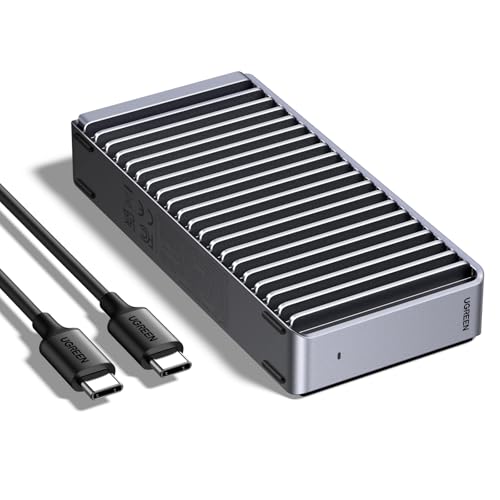
- Up to 3600 MB/s with Thunderbolt 4
- Silent passive fin-based cooling
- Supports four M.2 sizes and up to 8TB
Best For: Portable single-drive editing setups
Best for Multi-Drive Workflows
TERRAMASTER D4 4-Bay NVMe Enclosure

- Four NVMe bays and up to 32TB capacity
- 40Gbps connectivity for demanding workflows
- Active cooling with hot-swappable bays
Best For: Desktop editors managing multiple drives and backups
Best USB4 Speed – Sabrent Tool-Free NVMe Enclosure
For demanding video editing workflows, the SABRENT USB4 NVMe enclosure offers up to 3,900 MB/s with USB4 and up to 2,700 MB/s over Thunderbolt 3 or 4. Its active cooling fan and aluminum-and-ABS build are useful when moving large footage files for extended periods.
Best For: Editors and creators with USB4 or Thunderbolt hosts who need a fast, portable enclosure for PCIe NVMe storage.
Pros:
- Up to 3,900 MB/s with USB4 connectivity
- Active cooling fan helps maintain stable performance during large transfers
- Tool-free support for 2230, 2242, 2260, and 2280 PCIe NVMe SSDs
- Works with Windows and macOS without drivers or external power
Cons:
- Does not support SATA M.2 SSDs
- Top speeds require a USB4-capable host and suitable cable
This is one of the strongest choices for video editors who can take advantage of USB4. It is less compelling if your computer is limited to standard USB-C speeds.
Best for iPhone ProRes – ACASIS Magnetic SSD Enclosure Stand
The ACASIS magnetic SSD enclosure combines 10Gbps NVMe storage with a phone stand, making it a specialized option among SSD enclosures for video editing. It is designed for recording 4K ProRes footage directly to an external SSD from compatible USB-C iPhones, iPads, and other devices.
Best For: Mobile creators who shoot, store, and review 4K video on a compatible USB-C phone or tablet.
Pros:
- Supports up to 8TB of NVMe SSD capacity
- 10Gbps USB-C connectivity for high-bitrate video workflows
- Dual-sided magnetic phone stand with three adjustable angles
- Aircraft-grade aluminum construction with non-slip silicone pads
Cons:
- SSD is not included
- New SSDs must be formatted before use
- External power is recommended for drives over 1TB or multiple connected devices
This enclosure is particularly useful for mobile video capture rather than maximum desktop editing speed. Its stand design adds convenience, but the 10Gbps interface is slower than the USB4 models in this roundup.
Best Sustained 40Gbps Performance – Yottamaster NVMe Enclosure
The Yottamaster M.2 NVMe enclosure is built for high-speed video editing over Thunderbolt 4 or USB4. Its ASM2464PD controller, active cooling fan, and aluminum-and-transparent-case design support sustained workflows, with typical real-world speeds listed at approximately 2,800 to 3,200 MB/s.
Best For: Video editors who need fast external NVMe storage for 4K editing and other heavy file-transfer workloads.
Pros:
- 40Gbps interface compatible with Thunderbolt 4 and USB4
- Active fan and protection against overheating and overcurrent
- Tool-free installation for 2230, 2242, 2260, and 2280 NVMe SSDs
- Transparent cover shows activity LED and fan status
Cons:
- Best performance requires a 40Gbps-rated cable and compatible host
- Actual speeds vary with the SSD, computer, cable, and file workload
With its cooling system and stated sustained speeds, this is a well-rounded pick for editors moving large media libraries. Check your computer and cable specifications before expecting 40Gbps-class performance.
Best Budget 10Gbps Option – ORICO M.2 NVMe Enclosure
The ORICO M2PV is a practical 10Gbps enclosure for editors who want portable NVMe storage without requiring USB4 or Thunderbolt. Its USB 3.1 Gen 2 interface can exceed 900 MB/s with a suitable NVMe drive, and included USB-C and USB-A connectivity makes it flexible across older and newer computers.
Best For: Editors who need an affordable portable NVMe scratch or transfer drive for USB-C and USB-A systems.
Pros:
- Up to 10Gbps USB 3.1 Gen 2 connectivity with UASP support
- Supports 2230, 2242, 2260, and 2280 PCIe NVMe SSDs up to 8TB
- Includes USB-C-to-C and USB-C-to-A cable options
- Compact aluminum-and-plastic design with thermal pad
Cons:
- Does not support M.2 SATA, PCIe AHCI, or Mac SSDs
- Requires a screwdriver for installation
- Slower than the USB4 and Thunderbolt enclosures in this roundup
This is a sensible choice for basic editing transfers, backups, and portable project storage. Its broad host-cable compatibility is useful, but professionals working with very large files may prefer a faster 40Gbps enclosure.
Best for Sustained Speed – ACASIS 40Gbps NVMe Enclosure
For demanding video editing workflows, the ACASIS TBU405 Pro is one of the more performance-focused ssd enclosures for video editing. Its USB4/Thunderbolt-compatible connection and built-in fan are designed to help maintain high transfer speeds during large file transfers and sustained workloads.
Best For: Editors using compatible Mac or PC systems who need a compact, actively cooled enclosure for a single M.2 NVMe SSD.
Pros:
- 40Gbps interface with tested read/write speeds of up to 2805/2734 MB/s under the stated test conditions.
- Built-in cooling fan and aluminum heat-dissipation design help manage heat during heavy workloads.
- Supports M.2 sizes 2230, 2242, 2260, and 2280, plus USB4 and Thunderbolt 3/4 compatibility.
Cons:
- The fan must be activated with a switch, so operation is not entirely passive.
- It supports one SSD and requires a compatible M.2 NVMe drive; SATA M.2 support is not specified.
The ACASIS stands out when sustained performance matters more than simplicity. It is a strong match for editors moving large media projects, provided their computer supports the required high-speed connection.
Best Budget-Friendly Option – FIDECO USB 3.2 NVMe Enclosure
The FIDECO M210 is a straightforward choice among ssd enclosures for video editing when portability and broad computer compatibility are priorities. Its USB 3.2 Gen 2 connection supports up to 10Gbps, while the tool-free sandwich design makes swapping compatible NVMe drives simple.
Best For: Editors and creators who need an affordable, portable enclosure for occasional project transfers, backups, or working files.
Pros:
- USB 3.2 Gen 2 supports transfer speeds of up to 10Gbps in theory and includes UASP support.
- Tool-free sandwich design simplifies SSD installation and helps the thermal pad contact the drive.
- Supports M.2 NVMe drives in 2230, 2242, 2260, and 2280 sizes, with USB-C and USB-A connectivity options.
Cons:
- It does not support M.2 SATA SSDs.
- Its 10Gbps interface is slower than the 40Gbps options in this roundup.
FIDECO is best viewed as a practical, compact NVMe reader rather than a maximum-speed editing dock. It works well for lighter editing workflows and file movement across Windows, macOS, and Linux systems.
Best Multi-Drive Station – ORICO 4-Bay NVMe Dock
The ORICO 8848U4 takes a different approach to ssd enclosures for video editing by combining four M.2 NVMe bays in one all-flash station. It is designed for editors handling multiple drives, with up to 32TB of stated total capacity, active cooling, and a 40Gbps USB4 interface.
Best For: Professional video editors, DITs, and production teams who need a portable multi-drive setup for organizing or transferring large media libraries.
Pros:
- Four M.2 NVMe bays support up to 8TB per drive and 32TB total, with SSDs installed separately.
- 40Gbps USB4 bandwidth is designed for multi-drive workflows, with single-disk operation listed at up to 10Gbps.
- Aluminum housing, built-in fan, and front and rear vents support sustained operation; fan noise is stated below 30dB.
Cons:
- SSD drives are not included, adding substantially to the total setup cost.
- It is larger and more complex than a single-drive enclosure.
- The supplied notes list a one-year warranty.
The ORICO makes the most sense when four-drive capacity and workflow organization outweigh the convenience of a pocket-sized enclosure. Its all-flash, actively cooled design is particularly suited to production environments and large project libraries.
Best for Next-Gen Speed – ACASIS 80Gbps M.2 NVMe Enclosure
For editors building a high-performance mobile workstation, the ACASIS is one of the fastest SSD enclosures for video editing in this roundup. Its 80Gbps Thunderbolt 5 and USB4 V2 support, reported speeds up to 6000 MB/s, and integrated cooling are designed for demanding file transfers and sustained creative workloads.
Best For: Video editors with Thunderbolt 5 or USB4 V2 systems who want maximum throughput and up to 60W power delivery for a compatible laptop.
Pros:
- Up to 80Gbps connectivity and reported read/write speeds of up to 6000 MB/s with a suitable PCIe 4.0 x4 NVMe SSD.
- Supports PCIe 5.0 SSDs and includes backward compatibility with 40Gbps, USB4 V1.0, and USB 3.x devices.
- Smart temperature-controlled fan, aluminum construction, tool-free installation, and included thermal pads.
- 60W PD charging can power a compatible laptop while the enclosure is connected.
Cons:
- Not compatible with Thunderbolt 3 devices.
- Full speeds require compatible high-bandwidth hardware and an appropriate NVMe SSD.
- The enclosure can become warm during sustained workloads and needs good ventilation.
The ACASIS stands out for future-ready connectivity and unusually high headline speeds. It is best suited to editors whose computer supports Thunderbolt 5 or USB4 V2; older systems may not take advantage of its full performance.
Best Quiet Portable Pick – UGREEN 40Gbps M.2 NVMe Enclosure
The UGREEN 40Gbps enclosure is a practical choice among SSD enclosures for video editing when you want fast transfers without fan noise. Its ASM2464PD chip can reach up to 3600 MB/s with the required Thunderbolt 4 cable and device, while the finned aluminum design helps manage heat passively.
Best For: Travelers and editors who need a compact, quiet enclosure for a single NVMe drive across USB4, Thunderbolt, Mac, Windows, Linux, or Android systems.
Pros:
- Up to 40Gbps connectivity and reported speeds of up to 3600 MB/s with compatible Thunderbolt 4 hardware.
- Supports M.2 sizes 2230, 2242, 2260, and 2280, with drive capacities up to 8TB.
- Double-sided fins and a three-dimensional cooling design operate without fan noise.
- Compact aluminum enclosure includes a USB-C cable, cooling pad, and disassembly kit.
Cons:
- SSD is not included.
- Does not support SATA NGFF or mSATA drives.
- Some thicker SSDs may require thinner thermal pads for proper fit.
UGREEN offers a balanced mix of speed, portability, and silent operation. It is a strong fit for single-drive editing setups, provided your computer and cable support the performance level you expect.
Best for Multi-Drive Workflows – TERRAMASTER D4 4-Bay NVMe Enclosure
The TERRAMASTER D4 is designed for editors who need more than a single external drive. With four M.2 NVMe 2280 bays, up to 32TB of potential capacity, and 40Gbps connectivity, it is one of the most flexible SSD enclosures for video editing, backups, and large project libraries.
Best For: Desktop-based video editors who need four separate NVMe drives, high-capacity storage expansion, and active cooling for sustained workloads.
Pros:
- Four tool-free, hot-swappable M.2 NVMe 2280 bays support up to 8TB per drive.
- 40Gbps connectivity and reported speeds up to 3224 MB/s with four 990 PRO SSDs.
- Temperature-controlled fans and four internal sensors help manage heat, with standby noise rated at 19dB(A).
- Works with Windows, macOS, Linux, Android, and iOS, and supports backup features through included software and apps.
Cons:
- It has no built-in RAID; combining drives requires third-party software or soft RAID.
- The 1.3-pound, book-sized unit is less pocketable than a single-drive enclosure.
- Requires its included power adapter for operation.
The D4 is the most capable capacity-focused option here, especially for editors managing multiple project drives or backup destinations. Its lack of built-in RAID is important to factor in, but hot-swapping and four-bay expansion add substantial workflow flexibility.
How We Picked These SSD Enclosures for Video Editing
We selected enclosures that fit common NVMe M.2 SSD formats and offer a useful range of connection speeds, cooling approaches, and form factors. The lineup includes affordable 10Gbps models for everyday editing, 40Gbps USB4 and Thunderbolt-compatible options for demanding transfers, and newer high-bandwidth designs for compatible systems. We also considered tool-free installation, drive support, portability, heat management, and practical workflow features such as docking, charging, and multi-drive capacity.
Advertised throughput is a theoretical interface maximum. Actual performance depends on the installed SSD, host port, cable, thermal conditions, file sizes, and software.
Quick Comparison
| Type | Typical best use | What to expect |
|---|---|---|
| 10Gbps enclosure | Portable projects, proxies, backups | Good everyday performance and broad compatibility |
| 40Gbps enclosure | 4K/8K editing and large media transfers | Higher peak bandwidth, with greater cooling demands |
| 80Gbps enclosure | High-end workflows on newer systems | Very high potential speed, but limited by host support |
| Multi-bay enclosure | Desktop media libraries and storage expansion | More capacity and organization, less portability |
Key Buying Factors for SSD Enclosures for Video Editing
Interface and Host Compatibility
Check whether your computer supports USB 3.2 Gen 2, USB4, Thunderbolt 3 or 4, or Thunderbolt 5. A 40Gbps enclosure connected to a 10Gbps port will operate at the slower standard. Confirm the cable is rated for the advertised speed as well.
Sustained Speed and Cooling
Video transfers can run long enough to expose thermal throttling. Aluminum bodies, thermal pads, vents, and cooling fans can help maintain performance, particularly with fast PCIe 4.0 or PCIe 5.0 SSDs. A fan may improve sustained speed but can add noise and consume more power.
SSD Format and Installation
Most choices here support M.2 NVMe drives, but verify supported lengths such as 2230, 2242, 2260, or 2280. NVMe and SATA M.2 drives are not interchangeable unless the enclosure specifically supports both. Tool-free covers are convenient for swapping drives, while secure screws may be preferable for permanent installations.
Workflow and Portability
For laptop editing, prioritize a compact enclosure, a durable cable, and reliable bus power. A stand-style model can suit phone or tablet workflows, while a multi-bay unit is better for a desk-based library. Remember that the SSD is usually sold separately, and capacity is limited by the drive or drives installed.
Who Should Buy Which SSD Enclosures for Video Editing?
Choose a 10Gbps model such as the ORICO or FIDECO when you want affordable, widely compatible portable storage for proxies, project files, and routine backups. Pick a 40Gbps option from SABRENT, Yottamaster, ACASIS, UGREEN, or ORICO when large footage transfers and high-resolution editing justify the extra bandwidth. Favor an actively cooled ACASIS design for sustained workloads, especially with a fast SSD.
The ACASIS 80Gbps enclosure makes sense only for users with a compatible USB4 v2 or Thunderbolt 5 system and a drive capable of taking advantage of it. Choose the TERRAMASTER four-bay enclosure when desktop capacity, drive organization, or a larger media library matters more than pocketable portability. Whichever model you select, use a quality NVMe SSD, a certified cable, and adequate cooling for dependable editing performance.