The best USB-C RAID enclosures make it easier to combine multiple SATA hard drives or SSDs into a faster, larger, or more redundant external storage setup. They can be useful for backups, media libraries, workstation storage, and home servers without requiring a full NAS.
Our 2026 roundup covers two-, four-, and five-bay models with different RAID options, capacities, cooling systems, and connection speeds. Use the guide below to choose the enclosure that fits your drives, workflow, and data-protection priorities.
Best 10 USB C Raid Enclosures Picks for 2026
Maximum-Capacity Pick
Yottamaster PS500RC3 5-Bay RAID Enclosure

- Five bays support up to 110TB total
- RAID 0/1/3/5/10, JBOD, and CLONE modes
- Aluminum cooling design with removable trays
Best For: Large photo, video, and backup libraries
Fast Two-Drive Choice
TERRAMASTER D2-320 USB RAID Enclosure

- USB 3.2 Gen 2 connectivity up to 10Gbps
- Supports RAID 0, 1, JBOD, and SINGLE
- Tool-free trays support up to 44TB
Best For: Fast two-drive storage and mirrored backups
Best Trayless JBOD Dock
SABRENT DS-SC4B 4-Bay USB-C Enclosure
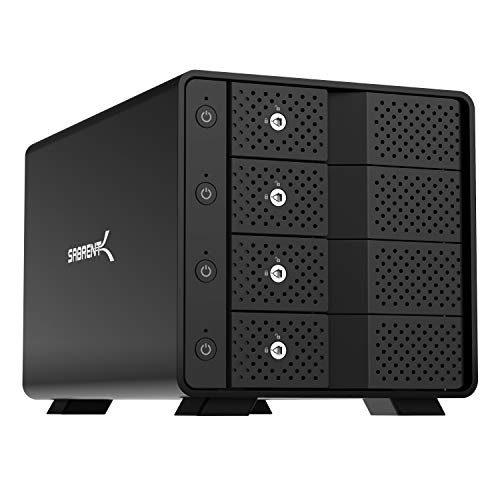
- Four independent bays over 10Gbps USB-C
- Trayless hot-swap design with per-bay switches
- Active cooling and aluminum-metal construction
Best For: Individual drive access without hardware RAID
Established RAID DAS
QNAP TR-004 4-Bay USB-C Enclosure
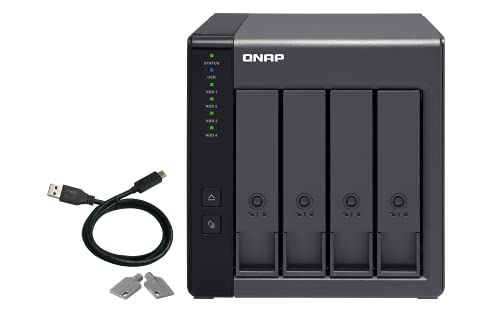
- Four bays with hardware RAID 0/1/5 and JBOD
- Works with Windows, macOS, and Linux
- Supports external storage and compatible QNAP NAS expansion
Best For: Four-drive DAS setups and QNAP users
Best Four-Bay DAS

- Four drive bays with up to 120TB total capacity
- USB 3.2 Gen 2 USB-C connection
- Hot-swappable, tool-free trays; no RAID
Best For: Four-drive USB-C storage expansion without built-in RAID
Best Compact RAID Option

- RAID 0, RAID 1, JBOD, and independent-disk modes
- USB-C 10Gbps interface with UASP support
- Two bays and up to 48TB capacity
Best For: Compact two-drive RAID storage with flexible modes
Best Five-Bay Expansion

- Five 3.5-inch bays with up to 100TB capacity
- USB-C 10Gbps connection with independent bays
- Trayless hot swap and PWM temperature-controlled cooling
Best For: Large individual-drive USB-C DAS expansion without hardware RAID
Versatile Two-Bay Value
CENMATE 2-Bay USB-C RAID Enclosure

- Four modes: RAID 0, RAID 1, Normal, and JBOD
- Supports 2.5-inch and 3.5-inch SATA drives
- USB-A/C 3.0 connectivity with up to 5Gbps transfers
Best For: Flexible two-drive desktop storage
Maximum RAID Flexibility
CENMATE 4-Bay USB-C RAID Enclosure

- Eight modes include RAID 0, 1, 3, 5, and 10
- Four bays support up to 80TB total
- USB 3.0 and eSATA connectivity included
Best For: Configurable four-drive direct-attached storage
Maximum-Capacity Pick – Yottamaster PS500RC3 5-Bay RAID Enclosure
If you need substantial direct-attached storage, this Yottamaster is one of the more capable USB C RAID enclosures in the group. Its five bays support up to 110TB total, while multiple hardware and software RAID options let you prioritize capacity, redundancy, or drive cloning.
Best For: Photographers, video editors, and home or business users managing large data collections.
Pros:
- Supports up to five SATA HDDs or SSDs and 110TB total capacity.
- Offers RAID 0/1/3/5/10, JBOD, and CLONE modes.
- Aluminum housing and temperature-controlled 80mm fan support cooling.
- Removable trays accommodate both 2.5-inch and 3.5-inch drives.
Cons:
- USB 3.1 transfer speed is limited to up to 5Gbps.
- Five-drive operation requires total drive power consumption to stay within 78W.
- New drives may need formatting and partitioning before use.
The PS500RC3 stands out when maximum bay count and flexible RAID configuration matter more than the fastest USB interface. Check your drives’ power requirements before purchasing.
Fast Two-Drive Choice – TERRAMASTER D2-320 USB RAID Enclosure
The TERRAMASTER D2-320 is a compact two-bay option for shoppers comparing USB C RAID enclosures with faster connectivity. Its USB 3.2 Gen 2 interface supports up to 10Gbps, and hardware RAID provides straightforward RAID 0, RAID 1, JBOD, and SINGLE modes.
Best For: Users who want a two-drive DAS for speed, mirrored backup, or flexible external storage.
Pros:
- USB 3.2 Gen 2 supports transfer rates up to 10Gbps.
- Supports two 3.5-inch or 2.5-inch SATA drives and up to 44TB total.
- Hardware RAID includes RAID 0, RAID 1, JBOD, and SINGLE.
- Tool-free push-lock trays simplify drive installation and removal.
Cons:
- Only two drive bays are available.
- It is a DAS rather than a NAS, so it does not provide network storage.
- Drives are not included.
Choose the D2-320 if you prefer a simple two-drive setup and want the higher 10Gbps USB interface. RAID 1 also makes it a practical choice for mirrored data protection.
Best Trayless JBOD Dock – SABRENT DS-SC4B 4-Bay USB-C Enclosure
The SABRENT DS-SC4B is useful when you want convenient individual drive access rather than a traditional RAID array. Among USB C RAID enclosures, it is important to note that this model is a JBOD DAS, not hardware RAID, with four independently connected bays and trayless hot-swapping.
Best For: Users who need simple access to multiple SATA drives, per-bay controls, and tool-free installation.
Pros:
- Provides four independent drive connections over USB 3.1 Gen 2 Type-C.
- Supports up to four 3.5-inch SATA HDDs or SSDs and up to 80TB.
- Trayless hot-swap design makes drive insertion and removal convenient.
- Aluminum-and-metal housing includes a 92mm fan for active cooling.
Cons:
- Does not provide hardware RAID.
- Drives are not included.
- Warranty is one year unless extended through registration.
The DS-SC4B is a better fit for independent drive management than for redundancy or striped performance. Its per-bay switches, activity LEDs, locking key, and Kensington slot add useful hands-on control.
Established RAID DAS – QNAP TR-004 4-Bay USB-C Enclosure
QNAP TR-004 4 Bay USB Type-C Direct Attached Storage (DAS) with hardware RAID (Diskless)
Check Price On AmazonThe QNAP TR-004 is a four-bay direct-attached storage enclosure for users comparing USB C RAID enclosures with hardware RAID support. It works with Windows, macOS, and Linux, and supports RAID 0, 1, 5, JBOD, and individual disks while remaining diskless for flexible drive selection.
Best For: Home and business users who want a four-drive USB DAS for external storage or QNAP NAS capacity expansion.
Pros:
- Four 3.5-inch SATA bays support hardware RAID 0, 1, 5, JBOD, and individual disks.
- Connects through USB Type-C and includes a USB Type-C-to-Type-A cable.
- Lockable drive bays add physical security.
- Can serve as external storage or expand the capacity of a compatible QNAP NAS.
Cons:
- USB transfer rate is listed at up to 5Gbps.
- Drives are not included.
- QNAP NAS compatibility has specific model and QTS version limitations.
The TR-004 offers a balanced four-bay RAID feature set and a two-year warranty. If you plan to connect it to a QNAP NAS, verify compatibility first because its storage pool cannot be combined with the connected NAS.
Best Four-Bay DAS – TerraMaster D4-320
If you want a high-capacity USB C RAID enclosure alternative for managing several drives from one computer, the TerraMaster D4-320 is worth considering—but note that it is a DAS, not a RAID enclosure. Its four bays provide up to 120TB of combined capacity, with USB 3.2 Gen 2 connectivity rated up to 10Gbps.
Best For: Users who need four individually accessible SATA drives, hot swapping, and broad Windows, macOS, and Linux compatibility without built-in RAID.
Pros:
- Four bays support 3.5-inch HDDs, 2.5-inch HDDs, and 2.5-inch SATA SSDs.
- USB-C 10Gbps connectivity and claimed combined read/write speeds up to 1,016 MB/s with four HDDs.
- Tool-free trays, hot swapping, and push-lock drive security simplify maintenance.
- Temperature-controlled cooling and standby noise below 21 dB(A) support quieter operation.
Cons:
- It has no RAID function, so redundancy must be handled elsewhere.
- Drives are not included.
The D4-320 is a practical choice when you want four-drive expansion over USB-C and prefer individual disk access. Choose a different model if hardware RAID is essential.
Best Compact RAID Option – MAIWO Dual-Bay RAID Enclosure
For shoppers comparing USB C RAID enclosures, the MAIWO dual-bay model offers a compact way to combine two SATA drives with selectable RAID modes. Its USB-C 10Gbps interface, aluminum case, and support for up to 48TB make it suitable for desktop or laptop storage setups.
Best For: Users who want RAID 0, RAID 1, JBOD, or independent-disk modes in a two-bay enclosure for 2.5- or 3.5-inch SATA drives.
Pros:
- Supports RAID 0, RAID 1, JBOD/LARGE, and NORMAL/PM modes.
- USB 3.1 Gen 2 USB-C connectivity provides up to 10Gbps transfer rates.
- Two bays support up to 48TB total capacity with compatible drives.
- Aluminum construction and a two-speed cooling fan help manage heat.
Cons:
- 2.5-inch drives require an additional 2.5-to-3.5-inch mounting bracket.
- New drives need initialization and formatting after selecting a RAID mode.
- The manufacturer recommends backing up data before changing RAID modes.
The MAIWO is the most directly suited option here for users who specifically need configurable RAID in a USB-C enclosure. Its two-bay design keeps the footprint modest, though careful setup is important when changing modes.
Best Five-Bay Expansion – SABRENT DS-SC5B 5-Bay DAS
The SABRENT DS-SC5B is a strong choice for buyers searching USB C RAID enclosures who actually need high-capacity multi-drive DAS expansion rather than hardware RAID. It holds five 3.5-inch SATA drives and connects them individually over one USB-C 10Gbps link.
Best For: Users who need up to five 3.5-inch drives, trayless hot swapping, per-bay control, and individually mounted disks on Windows, macOS, or Linux.
Pros:
- Five bays support up to 100TB with compatible 3.5-inch SATA HDDs or SSDs.
- Dedicated controller per bay is designed for stable, independent drive connections.
- Trayless hot swapping, per-bay power switches, activity LEDs, and a locking key add convenience.
- Temperature-controlled 120mm PWM cooling fan helps reduce unnecessary noise.
Cons:
- It is not a RAID enclosure or NAS; drives operate individually in JBOD-style access.
- Only 3.5-inch drives are supported according to the supplied specifications.
- Drives are not included.
The DS-SC5B makes sense when capacity and easy access to five separate drives matter more than RAID redundancy. Its independent-bay design and daisy-chain port add flexibility, but RAID must be configured through software or another storage solution.
Versatile Two-Bay Value – CENMATE 2-Bay USB-C RAID Enclosure
For shoppers comparing USB C RAID enclosures, this CENMATE model offers a straightforward two-drive setup with USB-A/USB-C 3.0 connectivity, tool-free installation, and four selectable modes: RAID 0, RAID 1, Normal, and JBOD. It supports 2.5-inch and 3.5-inch SATA HDDs or SSDs, with up to 20TB per drive.
Best For: Home users and small offices that need flexible two-drive external storage with basic RAID options.
Pros:
- Supports 2.5-inch and 3.5-inch SATA HDDs and SSDs.
- Offers RAID 0, RAID 1, Normal, and JBOD modes.
- Includes USB-A and USB-C 3.0 cables and supports up to 5Gbps transfers.
- Aluminum construction and a built-in 2-inch cooling fan help manage heat.
Cons:
- The fan operates at approximately 40–50 decibels, which may be noticeable.
- RAID changes require a reset procedure and may result in data loss.
- RAID software is not available for macOS according to the supplied notes.
This is a practical pick when you want a compact, broadly compatible two-bay enclosure rather than a network-attached system. Its USB 3.0 speed and limited RAID selection are best suited to everyday backups, media storage, and desktop expansion.
High-Speed Four-Bay Hub – WAVLINK 4-Bay USB-C Enclosure
Among USB C RAID enclosures, the WAVLINK stands out as a four-bay storage dock with USB 3.2 Type-C speeds up to 10Gbps, dual cooling fans, and an HDMI output. It accommodates four SATA 6Gbit/s drives and can expand storage to as much as 4x22TB, although 2.5-inch drives require separate mounting brackets.
Best For: Users who want high-capacity external storage plus USB-C expansion and an HDMI-connected workspace.
Pros:
- Four bays support 3.5-inch and 2.5-inch SATA HDDs and SSDs.
- USB 3.2 Type-C supports data rates up to 10Gbps.
- Includes HDMI output supporting up to 4K at 60Hz when the host USB-C port supports video output.
- Temperature-controlled fans activate at 48°C, and each bay has an independent power switch.
Cons:
- 2.5-inch drives need mounting brackets, which are not included.
- HDMI output depends on a compatible host USB-C video-output connection and USB-C-to-C cable.
- The supplied notes describe it as an enclosure/docking station but do not list selectable RAID modes.
Choose this WAVLINK when speed, capacity, and workstation connectivity matter more than a simple enclosure design. Its 10Gbps USB-C interface and four independent bays provide room to grow, while the HDMI feature adds useful flexibility for compatible systems.
Maximum RAID Flexibility – CENMATE 4-Bay USB-C RAID Enclosure
For buyers seeking USB C RAID enclosures with extensive hardware RAID choices, this four-bay CENMATE supports eight modes, including RAID 0, 1, 3, 5, and 10, plus CLONE, LARGE, and NORMAL. It accepts 2.5-inch and 3.5-inch SATA drives, supports up to 80TB total, and connects through USB 3.0 or eSATA.
Best For: Advanced desktop storage setups that need multiple RAID configurations and up to four installed drives.
Pros:
- Eight modes provide more configuration flexibility than a basic two-bay enclosure.
- Supports four 2.5-inch or 3.5-inch SATA HDDs or SSDs, up to 20TB per drive.
- Includes USB-A/C 3.0 and eSATA cables, with transfer speeds up to 5Gbps over USB.
- Aluminum housing and two 2-inch fans help with cooling during operation.
Cons:
- Fan noise is approximately 40–50 decibels.
- Switching RAID modes requires a manual power-off, selector, and reset procedure; changing modes can cause data loss.
- eSATA access depends on the computer supporting RAID, and hot-swapping is not supported.
This model is a strong fit for users who understand RAID configuration and want broad options in a direct-attached storage enclosure. Its 5Gbps USB limit is less ambitious than newer 10Gbps models, but the added RAID modes and 80TB capacity offer substantial flexibility.
How We Picked the Best USB C Raid Enclosures
We selected these USB-C RAID enclosures by comparing the features that matter most in real-world storage setups: bay count, supported drive sizes, RAID functionality, USB transfer speeds, cooling, maximum capacity, installation convenience, and overall flexibility. We also included both direct-attached storage (DAS) models and simpler multi-drive enclosures so shoppers can match the hardware to their workflow.
Because enclosure specifications can vary by configuration, check the manufacturer’s current documentation for supported RAID modes, drive-size limits, host-system compatibility, and included cables before buying.
Quick Comparison
| Best For | Recommended Bay Count | What to Prioritize |
|---|---|---|
| Small backups and simple drive management | 2-bay | RAID 1, quiet cooling, tool-free installation |
| Balanced capacity and redundancy | 4-bay | RAID flexibility, cooling, and 10Gbps USB-C |
| Large media libraries and expandable storage | 5-bay | High total capacity, ventilation, and stable power delivery |
Key Buying Factors for USB-C RAID Enclosures
Bay Count and Drive Compatibility
Choose a two-bay enclosure for a compact mirror or a straightforward external storage setup. Four- and five-bay models provide more capacity and allow additional RAID layouts, but they take up more space and generally require stronger cooling. Confirm that the enclosure supports both your 2.5-inch and 3.5-inch SATA drives if you plan to mix formats.
RAID Modes and Data Protection
RAID 0 can improve usable capacity and performance but provides no drive failure protection. RAID 1 mirrors data across two drives, reducing usable capacity while improving redundancy. RAID 5, RAID 10, JBOD, or spanning modes may be available on larger models. RAID is not a backup, so keep a separate copy of important files.
USB-C Speed and Host Compatibility
A 10Gbps USB-C connection can provide substantially more bandwidth than older USB standards, but actual performance depends on the enclosure, drives, cable, computer port, and RAID mode. USB-C describes the connector, not necessarily the speed, so verify the rated protocol and included cable.
Cooling, Noise, and Power
Multiple mechanical drives generate heat during sustained transfers. Look for a built-in fan, temperature-controlled cooling, ventilation, and a stable external power supply. A quieter enclosure may be preferable for a desk, while stronger active cooling is more important for continuous backups or media work.
Who Should Buy Which USB C Raid Enclosures?
Choose a Two-Bay Model If:
You need a compact enclosure for two existing drives, a mirrored backup, or a simple storage expansion. These models are usually easier to install and better suited to smaller desks and modest capacity requirements.
Choose a Four-Bay Model If:
You want the best balance of capacity, redundancy, and flexibility. Four bays are a strong choice for photographers, video editors, home offices, and users who want room to add drives later.
Choose a Five-Bay Model If:
You manage a large media collection, archive substantial files, or want maximum capacity from a desktop DAS. Prioritize cooling, reliable power, and a RAID mode that matches your backup strategy before filling every bay.