A good headphone stand does more than keep your headset upright. The right model protects the ear cups, frees desk space, and gives the cable a designated place instead of letting it trail across your workspace.
We compared 10 headphone stands with cable holders, including freestanding, clamp-on, wall-mounted, dual-headset, and feature-rich gaming designs. Use the guide below to match the stand’s storage style, stability, and extra features to your setup.
Best 10 Headphone Stands with Cable Holder Picks for 2026
Compact Desk Pick
Avantree HS102 Metal Headphone Stand
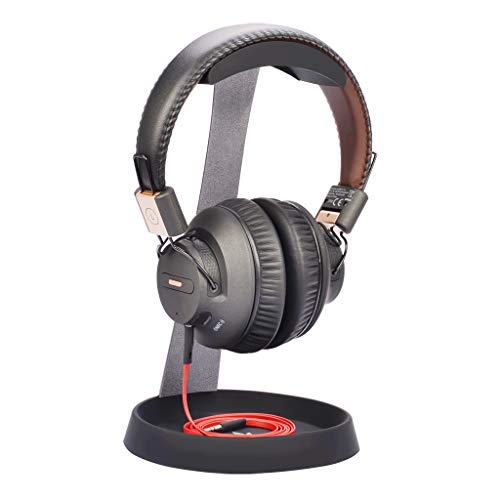
- Steel frame with silicone top pad
- Silicone cable holder also supports phones
- Space-saving tabletop design
Best For: Compact workstations and gaming desks
Premium Cable Management
Sanus Universal Headphones Stand

- Aluminum construction with silicone cradle
- Concealed cable channel under the base
- Magnetic tab keeps the cord in place
Best For: Sonos Ace owners seeking a refined desk setup
Flexible Under-Desk Option
EURPMASK Rotating Headphone Stand

- 360-degree swivel arm
- Cable clip for wired headsets
- Clamp fits desks 0.31–1.57 inches thick
Best For: Gamers and users saving desktop space
Heavy-Headphone Standout
Avantree TR902 Wood and Aluminum Stand

- Wood and aluminum construction
- Taller design for larger headphones
- Large wooden cable holder adds stability
Best For: Larger or heavier headphones
RGB Gaming Hub

- 10 RGB lighting modes with touch controls and memory
- Two USB 2.0 ports plus one USB-C port
- Non-slip, plug-and-play tabletop design
Best For: Gamers wanting lighting and convenient USB access
Under-Desk Space Saver
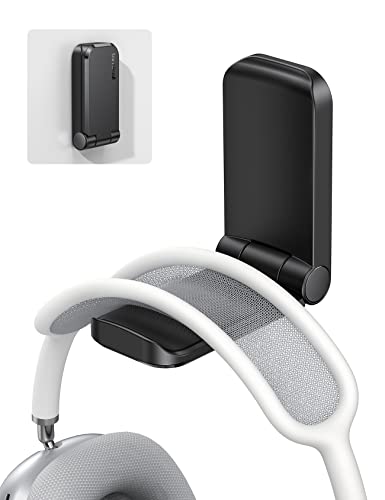
- Adhesive mount fits smooth, clean surfaces
- Foldable magnetic arm saves space
- Also holds cables and other small gadgets
Best For: Minimalist desks needing an under-desk headphone hook
All-in-One Organizer
Aluminum Headphone Stand with Drawer

- Two cable organizers reduce desktop wire clutter
- Drawer adds storage for small accessories
- Holds a headset and two controllers
Best For: Gaming desks needing comprehensive tabletop organization
Best Tall Desktop Stand
Curved Cable-Storage Headphone Holder

- 11.7-inch height keeps microphones off the desk
- Curved support helps protect headphone bands
- Base stores accessories and manages cables
Best For: Tall tabletop organization with built-in cable and accessory storage
Best 2-in-1 Desk Organizer
Acrylic Headphone and Phone Stand

- Rear organizer wraps long headphone cables
- Detachable and easy to transport
- Also holds compatible phones or tablets
Best For: Gaming desks needing headphone and mobile-device organization
Best Under-Desk Dual Holder
Rotating Clamp Headphone Hanger

- Stores two headphones with dual hooks
- Clamps to surfaces up to 39 mm thick
- Swivels 360 degrees with a cable loop
Best For: Space-saving storage for two headsets under a desk
Compact Desk Pick – Avantree HS102 Metal Headphone Stand
If you want headphone stands with cable holder functionality without taking up much desk space, the Avantree HS102 is a straightforward tabletop option. Its steel construction, silicone top pad, and lower cable holder provide a stable place for compatible headphones while helping keep a phone or headset cable organized.
Best For: Work desks, gaming setups, and users with headphones up to 4 cm wide at the headband and 25 cm tall.
Pros:
- Sturdy metal construction with a silicone top pad.
- Built-in silicone cable holder can also support a phone in several positions.
- Compact, space-saving tabletop design.
- Compatible with many major headphone brands.
Cons:
- Headphone size compatibility is limited to the listed dimensions.
- It has no fastening mechanism, so it is intended for tabletop use.
The HS102 is a practical choice when you want a simple desktop stand with cable organization and basic device protection, provided your headphones fit its size range.
Premium Cable Management – Sanus Universal Headphones Stand
The Sanus Universal Headphones Stand is a polished option among headphone stands with cable holder features, especially for Sonos Ace owners. Its aluminum build, soft silicone cradle, and concealed base channel keep headphones supported while routing excess cable out of sight.
Best For: Sonos Ace owners and users who want a premium-looking stand with concealed cable storage.
Pros:
- Designed in partnership with Sonos for the Sonos Ace.
- Soft silicone cradle helps protect headphones from scratches and creases.
- Built-in cable channel and magnetic tab help control excess cord.
- Tool-free setup includes the required hardware.
Cons:
- Its custom-molded cradle is particularly suited to Sonos Ace headphones.
- The premium aluminum design may be more than needed for a basic stand.
Choose the Sanus when tidy cable routing and a refined appearance matter as much as simply storing your headphones. It also lists compatibility with Apple AirPods Max, Sony, Bose, and other models.
Flexible Under-Desk Option – EURPMASK Rotating Headphone Stand
For shoppers seeking headphone stands with cable holder convenience while preserving desktop space, the EURPMASK uses a clamp-on design instead of a freestanding base. Its 360-degree swivel arm, cable clip, and padded clamp make it useful for gaming and office setups where headphones can be tucked away under the desk.
Best For: Users who want a removable, rotating headphone hanger for desks measuring 0.31 to 1.57 inches thick.
Pros:
- 360-degree rotating arm provides flexible headphone access.
- Built-in cable clip helps keep wired headsets organized.
- Clamp attaches without glue or permanent mounting.
- Rubber pads help protect both headphones and desk surfaces.
Cons:
- Requires a desk edge within the specified thickness range.
- Clamp-on mounting may not suit desks without an accessible edge.
The EURPMASK is a space-efficient choice for wired or wireless headphones, particularly if you value swivel adjustment and the ability to move the holder when needed.
Heavy-Headphone Standout – Avantree TR902 Wood and Aluminum Stand
The Avantree TR902 is a taller, sturdier choice among headphone stands with cable holder designs. Its wood and aluminum construction is built to support larger headphones, while the oversized wooden lower section provides cable storage and can hold a phone without scratching it.
Best For: Owners of larger or heavier headphones that fit a headband width up to 5 cm and a height up to 30.5 cm.
Pros:
- Solid aluminum alloy and wood construction.
- Taller 12-inch design accommodates larger headphones.
- Large wooden cable holder helps maintain stability.
- Lower section can hold a phone in multiple positions.
Cons:
- Larger footprint than a compact headphone stand.
- Compatibility is limited to the stated headband and height dimensions.
With its elevated profile and substantial materials, the TR902 makes sense for heavier headphones or setups where a more prominent wood-and-metal accessory fits the space.
RGB Gaming Hub – RGB USB Headset Stand
If you want headphone stands with cable holder functionality plus desk connectivity, this RGB gaming headset stand combines colorful lighting with two USB 2.0 ports and one USB-C port. Its non-slip base and plug-and-play design make it a practical addition to a gaming or office setup.
Best For: Gamers who want RGB lighting, basic device charging or data access, and a dedicated tabletop headset holder.
Pros:
- Offers 10 RGB lighting modes, including cycle, breathing, and static effects.
- Includes two USB 2.0 ports and one USB-C port for compatible devices.
- Touch controls and memory function make lighting settings convenient to manage.
- Non-slip base and universal, driver-free USB operation suit many desks.
Cons:
- The supplied notes do not specify a dedicated cable-management hook or channel.
- USB ports are listed as USB 2.0, so they may not be ideal for high-speed transfers.
This is a feature-rich choice when lighting and USB access matter as much as headset storage. Buyers specifically seeking a built-in cable holder may prefer a stand with explicitly designed cable organizers.
Under-Desk Space Saver – Adhesive Headphone Cable Hook
For compact headphone stands with cable holder versatility, the Lamicall adhesive hanger mounts under a desk and can also hold cables and other small items. Its foldable magnetic arm saves space when unused, while the rubber covering helps protect headphones from slipping and scratches.
Best For: Desks, nightstands, and other smooth surfaces where an under-surface headphone and cable hook is more useful than a freestanding stand.
Pros:
- Adhesive installation works on smooth, clean, dry, oil-free plastic, metal, wood, or glass surfaces.
- Can hold headphones, cables, hats, and other small gadgets.
- Magnetic folding design helps conserve space when the hanger is not in use.
- Soft rubber padding helps prevent slipping and scratching.
Cons:
- It should not be used on painted or whitewashed walls.
- The surface must be prepared carefully, and the hanger should remain unloaded for 24 hours after installation.
- Maximum total supported weight is 500g.
This is a strong fit for minimalist setups and cable control where floor or desktop space is limited. Its adhesive mounting makes surface compatibility and installation preparation important considerations.
All-in-One Organizer – Aluminum Headphone Stand with Drawer
Among headphone stands with cable holder features, the KDD organizer is designed for broader desktop storage. It combines an aluminum headset stand with two cable organizers, a drawer, and space for controllers, phones, tablets, or a Switch 2.
Best For: Gaming desks that need headset storage, cable organization, controller holding, and a small drawer in one tabletop accessory.
Pros:
- Two cable organizers help keep headset and controller wires tidy.
- Drawer stores chargers, remotes, pens, power banks, and other small accessories.
- Can hold one headset and two game controllers simultaneously.
- Aluminum construction and silicone pads support stability and help protect devices.
Cons:
- Requires assembly, although the supplied instructions indicate setup takes about five minutes.
- Its larger all-in-one design may take more desk space than a simple headphone hook.
- The supplied notes do not specify a weight capacity.
This is the most storage-focused option of the three, particularly for gaming stations with multiple controllers and loose accessories. Choose it when integrated organization is more important than a minimal footprint.
Best Tall Desktop Stand – Curved Cable-Storage Headphone Holder
If you want headphone stands with cable holder functionality plus room for small accessories, this desktop tower is a practical choice. Its 11.7-inch height keeps many headset microphones away from the desk, while the curved support and sturdy base are designed for everyday desktop storage.
Best For: Users who want a tall tabletop stand with cable management and accessory storage.
Pros:
- Curved support helps reduce dents and scratches from long-term hanging.
- Integrated cable spool clip helps prevent headphone cords from tangling.
- Large base includes space for items such as a Bluetooth headset case or keys.
- Built-in metal divider and sturdy base support both lightweight and heavy headphones.
Cons:
- The 11.7-inch tower design occupies more vertical space than a compact stand.
- The supplied information does not specify a maximum headphone weight.
This DC DREWCHAN stand combines a high profile with useful desktop organization. Choose it when preventing cable clutter and keeping accessories nearby matter more than having the smallest possible footprint.
Best 2-in-1 Desk Organizer – Acrylic Headphone and Phone Stand
This acrylic desktop holder is a useful option if you are comparing headphone stands with cable holder features for a gaming or work setup. It provides a roughly 10-inch hanging height, a rear cable organizer, and a separate platform intended for compatible phones or tablets.
Best For: Gamers and desk users who want headphone storage combined with a phone or tablet stand.
Pros:
- Rear cable organizer lets you wrap long headphone cords neatly.
- Detachable design is easy to install and transport.
- 2-in-1 layout helps organize headphones and compatible mobile devices in one place.
- Universal design is listed as compatible with many headphones, including Sennheiser, Sony, Bose, and Audio-Technica models.
Cons:
- The lightweight acrylic construction may be less suitable for users seeking a heavy-duty stand.
- It has one storage level, limiting how many accessories can be displayed directly on the stand.
- Phone and tablet compatibility depends on the device size and fit.
With its portable construction and dual-purpose layout, this stand is aimed at tidy gaming stations and compact desks. It is especially appealing when a cable-wrapping area and mobile-device holder are more useful than a storage base.
Best Under-Desk Dual Holder – Rotating Clamp Headphone Hanger
For desks where surface space is limited, this clamp-mounted model is one of the more flexible headphone stands with cable holder designs. It attaches beneath a desk or shelf without drilling, rotates 360 degrees, and can hold two headphones on separate hooks.
Best For: Multi-headset setups that need discreet, adjustable under-desk storage.
Pros:
- Dual hooks can store two headphones at once or split into separate hooking stations.
- Spring-loaded clamp fits desk or shelf boards up to 39 mm thick.
- 360-degree rotation allows the hooks to swing out for access or underneath the desk for discreet storage.
- Built-in cable loop helps keep cords from dragging or catching on a chair.
Cons:
- Clamp mounting is limited to surfaces within the stated 39 mm thickness range.
- Its listed capacity is up to 2 kg total, or 1 kg per hook.
- Under-desk installation provides less visible display than a tabletop stand.
This EURPMASK holder is a strong fit for shared desks, gaming stations, or anyone storing multiple headsets. Its clamp and swivel design saves desktop space, while the cable loop addresses cord clutter without requiring adhesives or drilling.
How We Picked the Best Headphone Stands with Cable Holders
We focused on the features that matter in daily use: stable construction, headset compatibility, practical cable management, desk footprint, and ease of installation. The selection includes metal, aluminum, wood, adhesive, clamp-on, and gaming-oriented designs so different workstations and budgets are represented.
We also considered how each stand handles common accessories. Some provide a simple cable hook or clip, while others add drawers, USB ports, phone storage, rotating arms, or room for two headsets. A useful stand should organize gear without making the desktop harder to use.
Quick Comparison
| Stand type | Best for | Main advantage |
|---|---|---|
| Freestanding | Most desks | Easy placement and removal |
| Clamp-on | Small or crowded desks | Uses the desk edge instead of surface area |
| Adhesive hanger | Minimal setups | Compact, low-profile storage |
| Dual headset stand | Multiple headphones | Stores two headsets in one location |
| Gaming stand with USB or RGB | Gaming stations | Adds lighting or charging convenience |
Key Buying Factors for Headphone Stands with Cable Holder
Stability and Construction
Look for a weighted base, non-slip feet, or a secure clamp. Metal and aluminum models typically offer strong long-term support, while wood can add a warmer appearance. A broad, stable cradle helps prevent the headset from tipping when you pull the cable.
Headband and Ear-Cup Protection
The contact surface should be smooth and wide enough to avoid concentrating pressure on one small area of the headband. Silicone cradles and rounded supports are useful for protecting finishes and reducing marks.
Cable Management
Check whether the holder is a hook, clip, channel, or integrated organizer. A deep cable holder is better for thick gaming or braided cables, while a simple clip may be enough for lightweight audio cables. Make sure the cable can be removed without unplugging the headset.
Desk Fit and Installation
Measure available clearance before buying. Clamp-on stands need an accessible desk edge and sufficient thickness range. Adhesive hangers require a clean, suitable surface and may be harder to reposition. Freestanding stands need more surface area but are usually the simplest option.
Extra Features
USB ports, RGB lighting, drawers, phone holders, and rotating arms can be convenient, but they should not outweigh basic stability. Prioritize the features you will actually use, especially if the stand sits beside a keyboard, monitor, or other accessories.
Who Should Buy Which Headphone Stands with Cable Holder?
Choose a freestanding metal or aluminum model if you want dependable everyday storage and straightforward setup. A wood-and-aluminum design suits buyers who want organization with a more refined desk aesthetic. Clamp-on options are best for compact desks, while an adhesive hanger works well when every inch of desktop space matters.
If you own two headsets, a dual stand prevents one from occupying a separate hook or drawer. Gamers may prefer a model with USB ports or RGB lighting, provided its base remains stable. For shared workstations or mixed accessories, a stand with a drawer or phone holder can deliver more useful storage than a basic hanger.