A good headphone stand does more than keep your headset off the desk. The right model adds convenient charging, reduces cable clutter, and gives your gaming or work setup a more organized finish.
These 10 headphone stands with charging include compact USB models, wireless charging stations, RGB-lit holders, and larger multi-device organizers. Compare their charging features, footprint, and stability to find the best fit for your setup.
Best 10 Headphone Stands with Charging Picks for 2026
Power Hub Pick
COZOO Headphone Stand with Charger

- Three USB ports plus two AC outlets
- Automatic USB charging up to 2.4 amps
- Built-in multi-protection safety features
Best For: Gamers who need a combined headphone stand and desk power hub
RGB Aluminum Pick

- Seven customizable RGB lighting modes
- USB-C and standard USB ports
- Weighted aluminum base with non-slip pads
Best For: Gaming desks that prioritize RGB style and sturdy construction
Apple Charging Station

- Charges iPhone, Apple Watch, and AirPods
- Includes an extra USB-C output
- Padded hanger and non-slip base
Best For: Apple users consolidating headphones and multiple device chargers
Budget RGB Pick

- 10 RGB lighting modes with touch control
- Two USB 2.0 ports and one USB-C port
- Lighting memory preserves the selected pattern
Best For: Gamers seeking a simple RGB stand with USB connectivity
Best Value Charging Stand
Hiwe Wireless Charging Headphone Stand

- Up to 15W wireless charging
- USB port for wired charging
- Foldable, anti-slip headphone holder
Best For: Mixed-device desks needing simple headphone storage and charging
Best for RGB Setups
New Bee RGB Charging Headphone Stand

- Seven RGB lighting modes
- Wireless charging plus three USB ports
- Stable aluminum and non-slip design
Best For: Gaming desks that want lighting and multiple charging connections
Best Multi-Device Station
Miroddi 5-in-1 Charging Headphone Stand

- Five functions in one foldable stand
- Up to 15W Qi wireless charging
- Includes 18W adapter and USB cable
Best For: Multi-device desks charging headphones, phones, earbuds, and watches
Best All-in-One Organizer
KDD RGB Charging Headphone Stand
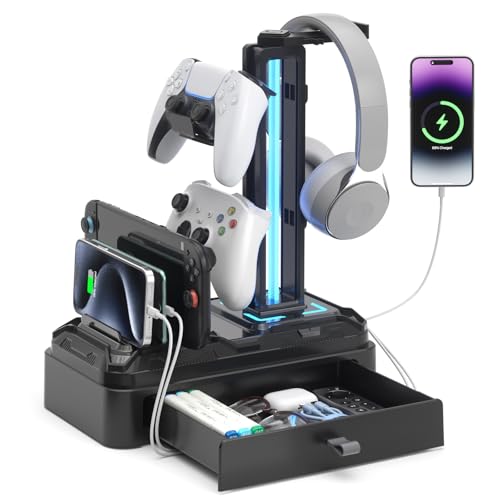
- Two USB ports plus one Type-C port
- Nine RGB modes with memory function
- Device slot, drawer, and rotating hook
Best For: Gamers seeking charging and storage together
Best Power-Station Stand
KAFRI RGB Charging Headphone Stand

- Three USB charging ports
- Two AC outlets with 1250W total output
- Nine RGB effects and safety protection
Best For: Gaming desks with multiple powered accessories
Best Dual-Headset Option

- Stores two compatible headphones
- Three USB ports and two AC outlets
- Up to 4 amps overall USB output
Best For: Shared desks and two-headset setups
Power Hub Pick – COZOO Headphone Stand with Charger
For shoppers comparing headphone stands with charging, the COZOO combines headset storage with a compact desk power hub. It includes three USB charging ports—one USB-C and two USB 3.0 ports—plus two AC outlets, making it useful for powering several accessories in one place.
Best For: Gamers and desk users who want headphone storage, USB charging, and AC outlets together.
Pros:
- Combines a headphone hanger with three USB ports and two AC outlets.
- USB charging supports automatic device detection and charging up to 2.4 amps.
- Includes protection against overload, short circuits, and over-current issues.
- Helps reduce desk clutter by consolidating storage and power functions.
Cons:
- The AC outlets have a combined 1250W rated output.
- Its larger power-hub design may be more functionality than some users need.
The COZOO is a practical choice when charging capacity matters as much as headphone storage. It is especially suited to gaming desks with multiple powered devices.
RGB Aluminum Pick – New Bee RGB Headphone Stand
The New Bee is one of the more style-focused headphone stands with charging, adding RGB lighting to a sturdy aluminum desktop holder. Its USB-C and standard USB ports support charging or data transfer, while the weighted base is designed to keep different headphone sizes secure.
Best For: Gamers who want RGB desk lighting, an aluminum build, and basic USB connectivity.
Pros:
- Offers seven RGB lighting modes for customizing a gaming setup.
- Provides both USB-C and standard USB extension ports.
- Aluminum construction, a weighted base, and silicone pads improve stability.
- TPU padding helps protect the headphone headband from scratches and deformation.
Cons:
- Wireless charging is not supported.
- The USB ports are extension ports rather than a built-in AC power solution.
This stand prioritizes appearance and physical stability while still adding useful wired connectivity. Choose it if RGB presentation and an aluminum frame matter more than extensive charging options.
Apple Charging Station – HiWe MagSafe Headphone Stand
The HiWe takes headphone stands with charging in an Apple-focused direction. Along with a universal headphone hanger, it provides MagSafe-style iPhone charging, Apple Watch charging, AirPods charging, and an extra USB-C output for wired devices.
Best For: Apple users who want to consolidate headphone storage and charging for an iPhone, Apple Watch, and AirPods.
Pros:
- Combines a headphone stand with iPhone, Apple Watch, and AirPods charging.
- Supports 7.5W iPhone, 3W Apple Watch, and 5W AirPods charging.
- Uses a padded hanger, aluminum support rod, and non-slip ABS base.
- Includes a charging-status LED, wall adapter, USB-C cable, and one-year warranty.
Cons:
- It is incompatible with Android watches and Android earbuds.
- Phone cases thicker than 5mm and phones with metal attachments or grips may interfere.
- Its charging features are designed primarily for Apple devices.
This is the most complete charging organizer in the group for users invested in Apple devices. Confirm device and case compatibility before buying, particularly if you use accessories on your phone.
Budget RGB Pick – Xergur Gaming Headset Stand
The Xergur is a straightforward option among headphone stands with charging, pairing RGB lighting with two USB 2.0 ports and one USB-C port. Its touch controls and lighting memory make it easy to personalize a gaming desk without installing drivers.
Best For: Gamers who want RGB lighting, simple USB charging, and a plug-and-play headset holder.
Pros:
- Offers 10 RGB lighting modes, including static, breathing, and color-cycle effects.
- Includes two USB 2.0 ports and one USB-C port for charging or data transfer.
- Touch controls make lighting adjustments simple.
- Lighting memory restores the selected color pattern after powering back on.
Cons:
- It uses a plastic enclosure rather than aluminum construction.
- Charging and data ports are USB-based, with no AC outlets.
- It must connect to a computer, USB charger, or another USB power source.
The Xergur is a practical fit for a gaming setup where visual effects and basic USB connectivity are the priorities. It offers more lighting modes than the New Bee, but less substantial power functionality than the COZOO.
Best Value Charging Stand – Hiwe Wireless Charging Headphone Stand
The Hiwe is a practical pick for shoppers comparing headphone stands with charging. It combines a headphone hanger, up to 15W wireless charging, and an additional USB charging port in a foldable desk-friendly design.
Best For: Desks that need a compact headset holder and convenient charging for phones, earbuds, or other USB devices.
Pros:
- Supports up to 15W wireless charging for compatible devices.
- Includes a USB charging port for wired charging accessories.
- Foldable design and anti-slip base help reduce desk clutter and movement.
- Soft leather contact surfaces help protect headphone earpads and headbands.
Cons:
- Wireless charging requires a compatible device.
- The product requires assembly before use.
The Hiwe offers a balanced mix of storage and charging without requiring separate stands and charging pads. It is especially useful for a mixed-device setup, though buyers should confirm their phone or accessory supports wireless charging.
Best for RGB Setups – New Bee RGB Charging Headphone Stand
The New Bee RGB stand is designed for gaming desks that want headphone storage, wireless charging, and extra connectivity. It adds seven lighting modes alongside two USB-C ports and one USB port.
Best For: Gaming and computer setups where RGB lighting, multiple charging connections, and a stable headset holder are priorities.
Pros:
- Offers seven RGB lighting modes, with a hold-to-toggle control.
- Combines wireless charging with two USB-C ports and one USB port.
- Aluminum construction, a silicone non-slip base, and a soft rubber headphone rest support stable storage.
- Plug-and-play compatibility is listed for Windows, Linux, and Mac systems.
Cons:
- Its 10.4-inch height and 5.98-inch width may require more desk space.
- The notes do not specify the wireless charging wattage.
Choose the New Bee if visual customization and port access matter as much as headphone storage. It is a versatile charging hub for a gaming desk, but shoppers focused primarily on charging speed may prefer a model with a stated wattage.
Best Multi-Device Station – Miroddi 5-in-1 Charging Headphone Stand
The Miroddi stands out among headphone stands with charging by combining headphone storage with phone, AirPods, iWatch, wireless, and wired USB charging. Its foldable, detachable design is aimed at reducing cable clutter across a multi-device workspace.
Best For: Apple, Samsung, and mixed-device users who want one station for headphones, a phone, earbuds, and a smartwatch.
Pros:
- Combines five functions, including headphone storage, phone charging, AirPods charging, iWatch charging, and a USB port.
- Provides up to 15W Qi wireless charging, with device-specific rates listed for phones, AirPods, and iWatch.
- Includes an independent USB charging port, an 18W QC adapter, and a USB-A-to-USB-C cable.
- U-shaped PU leather surface helps support the headband and prevent scratches.
Cons:
- Charging performance varies by device and supported charging standard.
- The multi-function design may be more than needed for a single-device setup.
The Miroddi is the most comprehensive option in this group for consolidating several charging needs. Its included power adapter and broad device compatibility make it convenient for busy desks, while single-device users may find a simpler stand more practical.
Best All-in-One Organizer – KDD RGB Charging Headphone Stand
If you want headphone stands with charging plus extra desktop storage, the KDD combines a rotating headset hook, USB charging, device storage, RGB lighting, and a drawer in one compact tower-style organizer. It is designed for gaming desks and everyday device management.
Best For: Gamers and desk users who want charging, RGB lighting, and storage in a single stand.
Pros:
- Includes two USB ports and one Type-C port for charging multiple devices.
- Offers nine lighting modes with a memory function for preferred settings.
- Combines a phone/tablet slot with a drawer for small accessories.
- 360-degree rotating hook and removable controller hook add placement flexibility.
Cons:
- The Type-C port is not compatible with iPhone charging.
- Its 11.22-inch tower height may require adequate vertical desk space.
The KDD is a feature-rich choice when organization matters as much as headphone storage. Its charging ports and built-in compartments help reduce desk clutter, while the adjustable hooks make it easier to position your gear.
Best Power-Station Stand – KAFRI RGB Charging Headphone Stand
The KAFRI is one of the more versatile headphone stands with charging because it combines a headset hanger with three USB charging ports and two AC outlets. Its RGB lighting and built-in safety features make it suited to gaming setups with several connected accessories.
Best For: Gamers who need USB charging and AC power in one desktop station.
Pros:
- Provides two USB-A ports, one USB-C port, and two AC outlets.
- Supports up to 2.4 amps per USB port according to the supplied notes.
- Offers nine RGB lighting effects with touch control.
- Includes overload, short-circuit, and over-current protection features.
Cons:
- The USB-C port is noted as incompatible with iPhone 15 charging.
- The AC outlets have a stated total output limit of 1250W.
Choose this model if your desk needs more than a place to hang headphones. The integrated outlets and charging ports can reduce cable sprawl, while the compact 9.84-inch design keeps the power station desktop-friendly.
Best Dual-Headset Option – KAFRI RGB Dual Charging Stand
For households or gaming setups with two headsets, the KAFRI dual stand offers headphone stands with charging in a shared desktop design. It holds two compatible headphones while also providing three USB ports, two AC outlets, and customizable RGB lighting.
Best For: Couples, shared gaming spaces, or users who regularly store two headsets together.
Pros:
- Holds two headphones with headbands up to 2.1 inches wide.
- Includes two USB-A ports, one USB-C port, and two AC outlets.
- Provides up to 4 amps overall across the USB charging ports.
- Uses a fire-resistant plastic shell and multi-protection circuitry.
Cons:
- Headphones must fit within the stated 2.1-inch headband-width limit.
- The supplied notes do not identify a storage drawer or device slot.
This dual model makes the most sense when one headset stand is not enough. It saves space compared with using two separate charging stations, while the outlets and USB ports support a broader gaming or entertainment setup.
How We Picked the Best Headphone Stands with Charging
We compared the selected stands by looking at the features that matter most in daily use: charging versatility, headset support, desk stability, cable management, footprint, and extra storage. Models with USB-A, USB-C, wireless charging, or multiple power outlets can suit different devices, so the best choice depends on what you need to charge alongside your headphones.
We also considered practical design details, including non-slip bases, detachable hooks, device slots, rotating hangers, RGB controls, and whether the stand is better suited to one headset or a shared gaming setup.
Quick Comparison
- Best for straightforward USB charging: Choose a compact stand with dedicated USB ports and a simple headset hanger.
- Best for wireless charging: Look for a model with a clearly positioned Qi or MagSafe-compatible charging surface.
- Best for RGB gaming setups: Select a stand offering adjustable light modes and a stable, non-slip base.
- Best for multiple devices: Consider a charging station with several USB ports, device slots, or power outlets.
- Best for two headsets: A dual-headphone stand provides shared storage without requiring two separate holders.
Key Buying Factors for Headphone Stands with Charging
Charging Compatibility and Port Layout
Check whether the stand uses USB-A, USB-C, wireless charging, or a combination. USB-C is useful for newer phones and accessories, while USB-A remains convenient for many cables. Wireless charging is particularly helpful when you want to place a compatible phone or earbuds case on the stand without connecting a cable.
Stability and Headset Protection
A wide, weighted, or rubberized base helps prevent tipping when you remove your headset. The hanger should have a smooth, adequately wide contact area so it does not create pressure marks on the headband. If your headphones are heavy, prioritize a sturdy aluminum or reinforced construction.
Size, Cable Management, and Extras
Measure the available desk space before choosing a stand. RGB lighting and extra hooks can improve organization, but they may increase the footprint. Device shelves, detachable hangers, rotating arms, and built-in outlets are valuable when you want one station to manage several accessories.
Who Should Buy Which Headphone Stands with Charging?
Choose a basic USB stand if you mainly need a reliable place to hang one headset while charging a controller, phone, or earbuds. Choose a wireless charging model if your phone or compatible accessories support Qi or MagSafe-style charging and you prefer a cleaner desk.
Choose an RGB model for a gaming desk where lighting and appearance matter, but verify that the lighting controls and power connection suit your setup. Choose a multi-port or outlet-equipped station if you regularly charge several devices at once. Finally, choose a dual stand for shared workspaces, couples, or households with two frequently used headsets.