A great podcast production console can simplify recording, mixing, sound effects, and live-stream routing in one place. That means less time fighting software and more time creating a polished show.
Below, we focus on standout options for solo creators, multi-host podcasts, hybrid studios, and video-first setups so you can find the right fit faster.
Best 10 Podcast Production Console Picks for 2026
Flagship All-in-One Console

- Four combo inputs with Revolution preamps
- APHEX processing and customizable SMART pads
- Dual USB-C plus Bluetooth and network connectivity
Best For: Podcasters and streamers wanting a powerful all-in-one console
Multi-Host Recording Mixer

- Six mic inputs with phantom power
- Six headphone outs with individual volume control
- Sound pads plus multi-track recording and Mix-Minus
Best For: Podcast teams recording interviews and managing multiple guests
Mobile Mixer-Recorder for Podcasters

- Records up to 14 tracks at 24-bit/96kHz
- Five monitor mixes with dedicated headphone outputs
- USB interface plus battery power for mobile use
Best For: Podcasters who also need a flexible live mixer and recorder
4-Host Podcast Studio Bundle
RODECaster Pro II 4-Mic Bundle

- 9-channel console with 4 mic inputs, dual USB-C, Bluetooth, and onboard wireless
- Includes 4 ZDM-1 mic packs, 4 boom arms, and 4 headphone sets
- Revolution preamps and APHEX DSP support clean, broadcast-style audio
Best For: Four-host podcasts and roundtable livestreams
Touchscreen Podcast Mixer

- Four mic inputs and four headphone outs support small podcast teams
- 14-track SD recording plus Bluetooth, USB, and Aux input
- 5-inch touchscreen and illuminated sound pads simplify live control
Best For: Small podcast teams wanting easy touch-controlled recording
Video-First Production Console

- Controls six 1080p60 video sources and mixes up to 20 audio inputs
- Includes scene presets, multiview, HDMI outputs, and live streaming support
- Bundle adds mics, headphones, arms, cables, storage, and accessories
Best For: Video podcasts and livestream studios
Compact audio-first pick
Compact podcast mixer with dual XLR inputs

- Dual XLR combo inputs with 60dB gain
- Loopback, Bluetooth, mute, and monitoring tools
- 8 sound effects plus pitch and reverb options
Best For: Creators who want a portable audio console for podcasts and streaming
Premium video-first console
All-in-one video console for podcasts
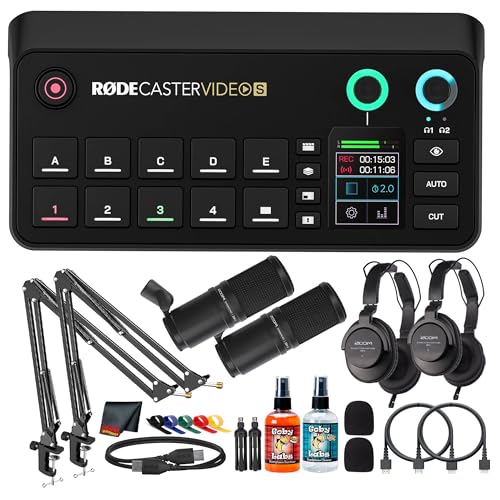
- Audio and video switching in one unit
- Up to four 1080p60 sources with HDMI, USB-C, and NDI
- 75dB gain preamps with Aphex processing
Best For: Creators who need a single console for podcast video production and live streaming
Customizable creator console
Feature-rich podcast studio console with sound pads

- 60dB gain preamps with 48V phantom power
- 11 customizable sound pads for show effects
- Supports XLR mics and 6.35mm instrument input
Best For: Podcasters and streamers who want a customizable mixer with lots of effects
Flagship All-in-One Console – RØDECaster Pro II
The RØDECaster Pro II is a strong fit if you want a podcast production console that can handle recording, streaming, and remote guests without a lot of extra gear. It combines four combo inputs, dual USB-C, Bluetooth, and onboard processing into one integrated studio designed to simplify a creator workflow.
Best For: Podcasters, streamers, and creators who want an all-in-one console with deep processing and flexible connectivity.
Pros:
- Four Neutrik combo inputs with ultra-low-noise Revolution preamps for clean mic or instrument recording
- APHEX processing plus compressor, de-esser, noise gate, EQ, and more for polished voice audio
- Eight SMART pads with 64 total actions for sound effects, voice effects, MIDI, and mixer commands
- Dual USB-C, Bluetooth, Wi-Fi, and Ethernet make it easy to connect multiple devices
Cons:
- May be more console than needed for very simple solo setups
- Advanced feature set can take time to learn fully
Overall, this is the most feature-rich option in the group for creators who want one console to do almost everything. Its strength is flexibility, with broadcast-style tools built in and enough connectivity to support complex podcasting setups.
Multi-Host Recording Mixer – Zoom PodTrak P8
The Zoom PodTrak P8 is built for podcast production console use when multiple speakers and remote guests are part of the plan. With six mic inputs, six headphone outputs, sound pads, and onboard editing tools, it focuses on practical podcast recording rather than broad studio features.
Best For: Multi-person podcast teams that need separate headphone control and straightforward recording tools.
Pros:
- Six microphone inputs with phantom power support
- Six headphone outputs with individual volume control for each participant
- Nine programmable sound pads plus multi-track recording for inputs and pads
- Automatic Mix-Minus and a dedicated phone channel help with call-in interviews
Cons:
- Fewer channel options than some larger production consoles
- Less focused on advanced music-production style features
This is a very podcast-specific mixer/recorder that keeps the workflow centered on voice sessions. If your priority is hosting interviews and managing several headphone mixes, it covers the essentials well.
Expanded Studio Podcast Console – RODECaster Pro II Bundle
This bundled version of the RODECaster Pro II works well as a podcast production console if you want the core hardware plus a few useful extras in the box. It keeps the same integrated studio approach, with four combo inputs, dual USB-C, Bluetooth, and on-board APHEX processing for polished recordings.
Best For: Creators who want the RODECaster Pro II platform with bundled accessories for quicker setup.
Pros:
- Includes the RODECaster Pro II console plus a cover, 32GB microSD card, and cloth
- Four Neutrik combo inputs and Revolution preamps support microphones and instruments
- Six physical faders plus three virtual faders give you a nine-channel mixer layout
- SMART pads, APHEX processing, and dual USB-C make it highly flexible for content creation
Cons:
- Bundle is more about convenience than different core hardware capabilities
- May be more advanced than needed for very basic podcasting
If you were already considering the Pro II, this bundle is attractive because it adds setup extras without changing the base platform. It is a clean pick for buyers who want to get started faster with fewer add-on purchases.
Mobile Mixer-Recorder for Podcasters – Zoom LiveTrak L-12
The Zoom LiveTrak L-12 is a practical podcast production console if you want multi-track recording and more traditional mixer control. It records up to 14 tracks to SD card, offers five monitor mixes, and can also function as a USB interface for working with a computer or livestream setup.
Best For: Podcasters who want a flexible mixer/recorder for studio sessions, live shows, or mobile recording.
Pros:
- Records up to 14 tracks at 24-bit/96kHz directly to SD card
- Five separate monitor mixes with dedicated headphone outputs
- -128dBu EIN preamps with up to +60dB of gain for clean input handling
- USB connectivity supports DAW recording and live streaming, with battery power for mobile use
Cons:
- Less all-in-one than dedicated podcast consoles with built-in creator features
- Designed as a mixer/recorder first, so podcast-specific shortcuts are more limited
This model stands out for users who want recording flexibility and monitor control rather than a highly automated podcast workstation. It is a solid choice when your show might expand into live performance, rehearsals, or location recording.
4-Host Podcast Studio Bundle – RODECaster Pro II 4-Mic Bundle
If you want a podcast production console that can handle a full four-person show right out of the box, this RODE bundle is built for that workflow. It combines the RODECaster Pro II with matching mics, boom arms, headphones, and cables, so you can set up a panel, interview show, or live-stream roundtable without piecing together the rest of the studio.
Best For: Four-host podcasts, roundtable streams, and broadcast-style shows that need a complete ready-to-record setup.
Pros:
- RODECaster Pro II offers 9-channel routing with 4 mic inputs, dual USB-C, Bluetooth, and onboard wireless support.
- APHEX DSP and Revolution preamps are designed to keep dynamic mics clean and broadcast-ready.
- Bundle includes 4 ZDM-1 mic packs, 4 boom arms, and 4 closed-back headphone setups for matched monitoring.
- Works with Mac, Windows, iOS, Android, and major DAWs and conferencing apps over USB-C.
Cons:
- This is a large bundle, so it may be more than solo creators or two-person shows need.
- Its strength is live production and podcasting, not being the simplest minimal interface-only option.
Overall, this is a strong all-in-one pick if you want a podcast production console that also solves the rest of the multi-host setup. It is especially practical when you need a matching, ready-to-run package rather than building a studio one piece at a time.
Touchscreen Podcast Mixer – TASCAM Mixcast 4
The TASCAM Mixcast 4 is a straightforward podcast production console for creators who want built-in mixing, recording, and sound playback without a complicated setup. With four mic inputs, a 5-inch touch screen, and onboard SD recording, it fits well in podcast studios, livestream setups, and voice-over workflows.
Best For: Podcasters and streamers who want a touch-controlled mixer with recording, sound pads, and simple multi-host operation.
Pros:
- Four XLR/TRS mic inputs and four headphone outputs support small multi-host sessions.
- 14-track recording to SD card adds flexible capture and post-production options.
- Bluetooth, USB, and Aux input help bring in phone calls, computer audio, and other sources.
- Illuminated sound pads and the included Podcast Editor add live effects and basic post-editing support.
Cons:
- It is focused on audio production, so it does not offer video switching or video-specific tools.
- The feature set is broad, but users who want the most premium console ecosystem may look elsewhere.
For creators who value touch-screen control and built-in recording, the Mixcast 4 is a practical podcast production console with a lot of everyday utility. It is especially appealing when you want easy operation, sound pads, and multi-source audio in one box.
Video-First Production Console – RODECaster Video Bundle
If your podcast production console needs to handle both audio and video, this RODECaster Video bundle is built for a more advanced live-production workflow. It combines the console with microphones, headphones, mic arms, storage, cables, and accessories, making it a strong fit for podcasts that also stream or publish visual content.
Best For: Video podcasts, livestreams, and creator studios that need integrated switching plus audio mixing.
Pros:
- Supports control of six 1080p60 video sources with scene presets, multiview, and two HDMI outputs.
- Mixes up to 20 audio inputs and includes dual combo XLR-1/4-inch inputs with Revolution Preamps.
- Built-in Wi-Fi 6, Ethernet streaming, and recording to external USB storage support flexible production workflows.
- Bundle adds headphones, microphones, mic arms, USB-C cables, and cleanup accessories for a fuller setup.
Cons:
- Its video features make it more specialized than a basic audio-only podcast console.
- The bundle is geared toward more serious production needs, so it may be more than a simple starter setup.
This is the most feature-rich option in the group if your show depends on switching video and mixing audio from the same control surface. For creators building a polished video podcast or livestream studio, it delivers a lot of production capability in one package.
Compact audio-first pick – Compact podcast mixer with dual XLR inputs
If you want a podcast production console that is easy to start with but still flexible enough for streaming and studio recording, the MAONO E2 Gen2 is built around that use case. It gives co-host setups two XLR combo inputs, 60dB of gain, Bluetooth, USB-C, and phone connectivity, so you can move between PC and smartphone workflows without extra gear.
Best For: Podcasters, streamers, and creators who want a simple all-in-one mixer with dual mic inputs and built-in effects.
Pros:
- Two XLR combo inputs with low-noise preamps and up to 60dB gain
- Loopback support, mute control, monitoring, and built-in 1500mA battery
- 8 customizable sound effect buttons plus pitch and reverb options
- Works with computers, smartphones, tablets, Mac, and Windows
Cons:
- Best suited to simpler production needs rather than multi-camera video switching
- USB microphones are not the focus of this setup
Overall, this is a practical podcast production console for creators who value portability, quick setup, and straightforward audio controls. The feature set is well matched to podcasting and streaming, especially if you want a compact interface that can handle a co-host and add some personality to the show.
Premium video-first console – All-in-one video console for podcasts
The RODE RODECaster Video S is a true podcast production console for creators who want audio mixing and video switching in one place. It supports up to four 1080p60 sources, combines touchscreen control with a rotary encoder, and adds studio-grade audio features like Revolution Preamps, phantom power, and Aphex processing for polished live production.
Best For: Podcasters and solo creators who want one console for switching video, mixing audio, and streaming live.
Pros:
- All-in-one audio and video workflow with onboard scene switching
- Supports up to four 1080p60 sources, plus HDMI, USB-C, and NDI inputs
- Revolution Preamps with up to 75dB gain and advanced Aphex processing
- Direct streaming via Wi‑Fi 6 or Ethernet, plus internal or USB recording
Cons:
- More complex and heavier than a simple audio-only mixer
- Designed for users who will actually use the video tools, not just basic podcast audio
If your workflow includes live switching, layered graphics, and multiview monitoring, this console offers a much fuller production toolkit than a standard audio interface. It is especially compelling for solo creators who want professional results without building a separate audio and video rig.
Customizable creator console – Feature-rich podcast studio console with sound pads
The MAONO AME2 is a flexible podcast production console for creators who want strong mic control, live-streaming tools, and lots of custom sound options. With XLR inputs, 48V phantom power, Bluetooth, loopback, and multiple output paths, it is built for podcasting, YouTube, TikTok live streaming, voice-over work, and instrument recording.
Best For: Podcasters and live streamers who want a customizable mixer with strong mic support and sound pads.
Pros:
- Built-in preamps with 60dB gain, 48V phantom power, and denoise support
- 11 customizable sound pads, including longer-recording options and looping
- Supports XLR microphones plus 6.35mm instrument input for guitar or bass
- Includes reverb modes, pitch changer knobs, sidechain, and loopback
Cons:
- Does not support USB microphones
- Feature set is broader than a simple beginner mixer, which may feel busy for minimal setups
For creators who want more control over tone, effects, and show branding, the AME2 brings a lot to the table in one compact unit. It stands out as a podcast production console for hybrid creators who may also record instruments or run multi-platform live sessions.
How We Picked the Best Podcast Production Console
We looked for a Podcast Production Console that balances sound quality, workflow speed, input flexibility, and ease of use. Priority went to models with dependable mic preamps, useful onboard controls, recording options, USB connectivity, and features that help creators work without a steep learning curve.
We also considered whether each unit suits real-world podcasting needs such as remote guests, sound pads, multitrack recording, livestreaming, and expansion for growing setups.
Quick Comparison
If you want the simplest all-in-one experience, choose a console built around onboard recording and easy routing. If you host interviews or panels, look for more XLR inputs and reliable multitrack capture. Creators who publish both audio and video should prioritize a Podcast Production Console with video switching or strong streaming integration.
Key Buying Factors for a Podcast Production Console
Inputs and Expandability
Check how many XLR inputs you need now, not just how many look impressive on paper. Solo hosts may only need one or two, while roundtable shows and studio teams benefit from four or more. If your format may grow, leave room for expansion.
Recording and Routing
Look for multitrack recording if you want cleaner editing later. Loopback, mix-minus, Bluetooth, and direct-to-card recording can make remote interviews and livestreaming much easier. These features are especially valuable in a Podcast Production Console used for hybrid content.
Workflow and Controls
Faders, touchscreens, sound pads, and scene controls should match how hands-on you want to be. A more tactile layout speeds up live use, while software-heavy systems may offer deeper control but require more setup.
Audio and Monitoring
Good headphone monitoring, low-noise preamps, phantom power, and clear metering all matter. If you use condenser microphones or work in louder environments, these details can affect both convenience and final sound quality.
Who Should Buy Which Podcast Production Console?
Solo creators: Choose a compact model with easy recording and minimal setup.
Interview and panel hosts: Pick a console with multiple XLR inputs and multitrack capture.
Livestreamers: Prioritize loopback, routing flexibility, and fast controls.
Video podcasters: Look for a Podcast Production Console with integrated video switching or strong USB connectivity.
Growing studios: Focus on expandability, durable hardware, and workflow tools that can scale with your production needs.