If your podcast setup keeps growing, a patch bay can make your studio far easier to manage. It helps you reroute microphones, interfaces, processors, and monitoring gear without constantly reaching behind racks and desks.
Below, we’ve focused on practical options for podcast creators who want cleaner signal management, faster workflow changes, and less cable wear in daily use.
Best 10 Patch Bays for Podcasting Picks for 2026
Flexible Studio Routing
Behringer PX3000 48-Point Balanced Patchbay

- 48-point balanced TRS layout
- Selectable Parallel, Half-normalled, Normalled, and Open modes
- Rugged build for long life
Best For: Podcasters who want flexible balanced routing and cleaner cabling
XLR Mic Hub
Black Lion Audio PBR XLR Patchbay

- 16-point patchbay with 32 gold-plated XLR connectors
- Easy-patch design for quick routing
- Aluminum housing for a sturdy build
Best For: Podcast studios built around XLR microphones
Balanced 1/4-Inch Routing
Samson S-Patch Plus 48-Point Balanced 1/4 Inch Patch Bay

- 48-point fully balanced 1/4-inch layout
- Front-panel switches for Normalled, Half-normalled, or Thru
- 1U rackmount design
Best For: Podcasters who want balanced 1/4-inch routing in a compact rack unit
TRS Routing Pro
Black Lion Audio PBR TRS3 48-Point TRS Patchbay

- 48-point TRS patchbay with 96 gold-plated connectors
- 3-way mode switch for flexible routing
- Works with guitars, microphones, speakers, and computers
Best For: Mixed-gear podcast studios needing dense TRS routing
Rack-Ready XLR Hub

- 32 XLR connectors for balanced routing
- 1U rack-mount design with shielded steel enclosure
- Reversible rack ears for flexible installation
Best For: Podcasters needing a rack-mount XLR patch bay
High-Capacity Balanced Router
Art Pro Audio P48-48 Point Balanced Patch Bay

- 48-point balanced XLR patch bay
- Fully shielded 19-inch rack design
- Helps organize cables and reduce connector wear
Best For: Larger podcast studios with multiple balanced audio connections
Compact 12-Point Option
Hosa PDR-369 12-Point XLR Balanced Patchbay

- 12-point reversible XLR patchbay
- Compact option for smaller setups
- Balanced design for simple routing
Best For: Small podcasting rigs that only need basic XLR routing
Balanced 8-Point Patch Bay
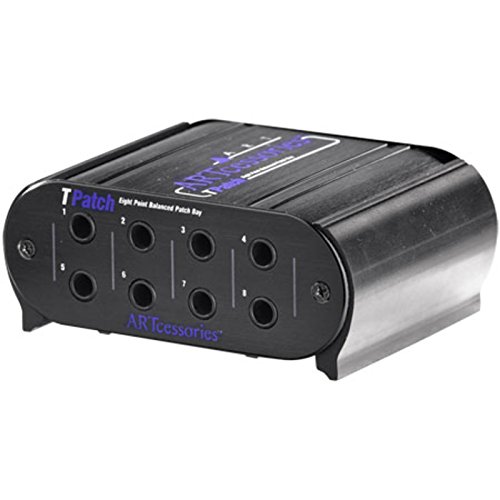
- Eight balanced points for direct routing
- Four linked input/output pairs
- Rugged extruded aluminum case
Best For: Balanced line-level routing in compact podcast studios
Compact XLR Patch Module

- 3-point balanced XLR design
- Gold-plated contacts
- Rolled-steel chassis
Best For: Small XLR-balanced routing needs
Modular 16-Channel XLR Patch Panel

- Factory-assembled modular blocks
- Configurable from 4 to 16 channels
- Full-steel chassis with reversible rack ears
Best For: Expandable XLR patching in larger podcast studios
Flexible Studio Routing – Behringer PX3000 48-Point Balanced Patchbay
Behringer ULTRAPATCH PRO PX3000 Multi-Functional 48-Point 3-Mode Balanced Patchbay
Check Price On AmazonIf you want patch bays for podcasting that make your rack easier to manage, the Behringer Ultrapatch Pro PX3000 is built around flexible signal routing. Its 48-point balanced layout and selectable Parallel, Half-normalled, Normalled, and Open modes give you plenty of control when organizing interfaces, mixers, and outboard gear.
Best For: Podcasters and home-studio users who need a flexible, balanced patchbay with multiple routing options.
Pros:
- 48-point balanced patchbay helps reduce cable clutter in a studio setup.
- Each channel can be switched between Parallel, Half-normalled, Normalled, and Open modes.
- High-quality components and rugged construction are made for long-term use.
Cons:
- It uses TRS-based connections, so it is best suited to balanced gear.
- It may be more patchbay than a very simple podcast desk needs.
The PX3000 is a practical choice if you want a central routing point with more configuration freedom than a basic pass-through panel. It is especially appealing when you want cleaner cabling without giving up routing control.
XLR Mic Hub – Black Lion Audio PBR XLR Patchbay
For patch bays for podcasting centered on microphones and XLR hardware, the Black Lion Audio PBR XLR Patchbay keeps routing simple. It offers a 16-point layout with 32 gold-plated XLR connectors, giving you a straightforward way to patch mic lines or studio connections without reaching behind gear.
Best For: Podcast studios that rely on XLR microphones and want easy front-panel access.
Pros:
- 16-point patchbay with 32 gold-plated XLR connectors.
- Designed for audio signal routing in recording and live sound studios.
- Easy-patch design helps simplify frequent connection changes.
- Aluminum outer material keeps the unit compact and sturdy.
Cons:
- It is XLR-focused, so it is not the right fit for TRS-heavy setups.
- Fewer points than larger patchbays if you need lots of routing density.
This model makes the most sense when your podcast workflow is built around microphones and XLR paths. If you want an uncomplicated patch point for mic routing, it delivers exactly that.
Balanced 1/4-Inch Routing – Samson S-Patch Plus 48-Point Balanced 1/4 Inch Patch Bay
Samson S-Patch Plus Balanced 48-Point 1/4" Patch Bay | 1/4 Inch Phone Connections
Check Price On AmazonIf you are comparing patch bays for podcasting and want a central place to manage balanced gear, the Samson S-Patch Plus is a solid rackmount option. It gives you 48 front and 48 rear 1/4-inch connections, plus toggle-switch routing modes that help you reconfigure a studio without constantly reaching behind equipment.
Best For: Podcast creators who need a rackmount balanced patchbay with straightforward switching options.
Pros:
- 48-point fully balanced design with 1/4-inch phone connections.
- Front-panel toggle switches allow Normalled, Half-normalled, or Thru operation.
- 1U rackmount format helps keep the setup compact.
- Solid construction and clean signal path are suited to studio use.
Cons:
- It is built for 1/4-inch balanced connections, not XLR mic routing.
- Its configuration options may be more than a basic podcast chain requires.
The S-Patch Plus is a good fit when your podcast workflow includes multiple balanced devices and you want the convenience of front-panel access. It balances flexibility with a simple rack-friendly layout.
TRS Routing Pro – Black Lion Audio PBR TRS3 48-Point TRS Patchbay
For patch bays for podcasting that need broad compatibility, the Black Lion Audio PBR TRS3 Patchbay is built around a 48-point, 96-connector TRS design. Its 3-way mode switch and support for devices like guitars, microphones, speakers, and computers make it a practical routing center for larger audio setups.
Best For: Podcasters with mixed studio gear who want a high-density TRS patchbay with flexible routing modes.
Pros:
- 48-point patchbay with 96 gold-plated TRS connectors.
- 3-way mode switch adds routing flexibility.
- Compatible with guitars, microphones, personal computers, speakers, and XLR gear.
- Supports up to 192 kHz sample rate.
Cons:
- It is TRS-focused, so XLR-only workflows may not be its main strength.
- More capable than a simple podcast-only patch solution.
The PBR TRS3 is a strong option when your podcast studio includes several types of audio equipment and you want one central patch point. It is especially useful if you value density and routing flexibility in the same unit.
Rack-Ready XLR Hub – ART P16 XLR Balanced Patchbay
If you want a straightforward patch bay for podcasting, the ART P16 gives you 16 front and 16 rear XLR connections in a 1U rack space. Its fully shielded steel enclosure and PCB wiring make it a practical choice for keeping mic and interface connections organized in a compact studio setup.
Best For: Podcasters who want a rack-mount XLR patch bay with plenty of balanced connections.
Pros:
- 32 XLR connectors provide a lot of routing options for a podcast rig.
- 19-inch 1U rack format fits neatly into standard studio setups.
- Fully shielded black steel enclosure is built for organized cable management.
- Reversible rack ears add flexibility for installation.
Cons:
- Designed specifically around XLR connections, so it is not a general-purpose patch bay.
- May be more capacity than a very small podcast setup needs.
Overall, the P16 is a solid rack-mounted option when your podcasting workflow centers on balanced XLR gear and you want cleaner, more durable connections.
High-Capacity Balanced Router – Art Pro Audio P48-48 Point Balanced Patch Bay
The Art Pro Audio P48 is a 48-point balanced patch bay built to organize cable-heavy setups, which can be useful in podcasting studios with multiple microphones, mixers, and other audio gear. Its fully shielded 19-inch rack design is aimed at reducing connector wear while keeping routing tidy.
Best For: Podcast studios that need a high-density balanced XLR patch bay for larger audio rigs.
Pros:
- 48-point layout offers a lot of routing capacity in one rack unit.
- Fully shielded design helps keep connections organized.
- Intended to save wear and tear on audio connectors.
- Works in professional or home recording studios, plus live sound and AV setups.
Cons:
- Its larger capacity may be unnecessary for simple podcast setups.
- Built around XLR connectivity, so it is specialized rather than universal.
If your podcasting setup has grown into a multi-device workflow, this patch bay offers a lot of balanced connection points in a studio-friendly rack format.
Compact 12-Point Option – Hosa PDR-369 12-Point XLR Balanced Patchbay
For podcasting setups that only need a simple way to manage XLR routing, the Hosa PDR-369 keeps things compact with a reversible 12-point design. It is a balanced XLR patchbay, so it suits studios that want an easy, no-frills way to tidy up basic mic connections.
Best For: Small podcasting setups that need a compact XLR patch bay.
Pros:
- 12-point layout keeps the footprint modest.
- Reversible design adds flexibility for setup.
- Balanced XLR format suits basic podcast audio routing.
Cons:
- Limited to 12 points, so it is less scalable than larger models.
- Supplied notes provide fewer build and feature details than the other options.
This is the simplest pick in the group, making it a practical choice when you want a compact patch bay for podcasting without overcommitting to a bigger rack solution.
Balanced 8-Point Patch Bay – Art Pro Audio TPatch
If you need patch bays for podcasting that stay simple and dependable, the Art Pro Audio TPatch is a straightforward balanced option for routing direct signals in a studio rack. Its eight points, four linked input/output pairs, and switchable half-normal or normal modes make it useful for cleaning up signal flow without adding much complexity.
Best For: Podcast creators and small studios that want a compact balanced patch bay for direct signal routing.
Pros:
- Eight balanced points for direct signal routing
- Four linked input/output pairs for organized connections
- Switchable half-normal and normal modes
- Rugged extruded aluminum case
Cons:
- Limited to 8 channels
- Uses 1/4-inch TRS phone jack connectors, so it is not an XLR patch bay
Overall, this is a practical rackmount-style choice if your podcasting setup is built around balanced line-level gear and you want a durable way to manage patching.
Compact XLR Patch Module – Hosa MXL-369
For patch bays for podcasting that rely on XLR gear, the Hosa MXL-369 offers a simple 3-point balanced module built for professional audio routing. It uses XLR connectors, gold-plated contacts, and a rolled-steel chassis, making it a compact way to handle a small number of balanced connections.
Best For: Podcasters and audio setups needing a small XLR-balanced patch module for professional routing.
Pros:
- 3-point balanced XLR patchbay design
- Gold-plated contacts for the connection points
- Rolled-steel chassis for durability
- Limited lifetime warranty
Cons:
- Only three points, so it is very limited in capacity
- Best suited to XLR-based setups rather than TRS routing
This module makes the most sense when you only need a small XLR patch point and prefer a tough, no-frills piece of hardware for studio or live-sound use.
Modular 16-Channel XLR Patch Panel – AA AUDIO ACCESSORY AP16
If you want patch bays for podcasting with more room to grow, the AA AUDIO ACCESSORY AP16 is a 16-channel XLR balanced patch panel built around modular blocks. It arrives factory-assembled in four independent 4-channel sections, so you can configure 4, 8, 12, or 16 channels without cutting PCBs or making risky modifications.
Best For: Larger podcast studios and audio workflows that need flexible, modular XLR patching.
Pros:
- Factory-assembled modular blocks with no PCB cutting required
- Configurable for 4, 8, 12, or 16 channels
- 24K gold-plated XLR pins
- Full-steel chassis with reversible rack ears
Cons:
- More patch capacity than many small podcast setups need
- Designed specifically around XLR routing, not TRS connections
For podcasters building a more advanced rack, this panel stands out for its modular layout, strong build, and flexible installation options.
How We Picked These Patch Bays for Podcasting
For this roundup, we prioritized Patch Bays for Podcasting that fit real-world studio workflows: balanced connections, solid build quality, sensible channel counts, and straightforward routing. We also looked for models that suit both compact creator setups and larger multi-mic or outboard-heavy studios.
Because podcast studios vary widely, we favored versatility over niche features. That means the best choice is not always the highest channel count; it’s the one that matches your gear, cabling standard, and how often you change routing.
Quick Comparison
As you compare options, first decide whether you need XLR, TRS, or a mix of both. XLR patch bays are common for mic and balanced audio lines, while TRS bays are often better for line-level routing and outboard gear. A smaller bay can be perfect for a lean voice-only studio, while a 48-point model makes more sense if you patch multiple mics, processors, and monitor paths.
Key Buying Factors for Patch Bays for Podcasting
Connection Type
Choose the connector format that matches your signal chain. If your setup is mostly microphones and balanced studio lines, XLR may be the simplest choice. If you regularly patch interfaces, compressors, preamps, or mixers, TRS can be more flexible.
Balanced Vs. Unbalanced Routing
For podcasting, balanced routing is usually preferred because it helps reduce noise and interference, especially in studios with longer cable runs or multiple powered devices. If your studio is small and simple, this still matters, but it becomes even more important as your setup expands.
Normaling Options
Some patch bays support different normaling modes, which determine whether signals pass through by default or only when patched. This can be useful if you want your default recording path to stay connected while still allowing quick overrides.
Channel Count and Layout
Pick a count that leaves room to grow. Too few points can force a replacement later, while too many may be unnecessary if you only patch a handful of sources. Make sure the front-panel layout is easy to read and access during sessions.
Who Should Buy Which Patch Bays for Podcasting?
If you run a small solo or two-host podcast, a compact XLR patch bay may be enough. If you use outboard processing, multiple interfaces, or regularly reconfigure your studio, a larger balanced TRS or multi-mode bay will save time and reduce cable handling. For hybrid creators, the best choice is usually the model that matches your most common signal path first, then leaves a little room for expansion.
In short, the best Patch Bays for Podcasting are the ones that match your workflow, not just your gear list. Prioritize clean routing, balanced connections, and a channel count that supports how you actually produce.