Choosing the right nearfield studio monitors can make a huge difference in how accurately you hear your music, edits, and mixes. The best models balance clarity, compact size, and low listening fatigue.
In this roundup, we focus on desktop-friendly options that suit creators, gamers, and everyday listeners who want precise sound without needing a large room.
Best 10 Nearfield Studio Monitors Picks for 2026
Compact Desktop Starter
PreSonus Eris 3.5 Powered Monitors

- 50W powered pair with clean, distortion-free output
- 3.5-inch woofers plus silk-dome tweeters
- TRS, RCA, aux, and headphone connections
Best For: Desktop producers and casual users needing compact nearfield monitors
Ultra-Nearfield Imaging Pick
Kali Audio LP-UNF Monitor System

- 160W desktop monitor pair with 4.5-inch woofers
- 3D imaging waveguide and boundary EQ
- USB, TRS, RCA, and Bluetooth connectivity
Best For: Desktop users who want precise imaging and flexible connections
Mid-Size Mixing Upgrade
PreSonus Eris E5 Near Field Monitors
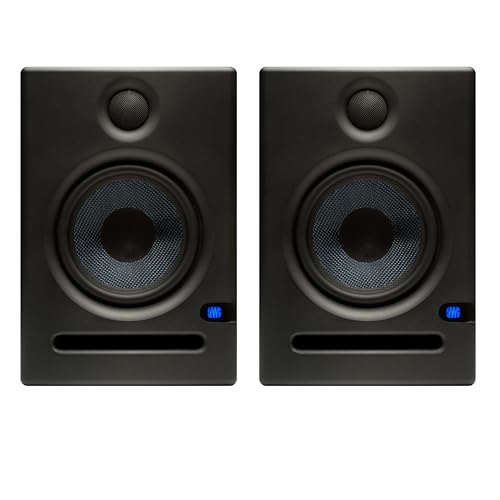
- 5.25-inch woofers for stronger low-end support
- 80W Class AB bi-amplification with good headroom
- XLR, 1/4-inch, and RCA inputs with tuning controls
Best For: Producers needing a bigger nearfield setup for mixing and monitoring
Premium Desktop Detail
ADAM Audio D3V Active Monitors

- USB-C desktop monitor pair with balanced TRS inputs
- D-ART tweeter for detailed, unfatiguing highs
- Passive radiators extend low end to 45 Hz
Best For: Creators wanting premium compact nearfield monitors for desktop use
Compact Reference Pick
PreSonus Eris E4.5 Near Field Studio Monitor Pair

- 4.5-inch woven-composite woofers for tight bass
- 1-inch silk-dome tweeters for wide imaging
- 50W Class AB dual amp with TRS, RCA, and aux inputs
Best For: Desktop producers and listeners who need a compact, flexible monitor pair
Smallest Yamaha Choice
Yamaha HS3 Powered Studio Monitor Pair

- 3.5-inch two-way powered speakers for small desks
- Room control and high-trim response controls
- XLR/TRS, RCA, and stereo mini inputs included
Best For: Tight studio spaces and buyers who want a very compact Yamaha pair
Bigger Desktop Upgrade
PreSonus Eris E5 5.25-Inch Near Field Studio Monitor

- 5.25-inch woofer for solid low-end with less distortion
- 80W Class AB bi-amplification for more headroom
- Balanced XLR/1/4-inch and unbalanced RCA inputs
Best For: Home-studio users who want a fuller-sounding nearfield monitor
Budget-Friendly Nearfield Monitoring
Edifier MR3 Powered Studio Monitor Speakers

- Hi-Res Audio certified with a 52Hz to 40kHz response.
- Balanced TRS, RCA, AUX, Bluetooth, and headphone output.
- Monitor, Music, and Custom modes with app EQ control.
Best For: Home studios, video editing, and everyday nearfield listening
Classic KRK Nearfield Choice
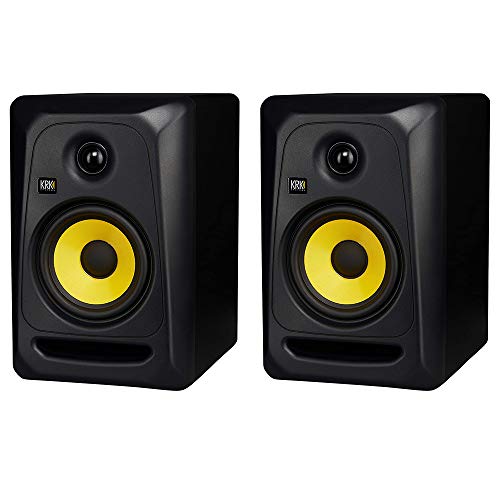
- 5-inch bi-amped monitor with soft-dome tweeter.
- High/low controls and flat low-frequency adjustment.
- KRK Bass Boost option for added low-end lift.
Best For: Music production and studio applications
Compact Reference Monitor Pair
Edifier MR4 Powered Studio Monitors
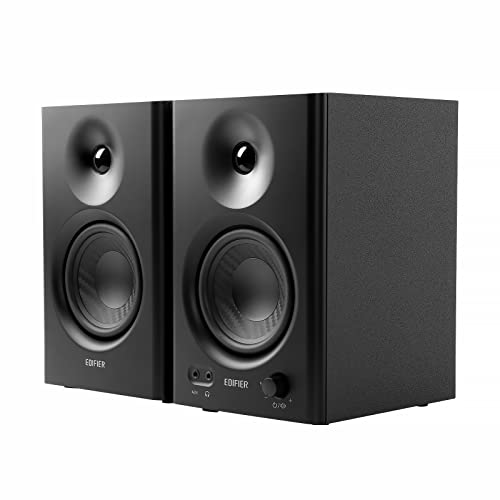
- Professionally tuned almost-flat response for reference use.
- TRS, RCA, AUX, and front headphone output.
- Monitor mode, music mode, and separate tone controls.
Best For: Professional music production, recording, and desktop use
Compact Desktop Starter – PreSonus Eris 3.5 Powered Monitors
If you want nearfield studio monitors for a small desk setup, the PreSonus Eris 3.5 pair offers true stereo monitoring with a straightforward feature set. The 50W amp, 3.5-inch woven-composite woofers, and silk-dome tweeters are built for clear, balanced everyday listening as well as production work.
Best For: Desktop producers, gamers, and listeners who need compact nearfield monitors with simple room tuning.
Pros:
- 50W built-in amplification provides clean, distortion-free output.
- 3.5-inch woofers and 1-inch silk-dome tweeters aim for tight lows and smooth highs.
- High- and low-frequency tuning controls help tailor sound to the room.
- Balanced TRS, RCA, front aux, and headphone jack make desk hookup easy.
Cons:
- 3.5-inch drivers are best suited to compact spaces rather than bigger rooms.
- Lowest bass extension is limited compared with larger nearfield monitors.
Overall, this is a practical entry-point option if you need versatile nearfield studio monitors that fit neatly on a desk and connect to nearly anything. It emphasizes convenience and tuning flexibility over outright low-end output.
Ultra-Nearfield Imaging Pick – Kali Audio LP-UNF Monitor System
The Kali Audio LP-UNF is designed as an ultra-nearfield monitor system for desktop listening, mixing, and monitoring. Its 4.5-inch woofers, 1-inch tweeter, 160W output, and 3D imaging waveguide focus on precise desktop playback with flexible wired and Bluetooth connectivity.
Best For: Users who want a desktop nearfield monitor system with strong imaging, broad connectivity, and lots of output.
Pros:
- 160W maximum output gives the pair plenty of headroom for desktop use.
- 3D imaging waveguide is aimed at more precise stereo placement.
- Bluetooth, USB, RCA, and 1/4-inch TRS inputs support many setups.
- Boundary EQ and touch volume control add convenience for desk placement.
Cons:
- More feature-rich than basic monitors, so it may be more than some casual users need.
- Its desktop-focused design is less about traditional larger-room monitoring.
For nearfield studio monitors on a desk, this model stands out for connectivity and imaging tools rather than simplicity. It is a strong fit if you want a modern ultra-nearfield system that can handle monitoring, listening, and streaming in one package.
Mid-Size Mixing Upgrade – PreSonus Eris E5 Near Field Monitors
The PreSonus Eris E5 pair is a step up for buyers who want nearfield studio monitors with more size and headroom. With 5.25-inch woven-composite woofers, a silk-dome tweeter, 80W Class AB bi-amplification, and a front-firing port, these speakers are built to help mixes translate more reliably.
Best For: Producers who want a larger desktop or small-room monitoring setup with stronger low-end support.
Pros:
- 5.25-inch woofers provide more low-end weight than smaller desktop monitors.
- 80W Class AB amplification adds solid volume and headroom.
- Balanced XLR and 1/4-inch plus RCA inputs offer broad wired compatibility.
- Acoustic tuning controls help adapt the sound to your room.
Cons:
- Still a nearfield design, so it is not intended for filling large rooms.
- More desk space is required than compact 3.5-inch monitor pairs.
This pair makes sense if you like the idea of nearfield studio monitors but want a more substantial speaker than entry-level desktop models. The larger woofer and extra power give it a clearer path for mixing work and critical listening.
Premium Desktop Detail – ADAM Audio D3V Active Monitors
The ADAM Audio D3V brings a more premium take on nearfield studio monitors to a compact desktop format. It pairs 3.5-inch aluminum woofers, dual-sided passive radiators, and a 1.5-inch D-ART tweeter with USB-C and balanced TRS support for focused desktop production and listening.
Best For: Songwriters, producers, and gamers who want compact desktop monitors with detailed highs and flexible input options.
Pros:
- D-ART tweeter is designed for precise, unfatiguing high-frequency reproduction.
- Passive radiators help the compact pair extend down to 45 Hz.
- USB-C plus balanced 1/4-inch inputs make desktop connection simple.
- Includes angled stands and a front headphone jack for convenience.
Cons:
- Compact size limits the scale you would expect from larger nearfield monitors.
- USB-C is built in, but other connections are concentrated on the left speaker.
If you want nearfield studio monitors with a polished desktop-first design, the D3V is a compelling choice. It focuses on clean detail, practical placement tools, and a setup that works well for long listening sessions.
Compact Reference Pick – PreSonus Eris E4.5 Near Field Studio Monitor Pair
If you want nearfield studio monitors that stay compact without giving up useful detail, the PreSonus Eris E4.5 is a practical place to start. This pair is designed for accurate everyday listening, music production, and multimedia reference, with enough low-end weight to make desktop setups feel fuller.
Best For: Desktop producers, casual mixers, and listeners who want a small monitor with balanced sound and flexible inputs.
Pros:
- 4.5-inch woven-composite woofers are tuned for tight, clear bass.
- 1-inch silk-dome tweeters help create a wide listening sweet spot and strong stereo imaging.
- 50W Class AB dual amplification provides solid output for nearfield use.
- Front-panel headphone output and multiple rear/front input options add convenience.
Cons:
- Compact cabinets limit deep low-end compared with larger monitors.
- Best results depend on using the high- and low-frequency tuning controls for your room.
Overall, the Eris E4.5 is a versatile nearfield monitor pair for smaller spaces where accuracy, easy connectivity, and a controlled footprint matter more than maximum bass extension.
Smallest Yamaha Choice – Yamaha HS3 Powered Studio Monitor Pair
The Yamaha HS3 is a compact option for nearfield studio monitors when desk space is tight and you still want a true studio-monitor layout. With a 3.5-inch woofer, 0.75-inch dome tweeter, and room-control features, this pair is aimed at straightforward studio monitoring and recording setups.
Best For: Small desks, home studios, and users who want Yamaha monitoring in a very compact format.
Pros:
- Very compact 3.5-inch two-way design fits small tabletop setups.
- Room control and high-trim response controls help tailor the sound.
- XLR/TRS combo, RCA, and stereo mini inputs support common studio and consumer gear.
- Anti-slip pads and cables are included in the box.
Cons:
- 3.5-inch woofer and 70 Hz low-end rating limit bass extension.
- 26W and above output is modest compared with larger nearfield monitors.
In practice, the HS3 makes the most sense if you value compact size and basic tuning controls over bigger output or deeper bass. It is a sensible nearfield pick for tight rooms and simple studio-monitoring needs.
Bigger Desktop Upgrade – PreSonus Eris E5 5.25-Inch Near Field Studio Monitor
The PreSonus Eris E5 is a stronger nearfield studio monitor option when you want more headroom and a larger woofer than a typical compact desktop speaker. Its 5.25-inch woven-composite woofer, 1-inch silk-dome tweeter, and 80W Class AB bi-amplification are built for monitoring work where cleaner low-end and balanced output matter.
Best For: Producers and home-studio users who want a more robust nearfield monitor with extra headroom.
Pros:
- 5.25-inch woofer delivers solid low-end sound with minimal bass distortion.
- 80W Class AB bi-amplification provides plenty of volume and headroom.
- Balanced XLR and 1/4-inch inputs plus unbalanced RCA inputs offer flexible connectivity.
- Acoustic tuning controls and a front-firing port help you adapt the sound to your room.
Cons:
- Larger size may be less convenient for very small desks.
- Like most nearfield monitors, it still benefits from room tuning to sound its best.
For users stepping up from entry-level desktop speakers, the Eris E5 offers a more authoritative monitor presentation without losing the practical connectivity and tuning features that make nearfield setups easier to use.
Budget-Friendly Nearfield Monitoring – Edifier MR3 Powered Studio Monitor Speakers
If you want nearfield studio monitors that can handle both creative work and everyday listening, the Edifier MR3 is a practical all-rounder. It offers Hi-Res Audio certification, a flat response from 52Hz to 40kHz, and flexible inputs that make it easy to connect a desktop, laptop, mixer, or mobile device.
Best For: Home studios, video editing, guitar practice, and listeners who want a monitor-style speaker with broad connectivity.
Pros:
- Hi-Res Audio certified with a flat 52Hz to 40kHz response for more precise monitoring.
- Balanced TRS, RCA, AUX, Bluetooth, and headphone output cover a wide range of setups.
- Monitor, Music, and Custom modes plus app-based EQ give you useful tuning options.
- MDF cabinet design helps reduce distortion for nearfield listening and creative work.
Cons:
- 18W x 2 RMS output is modest compared with larger studio monitors.
- Best suited to nearfield use rather than filling a large room.
The MR3 is a sensible pick if you need nearfield studio monitors that stay versatile without getting overly complicated. Its strength is the combination of accurate-tuned playback, modern connectivity, and easy mode switching.
Classic KRK Nearfield Choice – KRK Classic 5 Studio Monitors
The KRK Classic 5 is aimed squarely at nearfield studio monitors users who want a familiar 5-inch reference format with flexible voicing controls. It combines a soft-dome tweeter, a lightweight glass-aramid woofer, and a bi-amped class A/B design to support detailed mixing in a desktop setup.
Best For: Music production and studio applications where you want adjustable tone controls and a traditional 5-inch monitor size.
Pros:
- High/low-frequency controls let you contour the sound for your room and taste.
- Soft-dome tweeter and waveguide are designed for smooth highs up to 35kHz.
- Glass-aramid composite woofer aims for clear mids and tight bass.
- Flat low-frequency adjustment and optional KRK Bass Boost add setup flexibility.
Cons:
- Requires corded power and is built for tabletop studio placement.
- Connectivity details are limited to auxiliary in the supplied notes.
For buyers comparing nearfield studio monitors in the 5-inch class, the Classic 5 stands out for its tuning flexibility and proven studio-focused design. It is best if you want to shape the response around your room rather than rely on a fixed sound profile.
Compact Reference Monitor Pair – Edifier MR4 Powered Studio Monitors
The Edifier MR4 is a straightforward option for buyers seeking nearfield studio monitors with a more reference-style tuning. It uses a 1-inch silk dome tweeter and a 4-inch composite woofer, plus balanced TRS, RCA, AUX, and front headphone output for a practical desktop or studio setup.
Best For: Professional music production, studio recording, and personal computer use in a compact nearfield setup.
Pros:
- Professionally tuned almost-flat curve is designed for more accurate listening.
- Balanced TRS, RCA, AUX, and front headphone output make hookup easy.
- Monitor mode and music mode let you switch between reference and casual listening.
- Separate high and low frequency knobs offer direct on-speaker control.
Cons:
- 4-inch design is better for nearfield use than larger-room listening.
- Wired-only subwoofer connectivity and corded power limit placement flexibility.
The MR4 makes a lot of sense if you want nearfield studio monitors that balance accuracy and convenience. Its dual-mode design and simple controls make it easy to adapt to both production work and everyday desktop listening.
How We Picked the Best Nearfield Studio Monitors
We prioritized models that are practical for close-range listening, with a focus on tonal balance, connectivity, desktop footprint, and overall value. Because Nearfield Studio Monitors are typically used in small rooms or on a desk, we gave extra weight to speakers that remain clear and controlled at short distances.
We also looked at driver size, tuning philosophy, input options, and whether each model makes sense for music production, multimedia use, or both.
Quick Comparison: What Matters Most
If you want the simplest shortcut, think in terms of room size and use case. Smaller monitors are easier to place on desks and in tight spaces, while larger models can deliver more low-end extension but may need better positioning and room treatment. Some pairs are tuned more neutrally for mixing, while others lean toward a more enjoyable everyday listening sound.
Key Buying Factors for Nearfield Studio Monitors
Size and Placement
In close-range setups, placement matters as much as the speaker itself. A smaller cabinet can be ideal for compact desks, but don’t ignore stand height, isolation, and the listening triangle. Good placement often improves clarity more than spending more on a bigger driver.
Sound Signature
For production, look for a balanced response with clear mids and controlled bass. If you also want these monitors for casual listening, a slightly more forgiving sound can be easier to enjoy for long sessions. The right choice depends on whether you value accuracy or a more engaging presentation.
Connectivity and Workflow
Check whether you need balanced TRS/XLR inputs, USB-C, Bluetooth, or simple analog connections. Creators with audio interfaces usually benefit from balanced input options, while desktop users may prefer plug-and-play convenience.
Power and Low-End Extension
More power does not automatically mean better sound, but it can help with headroom and cleaner playback. Larger woofers often reach deeper into the bass, though that can be less important than tight, well-defined low end in a small room.
Who Should Buy Which Nearfield Studio Monitors?
Buy compact Nearfield Studio Monitors if you need a small footprint for editing, gaming, or general desktop use. Choose mid-size monitors if you want a stronger mix reference and fuller bass without stepping up to large studio speakers. If you work on music seriously, prioritize neutral tuning and balanced inputs. If convenience matters more, look for models with Bluetooth or USB connectivity.
For most buyers, the best choice comes down to room size, listening distance, and whether the monitors will be used mainly for production or everyday entertainment. Matching those priorities will lead you to a setup that sounds better and works better day to day.