The best MIDI controllers for Ableton make it faster to play instruments, trigger clips, shape effects, and control mixes without relying on a mouse. The right choice depends on whether you prioritize keys, pads, hands-on mixing, portability, or an integrated Ableton workflow.
We’ve selected 10 options ranging from compact beginner controllers to sophisticated performance-focused hardware, so you can match your setup, budget, and production style to the features that matter most.
Best 10 Midi Controllers for Ableton Picks for 2026
Best Compact Keyboard

- 25 velocity-sensitive mini keys and eight MPC pads
- Eight assignable knobs plus pitch/modulation control
- Includes arpeggiator and production software
Best For: Compact beat-making and home production setups
Best Standalone Option

- Standalone groovebox with battery, speaker, and microphone
- 32 pads with velocity sensitivity and polyphonic aftertouch
- Includes Ableton Live 12 Intro and wireless integration
Best For: Portable, computer-free Ableton production and performance
Best Ableton Clip Controller

- 40 RGB pads launch clips with visual feedback
- 25 velocity-sensitive mini keys for melodic parts
- Pre-mapped Ableton control with eight assignable knobs
Best For: Live clip launching and compact Ableton performance
Best Mixing Control Surface

- Slim USB surface for compact desktop setups
- Supports Ableton Live and other major DAWs
- Adds track and control-surface functions
Best For: Supplementary Ableton mixing and track management
Expressive Pad Pick

- 16 velocity- and pressure-sensitive RGB pads
- Includes Ableton Live Lite and Studio One Artist
- 20 buttons and four rotary encoders
Best For: Expressive beat making and sample performance
Advanced Ableton Workstation
Ableton Push 3 Desktop Controller

- 64 MPE-enabled pads with XY sensing
- Built-in audio interface and ADAT expansion
- MIDI and CV/gate connectivity
Best For: Expressive Ableton performance and hardware integration
Compact Clip-Launching Choice

- 64 RGB pads for Ableton clip launching
- Eight assignable faders plus a master fader
- USB-powered with Ableton Live Lite included
Best For: Compact live looping and hands-on Ableton mixing
Best Ableton Performance Mixer

- 5x8 RGB clip-launch matrix
- 9 faders and 8 control knobs
- Assignable crossfader for live mixing
Best For: Ableton users needing comprehensive clip and mixer control
Best Compact Clip Launcher
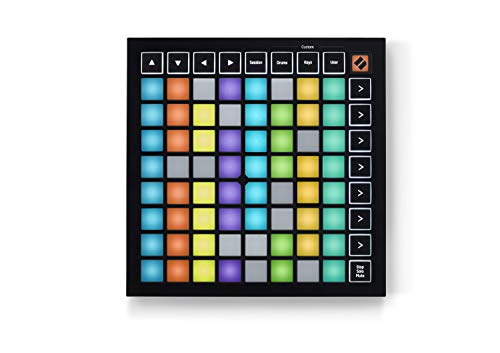
- 64 RGB performance pads
- Ableton clip and scene launching
- Compact USB-C bus-powered design
Best For: Portable Ableton performances centered on clip launching
Best Portable Pad-and-Knob Controller

- 8 RGB MPC-style drum pads
- 8 assignable Q-Link knobs
- Four programmable mapping presets
Best For: Mobile beat making and compact Ableton production setups
Best Compact Keyboard – Akai MPK Mini MK3
The Akai MPK Mini MK3 is a practical choice for producers seeking compact midi controllers for ableton. Its 25 velocity-sensitive mini keys, MPC-style pads, assignable knobs, arpeggiator, and pitch/modulation thumbstick cover both melodic and beat-making duties in a small, USB-powered design.
Best For: Home producers, beat makers, and mobile setups that need keys, pads, and plugin control in one compact controller.
Pros:
- Combines 25 velocity-sensitive keys with eight MPC-style pads.
- Eight 360-degree knobs support plugin, mixing, and synth control.
- Includes an arpeggiator, pitch/modulation thumbstick, software, and sound content.
Cons:
- Mini keys provide less playing space than a full-size keyboard.
- USB connection means it requires a compatible computer or USB device.
The MPK Mini MK3 is a well-rounded entry point when portability and varied control matter more than a large keyboard. It is especially versatile for sketching melodies, programming drums, and adjusting virtual instruments in Ableton.
Best Standalone Option – Ableton Move
The Ableton Move takes a different approach to midi controllers for ableton by functioning as a standalone instrument and groovebox. Its rechargeable battery, built-in speaker and microphone, 32 pads, sequencer, sampling tools, and included Live 12 Intro support music creation without requiring a computer.
Best For: Portable creators who want to sketch, sample, sequence, and perform away from a computer while retaining wireless Ableton integration.
Pros:
- Works untethered with a battery, speaker, microphone, and built-in processor.
- 32 pads offer velocity sensitivity and polyphonic aftertouch.
- Supports sampling, slicing, effects, audio tracks, and Ableton Live control.
Cons:
- Four flexible tracks may be limiting for larger arrangements.
- Live 12 Intro has limited tracks, instruments, and effects.
Move is more than a conventional controller: it is a self-contained music-making system with a direct Ableton workflow. Choose it when portability, sampling, and hands-on beat creation are higher priorities than a traditional keyboard layout.
Best Ableton Clip Controller – Akai APC Key 25 MK2
The Akai APC Key 25 MK2 is designed specifically for Ableton users who want keyboard playing and clip launching together. As one of the more focused midi controllers for ableton, it pairs 25 velocity-sensitive mini keys with a 40-pad RGB matrix, eight knobs, and pre-mapped Live integration.
Best For: Ableton Live performers and producers who need direct clip, scene, instrument, and macro control from a single USB controller.
Pros:
- 40 RGB pads provide visual feedback for launching clips and scenes.
- 25 velocity-sensitive keys cover chords, basslines, and synth parts.
- Eight knobs support track controls, effects sends, automation, and device macros.
Cons:
- Its two-octave mini keyboard is less suitable for broad-range playing.
- It is primarily a computer-connected controller rather than a standalone instrument.
With 1:1 Ableton mapping and a clip-launching grid, the APC Key 25 MK2 is a strong fit for session-based workflows and live performance. It makes the most sense for users who value Ableton-specific control over a larger keyboard.
Best Mixing Control Surface – Korg nanoKONTROL2
The Korg nanoKONTROL2 is a slim USB control surface for Ableton users who already have a keyboard or pad controller. Rather than supplying playable keys, it focuses on compact track-management controls, including support for select software parameters and eight-channel mixing functions.
Best For: Producers who want a low-profile companion controller for mute, track selection, marker navigation, and DAW mixing tasks.
Pros:
- Low-profile design fits easily beside a laptop or other controller.
- Supports Ableton Live and numerous other software titles.
- Adds dedicated control-surface functionality without taking much desk space.
Cons:
- It does not provide traditional keys or playable drum pads.
- Its control set is more specialized than an all-in-one MIDI keyboard.
The nanoKONTROL2 is best viewed as a focused mixing and navigation companion, not a complete music-production keyboard. It is a sensible addition for an Ableton desk that needs extra physical control over tracks and software parameters.
Expressive Pad Pick – PreSonus ATOM
The PreSonus ATOM is a compact, expressive option for anyone comparing MIDI controllers for Ableton. Its 16 full-size RGB pads support velocity and pressure sensitivity, while assignable buttons and rotary encoders provide hands-on control for samples, loops, effects, and virtual instruments.
Best For: Beat makers, sample-based producers, and performers who want expressive pads with broad software compatibility.
Pros:
- 16 velocity- and pressure-sensitive RGB pads with eight assignable pad banks.
- Includes Ableton Live Lite, Studio One Artist, and the Studio Magic Plug-In Suite.
- Offers 20 assignable buttons, four endless rotary encoders, and customizable pad response.
Cons:
- It is a pad controller rather than a traditional keyboard controller.
- Advanced features and some modes are application dependent.
With USB connectivity and support for Windows, Mac, iOS, and Android, the ATOM is a flexible entry point for hands-on Ableton control. Choose it when expressive pad performance matters more than faders or a full piano-style keybed.
Advanced Ableton Workstation – Ableton Push 3 Desktop Controller
The Ableton Push 3 is designed for deep, hands-on control of Ableton Live on a computer. Its 64 MPE-enabled pads support multidimensional playing, while the built-in audio interface, ADAT connectivity, MIDI, and CV/gate features make it a substantial centerpiece for an electronic music setup.
Best For: Ableton Live users who want expressive MPE performance, integrated recording, and connections for external instruments.
Pros:
- 64 MPE-enabled pads with XY sensing for expressive touch control.
- Built-in audio interface with two inputs and two balanced outputs.
- Supports ADAT optical expansion, MIDI connections, and CV/gate control.
- Ableton Live Intro is included.
Cons:
- The tethered version requires connection to a computer running Ableton Live.
- Its 15-inch-square footprint and 11.53-pound weight make it less portable than compact controllers.
- Its advanced connectivity may be more than a simple clip-launching setup requires.
Push 3 is a powerful choice among MIDI controllers for Ableton when expressive playing and hardware integration are priorities. It is best suited to users building a central workstation rather than seeking a basic, lightweight controller.
Compact Clip-Launching Choice – Akai APC Mini MK2
The Akai APC Mini MK2 focuses on direct Ableton Live clip launching and mixer control in a compact USB-powered format. Its 8×8 RGB pad matrix provides visual feedback for clips, while eight assignable faders plus a master fader support hands-on mixing and device control.
Best For: Live performers, loop-based producers, and home-studio users who want compact clip launching with integrated faders.
Pros:
- 64 RGB pads offer visual feedback for launching clips, loops, vocals, and samples.
- Eight assignable faders and one master fader provide practical mixer control.
- Pre-mapped 1:1 integration with Ableton Live 11.2.7 and later.
- Includes Ableton Live Lite and requires no separate power adapter.
Cons:
- It is focused on Ableton clip launching and fader control rather than piano-style playing.
- USB connectivity is required for operation.
For shoppers seeking MIDI controllers for Ableton that are portable and performance-oriented, the APC Mini MK2 offers a straightforward layout. Its combination of RGB pads, faders, and Drum and Note modes makes it particularly practical for clip-based workflows.
Best Ableton Performance Mixer – APC40 MKII
If you want hands-on control over clips, mixer levels, instruments, and effects, the Akai Professional APC40 MKII is one of the more complete MIDI controllers for Ableton. Its 5×8 RGB clip-launch matrix, channel faders, knobs, and crossfader are designed for live performance and production.
Best For: Ableton Live users who want an all-in-one controller for clip launching, mixing, and live performance.
Pros:
- Provides 1:1 Ableton Live mapping with a 5×8 RGB clip-launch grid.
- Includes 9 channel faders, 8 control knobs, and 8 device controls.
- Assignable A/B crossfader supports dynamic DJ-style mixing.
- USB-powered and includes Ableton Live Lite plus additional software downloads.
Cons:
- Its larger control layout is less portable than a compact pad controller.
- Designed primarily around Ableton Live rather than broad standalone use.
The APC40 MKII is a strong choice when tactile mixing and clip control matter more than minimal size. It offers extensive Ableton-focused controls without requiring an external power adapter.
Best Compact Clip Launcher – Launchpad Mini MK3
The Novation Launchpad Mini MK3 focuses on fast, visual clip and scene launching in a compact format. For musicians comparing MIDI controllers for Ableton, its 64 RGB pads mirror the session and provide dedicated Stop, Solo, and Mute controls.
Best For: Ableton Live performers who prioritize portable clip launching and clear visual feedback.
Pros:
- Offers 64 RGB pads that reflect clips and their status in Ableton Live.
- Dedicated Stop, Solo, and Mute controls add practical performance access.
- Three Custom Modes allow user mappings for other MIDI functions.
- USB-C, bus-powered design is slim, lightweight, and travel-friendly.
Cons:
- Does not provide the faders and extensive mixer controls found on larger controllers.
- Its pad-focused layout may be limiting for users seeking detailed instrument or effect control.
The Launchpad Mini MK3 is a sensible space-saving choice for launching clips and scenes. Its compact design and RGB feedback make it especially useful for mobile setups and performance-oriented Ableton sessions.
Best Portable Pad-and-Knob Controller – LPD8 MK2
The Akai Professional LPD8 MK2 combines eight responsive RGB drum pads with eight assignable Q-Link knobs in a compact, laptop-friendly design. Among MIDI controllers for Ableton, it suits producers who need basic beat triggering and tactile parameter control without a full-size controller.
Best For: Mobile producers and beat makers who want compact pad triggering plus assignable DAW controls.
Pros:
- Includes 8 RGB-backlit MPC-style pads for samples, loops, and virtual instruments.
- Eight assignable knobs provide hands-on control of DAW, instrument, and effect parameters.
- Four programmable preset slots support quick mapping recall.
- USB-powered plug-and-play operation works with Ableton Live and other popular DAWs.
Cons:
- Only eight pads are available, so it offers less clip-launching space than a grid controller.
- Its compact layout has fewer dedicated Ableton controls and no built-in faders.
The LPD8 MK2 is best viewed as a portable production companion rather than a complete Ableton performance surface. It delivers useful pad and knob control in a slim package that can fit alongside a laptop.
How We Picked the Best Midi Controllers for Ableton
We focused on controllers with practical Ableton Live compatibility, useful hands-on controls, and a clear role in a home studio, mobile rig, or live setup. The selection includes keyboards for playing software instruments, pad and grid controllers for clip launching, compact mixers for parameter control, and workstation-style hardware for more independent performance.
We also considered portability, control layout, connectivity, included software, expandability, and how approachable each device is for beginners. Because no single controller suits every Ableton user, the list covers different workflows rather than ranking products on size or feature count alone.
Quick Comparison
| Controller type | Best suited to | Main advantage |
|---|---|---|
| Mini keyboard | Melodies, bass lines, and portable production | Compact keys with performance controls |
| Pad or grid controller | Clip launching, drums, and live performance | Hands-on visual triggering |
| Control surface | Mixing and automation | Dedicated knobs, faders, and transport controls |
| Integrated workstation | Advanced performance and standalone use | Deeper hardware-based control |
Key Buying Factors for Midi Controllers for Ableton
Choose the Right Control Layout
Keyboard controllers are the most flexible choice for playing virtual instruments, while pad grids are better for launching clips, sequencing drums, and performing rhythmic parts. A control surface with knobs or faders can be more useful than keys if your workflow centers on mixing, effects, and automation.
Check Ableton Integration
Look for clear mapping support, clip-launching layouts, transport controls, and templates designed for Live. Dedicated integration can reduce setup time, but standard MIDI mapping is still valuable when you want to customize controls across instruments and effects.
Consider Size and Connectivity
Measure your desk or performance space before buying. Compact models suit laptops and travel, while larger controllers provide more simultaneous access. Check USB requirements, power options, MIDI connections, audio interfaces, and whether the controller depends on a computer or can operate independently.
Think About Your Experience Level
Beginners often benefit from a simple layout and bundled software. Experienced users may prefer deeper customization, more controls, velocity-sensitive pads, aftertouch, or a controller that can anchor a full live-performance setup.
Who Should Buy Which Midi Controllers for Ableton?
Choose a compact keyboard if you mainly play synths, bass, and sampled instruments. Select a pad or grid controller if launching clips and performing drums are your priorities. A knob-and-fader control surface is the better fit for mixing and detailed automation. If you want the most self-contained performance experience and can accept a higher cost, an integrated Ableton-focused workstation offers the broadest control.
For uncertain buyers, start with the workflow you use most rather than the longest feature list. A focused controller that stays within reach is usually more useful than a larger device with controls you rarely touch.