A headphone stand with a USB hub can do more than keep your headset off the desk. The right model adds accessible ports, charging convenience, RGB lighting, or useful features such as a headset hook and mouse bungee.
We selected 10 options for different desk setups and budgets, with attention to port layouts, stability, connectivity, and everyday usability. Use the guide below to narrow down the best fit before you buy.
Best 10 Headphone Stands with USB Hub Picks for 2026
Best All-in-One Gaming Pick
Tilted Nation RGB Headset Stand

- RGB headset holder with two USB 2.0 ports
- Built-in mouse bungee for cable control
- Weighted, non-slip base for stability
Best For: Gaming desks needing USB expansion and mouse management
Best for Extra USB Ports

- Three USB 2.0 ports for desk accessories
- Built-in 3.5mm AUX audio connection
- Weighted base with multicolor RGB modes
Best For: Desks that need extra USB and AUX access
Best Power-Strip Combo

- Two AC outlets plus three USB charging ports
- Nine RGB lighting modes
- Aluminum holder with non-slip silicone base
Best For: Charging devices and organizing a gaming or work desk
Best USB-C Option

- USB-C and standard USB extension ports
- Seven RGB lighting modes
- Stable aluminum design with padded headphone rest
Best For: Modern desks needing USB-C and USB-A access
Best Storage Pick
KDD RGB Charging Headphone Stand
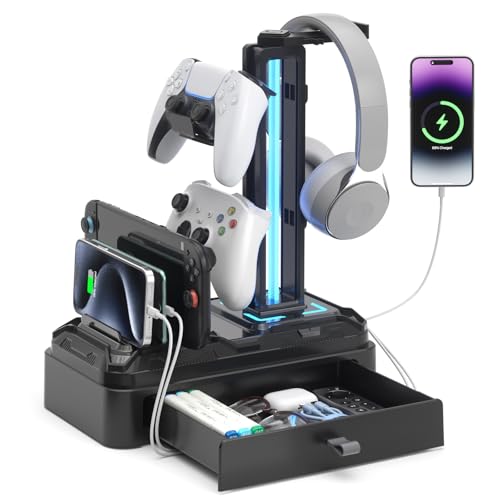
- Two USB ports plus one USB-C charging port
- Drawer and device slot reduce desktop clutter
- Rotating and detachable hooks add flexibility
Best For: Gamers needing charging and built-in accessory storage
Best Connectivity Pick
MARVO RGB USB Hub Headphone Stand

- Three USB 2.0 ports, USB-C, and 3.5mm audio
- Weighted base supports stable tabletop use
- Nine lighting modes and 24-month warranty
Best For: Gamers who need multiple peripheral connections
Best Charging Flexibility

- Wireless charging plus two USB-C and one USB port
- Aluminum body with protective rubber headset rest
- Seven lighting modes and broad headset compatibility
Best For: Users prioritizing wireless and wired charging options
Best RGB Desk Organizer
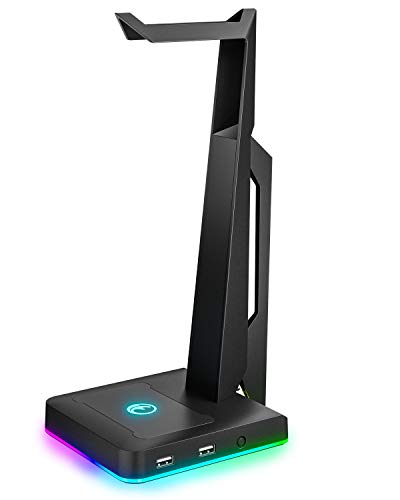
- Two USB 2.0 ports for data and power
- Three RGB lighting modes
- Weighted anti-slip base
Best For: Gaming and productivity desks needing two USB ports
Best USB-C RGB Stand
Xergur 3-Port Gaming Headset Stand

- Two USB 2.0 ports plus one USB-C port
- 10 RGB lighting modes with touch control
- Memory function saves the lighting pattern
Best For: Gamers wanting USB-C access and customizable lighting
Best Cable-Management Pick
KAFRI Single-Port RGB Headphone Stand

- Compact design for less desk clutter
- Nine RGB lighting modes with touch control
- Rear hook organizes the included USB cable
Best For: Small gaming desks needing one USB port and cable storage
Best All-in-One Gaming Pick – Tilted Nation RGB Headset Stand
If you want headphone stands with USB hub functionality plus better cable control, this Tilted Nation model combines an RGB headset holder, two USB 2.0 ports, and a built-in mouse bungee. Its weighted, non-slip base is designed to stay steady during gaming.
Best For: Gamers who want a compact stand with RGB lighting, USB accessories, and mouse-cable management.
Pros:
- Combines a headset stand, two-port USB 2.0 hub, and mouse bungee.
- Weighted base and non-slip grips help prevent tipping.
- Offers dynamic or static RGB lighting modes.
Cons:
- USB ports are USB 2.0 rather than a faster standard.
- The headset is not included.
This is a practical choice for a gaming desk that needs several functions in one slim-profile accessory, especially if a wired mouse is part of your setup.
Best for Extra USB Ports – PHNIXGAM RGB Headphone Stand
Among headphone stands with USB hub features, the PHNIXGAM model stands out with three USB 2.0 ports and a 3.5mm AUX connection. It also adds RGB lighting and a weighted metal-block base for a stable desktop setup.
Best For: Users who need several USB 2.0 connections and a convenient wired audio port beside their headphones.
Pros:
- Provides three USB 2.0 ports for devices such as mice, keyboards, and flash drives.
- Includes a 3.5mm AUX port and supports 7.1 surround sound headsets.
- Features two RGB base modes and a single-color breathing light on the frame.
- Metal blocks and anti-slip rubber mats improve stability.
Cons:
- USB connectivity is limited to USB 2.0 speeds.
- It is powered through a USB cable, so it requires an available USB connection.
Choose this stand if port count and built-in audio access matter more than having a mouse bungee or power-strip functionality.
Best Power-Strip Combo – COZOO RGB Headphone Stand
The COZOO combines a headset holder with two AC outlets and three USB charging ports, making it one of the more versatile headphone stands with USB hub-style functionality. Its RGB lighting and aluminum construction add desk appeal while helping organize charging equipment.
Best For: Gamers and home-office users who want headset storage alongside AC power and USB charging.
Pros:
- Includes two AC outlets and three USB charging ports.
- USB charging supports up to 2.4 amps per port and 4 amps overall, according to the supplied specifications.
- Offers nine RGB lighting modes.
- Aluminum construction and a silicone non-slip base support stability.
Cons:
- Its power-strip design takes up more desk space than a basic headset stand.
- The supplied notes describe charging ports rather than a data hub for peripherals.
This is the strongest fit when charging and outlet access are priorities, but shoppers seeking USB data connections for a keyboard or mouse may prefer a dedicated USB hub design.
Best USB-C Option – New Bee RGB Headphone Stand
This New Bee model is a streamlined choice among headphone stands with USB hub functionality, offering both USB-C and standard USB ports. It adds seven RGB lighting modes, a weighted aluminum base, and a TPU-covered rest designed to protect the headphone headband.
Best For: Users who want a stable RGB stand with both USB-C and USB-A connectivity.
Pros:
- Includes one USB-C port and one standard USB port for charging or file transfers.
- Supports plug-and-play use with Windows, Linux, and Mac systems.
- Aluminum construction, a weighted base, and silicone pads help prevent slipping.
- TPU rubber padding helps protect the headphone headband from scratches and deformation.
Cons:
- It has only two extension ports.
- Wireless charging is not supported.
With modern USB-C connectivity and a relatively focused design, this stand suits users who need occasional device access without adding a larger power-strip unit to the desk.
Best Storage Pick – KDD RGB Charging Headphone Stand
The KDD is a practical choice among headphone stands with usb hub features, combining two USB ports and one USB-C charging port with a device slot, drawer, and RGB lighting. Its rotating headphone hook and detachable controller hook help keep a gaming desk organized.
Best For: Gamers who want charging, headset storage, and small-item organization in one desktop stand.
Pros:
- Includes two USB ports and one USB-C charging port for powering multiple devices.
- Provides a phone/tablet slot and drawer for accessories such as pens, game cards, or Bluetooth headphones.
- Offers nine lighting modes, memory functionality, and a 360-degree rotating hook.
- Rubber-protected hooks and six bottom pads help protect devices and stabilize the stand.
Cons:
- The USB-C port is not compatible with iPhone charging.
- The stand has a relatively large tower-style footprint.
Choose this model if desk organization matters as much as charging. The drawer and device slot give it more storage utility than a basic headset hanger, while the detachable hook adds flexibility for controller storage.
Best Connectivity Pick – MARVO RGB USB Hub Headphone Stand
The MARVO stands out among headphone stands with usb hub designs by offering three USB 2.0 ports, one USB-C port, and a 3.5mm audio jack. It is designed as a plug-and-play desktop hub for connecting peripherals such as keyboards, webcams, and headsets.
Best For: PC and console gamers who want extra USB connectivity and a convenient audio jack at their desk.
Pros:
- Combines three USB 2.0 ports, one USB-C port, and one 3.5mm jack.
- Supports connections for keyboards, headsets, webcams, and other peripherals.
- Weighted base and silicone non-slip pad improve stability.
- Includes nine lighting modes and a 24-month manufacturer warranty.
Cons:
- The supplied notes do not specify USB-C charging performance.
- Its plastic enclosure may feel less premium than an aluminum stand.
This is the strongest fit when data and peripheral access are more important than storage features. Its large base and broad port selection make it a useful central connection point for a gaming setup.
Best Charging Flexibility – New Bee RGB Headphone Stand
The New Bee combines headphone storage with wireless charging plus two USB-C ports and one USB port. For shoppers comparing headphone stands with usb hub functionality, its aluminum construction, seven light modes, and broad headset compatibility make it a versatile desk accessory.
Best For: Users who want wireless charging and multiple wired charging or file-transfer connections in a compact stand.
Pros:
- Supports wireless charging and includes two USB-C ports plus one USB port.
- Aluminum construction, silicone base padding, and a soft rubber headphone rest improve stability and protection.
- Fits all headset sizes according to the supplied product notes.
- Offers seven lighting modes and a 36-month customer-service warranty.
Cons:
- The notes do not specify the wireless charging wattage.
- It has fewer lighting modes than the KDD and MARVO models.
Consider this stand if wireless charging is a priority. It offers a balanced mix of headset protection, wired ports, and device charging without adding a drawer or extra controller hook.
Best RGB Desk Organizer – IFYOO 2-Port Headphone Stand
If you want headphone stands with USB hub functionality and a colorful gaming aesthetic, the IFYOO combines a tabletop headphone holder with two USB 2.0 ports. Its weighted, rubberized base is designed to keep headphones accessible while helping protect them from desk scratches.
Best For: Gaming or productivity setups that need two convenient USB ports and customizable RGB lighting.
Pros:
- Two USB 2.0 ports support data transfer and power.
- Three RGB lighting modes, including rainbow, breathing, and static colors.
- Weighted base and anti-slip rubberized mat improve stability.
- Works with headband-style gaming and productivity headphones.
Cons:
- USB ports are USB 2.0 rather than a faster standard.
- Lighting and USB features require connection to a USB power source.
The IFYOO is a practical choice when desk organization, basic USB expansion, and RGB styling matter more than advanced charging features.
Best USB-C RGB Stand – Xergur 3-Port Gaming Headset Stand
Among headphone stands with USB hub features, the Xergur stands out by combining two USB 2.0 ports with a USB-C port. It also offers 10 RGB modes, touch controls, and a memory function for a desk setup that is easy to personalize.
Best For: Gamers who want a compact headset stand with USB-C connectivity, multiple lighting effects, and touch controls.
Pros:
- Includes two USB 2.0 ports and one USB-C port for data or charging.
- Offers 10 RGB lighting modes with cycle, breathing, and static effects.
- Touch controls make lighting adjustments convenient.
- Memory function retains the selected color pattern after powering off.
Cons:
- The USB ports are specified as USB 2.0, so they are not intended for high-speed transfers.
- The stand is described with a plastic enclosure rather than a metal one.
Choose the Xergur if USB-C access and lighting customization are priorities. Its combination of ports and controls gives it broader desk utility than a basic headset hanger.
Best Cable-Management Pick – KAFRI Single-Port RGB Headphone Stand
The KAFRI is a compact option for shoppers comparing headphone stands with USB hub capability. It provides one USB 2.0 extension port, nine RGB lighting modes, and a rear hook for managing the included cable, making it useful for keeping a gaming desk tidy.
Best For: Smaller desks and gaming setups that need one accessible USB port plus built-in cable organization.
Pros:
- Compact footprint helps reduce desk clutter.
- Nine RGB lighting modes can be selected with a touch switch.
- Rear hook provides a place to wrap and store the cable.
- USB 2.0 port supports file transfer and charging at up to 480 Mbps.
Cons:
- Only one USB port is included.
- It does not support wireless charging.
- The USB connection is USB 2.0 rather than a faster standard.
The KAFRI makes the most sense when footprint and cable storage are more important than having multiple USB ports. Its RGB modes add visual customization without requiring a larger stand.
How We Picked the Best Headphone Stands with USB Hub
We compared these stands by looking at the features that matter most in daily use: USB port count and placement, charging support, headset stability, base design, cable management, lighting controls, and compatibility with common computers and gaming platforms. We also considered whether each stand adds useful extras, such as a 3.5mm audio jack, USB-C connectivity, detachable hooks, device slots, or a mouse bungee.
Because product configurations can vary, check the current listing for exact port speeds, power limits, included cables, and compatibility before ordering. A USB charging port is not always the same as a high-speed data port.
Quick Comparison
| Best For | Look For | Standout Features |
|---|---|---|
| RGB-focused gaming desks | Multiple lighting modes | Colorful accent lighting and gaming-style design |
| More connectivity | Three or more USB ports | Convenient access for peripherals and charging |
| Modern devices | USB-C ports | More flexible charging and device compatibility |
| Compact setups | Small footprint and integrated slots | Better use of limited desk space |
| Audio convenience | 3.5mm jack or data support | Easy access to headset-related connections |
Key Buying Factors for Headphone Stands with USB Hub
Port Type and Speed
Count the ports you actually need, then check what each one does. USB-A remains useful for keyboards, mice, controllers, and flash drives, while USB-C can be more convenient for newer accessories. Some ports provide charging only; others support data transfer. If you plan to connect storage or peripherals, verify the advertised speed and computer connection.
Power and Charging
Charging performance depends on the stand’s power design and the connected adapter. Do not assume every USB port can rapidly charge a phone, tablet, or wireless headset. Models with AC outlets or dedicated charging ports may offer more flexibility, but they also require extra desk space and careful cable management.
Stability and Headset Protection
A wide, weighted, or rubberized base helps prevent tipping when you lift your headset. Check the hook’s height and shape for compatibility with large headbands. A soft contact surface is preferable because it reduces the chance of scratching the headset or compressing its padding.
Lighting, Controls, and Cable Length
RGB lighting is mainly an appearance feature, so prioritize construction and connectivity first. Look for accessible controls and lighting modes that can be turned off. Also confirm that the included cable is long enough to reach your computer without crossing the front of the desk.
Who Should Buy Which Headphone Stands with USB Hub?
Choose a multi-port model if you regularly connect controllers, charging cables, or other desk accessories. Pick a USB-C-equipped stand if your setup includes newer phones, tablets, or peripherals. RGB-focused options suit gamers who want coordinated desk lighting, while a simpler compact stand is better for small workspaces or minimalist setups. If you need audio pass-through, prioritize a model with a 3.5mm jack and confirm how it connects to your computer. Finally, anyone using a heavy headset should favor a stable metal or reinforced design over a lightweight stand chosen only for its appearance.