Choosing a guitar pedal recording interface is all about getting great tone into your recordings without extra hassle. The best options can handle direct monitoring, amp and cab simulation, and simple connectivity for your setup.
Below, we’ve focused on versatile, musician-friendly picks for home practice, streaming, and direct-to-device recording in 2026.
Best 10 Guitar Pedal Recording Interface Picks for 2026
Simple Two-Input Interface

- Dedicated instrument input for guitar recording
- 48kHz USB audio with zero-latency monitoring
- Headphone and RCA outputs for flexible monitoring
Best For: Guitarists needing a simple USB interface for recording and monitoring
Direct Amp-Sim Pedal
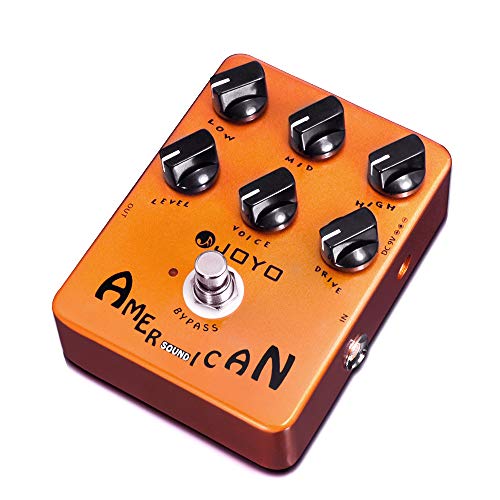
- Built-in cab simulation for direct recording
- American-style amp and preamp tone shaping
- 6-knob layout for quick tone control
Best For: Players wanting an amp-sim pedal for direct recording and simple live rigs
Mobile Recording Adapter
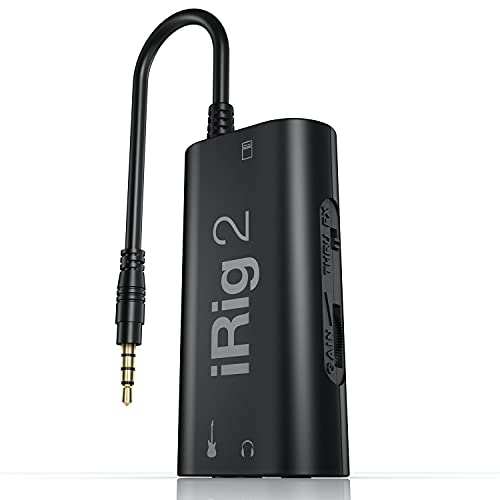
- Plug-and-play guitar connection for iPhone, iPad, and Mac
- Adjustable gain with headphone and amp outputs
- Processed and clean thru modes for practice and recording
Best For: Guitarists who want a simple mobile interface for recording and app-based practice
All-in-One Modeling Desk Rig
MOOER GE200 Pro Li multi-effects pedal with USB recording
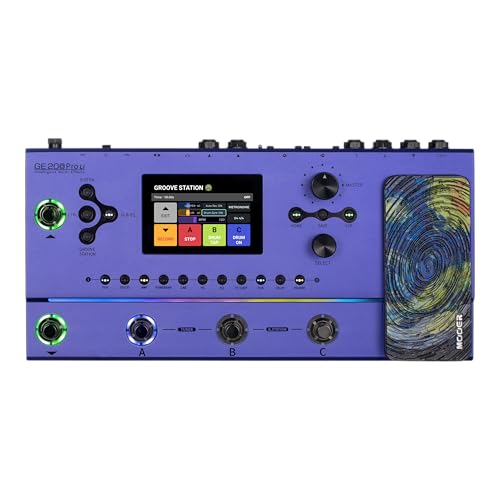
- 286 effect modules and amp models
- USB-C ASIO interface for recording
- Stereo XLR, FX loop, MIDI, Bluetooth
Best For: Players who want a battery-powered multi-effects unit for recording and live use.
Mobile Dry-Track Adapter
JOYO MOMIX CAB phone guitar interface with direct monitoring

- Zero-latency direct monitoring
- USB-C and Lightning plug-and-play
- Pocket-size clip-on portability
Best For: Mobile players who want a tiny, phone-based dry recording solution.
Creator-Friendly USB Recorder
MAONO PS22 Lite compact USB interface for guitar and vocals

- 24-bit/192kHz recording with low-noise preamp
- Dedicated instrument input with adjustable impedance
- ASIO driver and routing software included
Best For: Beginners and creators who want a compact computer interface for guitar and vocals.
Smart Modeling Workstation

- 130+ effects with amp and IR support
- USB audio interface with loopback and re-amp
- Looper, tuner, metronome, and drum rhythms
Best For: Versatile players who want one pedal for tone shaping and recording
Pocket Recording Rig
ANN Amp Model & IR Loader SK17

- USB sound card with OTG recording and loopback
- 120g design with up to 7 hours of battery life
- 80 presets plus 3rd-party IR support
Best For: Mobile players who need a tiny recording-focused processor
Backpack Studio Pedal
LEKATO Multi Effects Guitar Pedal

- 125 effects, 30 amp models, and 30 cab sims
- USB audio interface with ASIO and OTG recording
- NAM/IR support plus looper and drum rhythms
Best For: Portable recording and practice with modern amp-modeling features
Portable Modeling Hub – SONICAKE Pocket Master
If you want a guitar pedal recording interface that also doubles as a compact multi-effects unit, the SONICAKE Pocket Master is built for mobile players and quick direct recording. It combines amp modeling, cabinet simulation, USB audio streaming, and onboard effects in a pocket-sized format, making it useful for practice, sketching tones, and recording on the go.
Best For: Guitarists who want a portable all-in-one pedal with USB recording and built-in effects.
Pros:
- USB audio interface with stereo streaming and OTG support for iOS and Android devices
- 100+ built-in guitar, bass, and acoustic effects plus 20 amp models
- Supports third-party IRs with 5 user slots for custom cab sounds
- Includes looper, 99 drum rhythms, and 100 presets for fast idea capture
Cons:
- Compact format may feel limited if you want traditional floorboard controls
- Best suited to direct recording and mobile use rather than a full studio interface
The Pocket Master stands out if you want one device to cover tones, practice, and basic recording without extra hardware. Its strength is convenience: plug in, shape a sound, and send audio straight to a computer or mobile device.
Simple Two-Input Interface – M-AUDIO M-Track Solo
The M-AUDIO M-Track Solo is a straightforward guitar pedal recording interface for players who want an easy way to capture instrument signals into a computer. With a dedicated instrument input, a combo XLR/line input, and zero-latency monitoring, it fits clean home recording, streaming, and basic podcast setups.
Best For: Guitarists who need an affordable, no-fuss USB interface for recording and monitoring.
Pros:
- Dedicated instrument input for guitar recording
- 48kHz resolution for clean USB recording
- USB/Direct monitoring switch for zero-latency tracking
- Headphone output plus stereo RCA outputs for flexible monitoring
Cons:
- Only two channels, so it is not built for larger recording setups
- No built-in amp modeling or effects for shaping guitar tone on its own
This interface makes sense if your priority is simple signal capture rather than a feature-heavy multi-effects rig. It gives you the core connectivity needed for guitar recording and leaves tone shaping to your amp sim or software.
Direct Amp-Sim Pedal – JOYO American Sound JF-14
If your goal is to run a guitar pedal recording interface-style setup straight into a mixer, PA, or audio interface, the JOYO American Sound is a focused option. Its built-in cab simulation and amp-preamp voicing are designed for direct recording and silent practice without needing a mic’d cabinet.
Best For: Players who want an affordable amp-sim pedal for direct recording and simple live use.
Pros:
- Built-in analog cabinet simulation for direct recording
- Authentic American-style tube amp and preamp voicing
- 6-knob layout with Level, Drive, EQ, and Voice control
- Can go straight to a PA, audio interface, or mixer
Cons:
- Focused on amp simulation rather than multi-effects or USB recording
- Requires a separate power supply, which is not included
The American Sound is a practical pick when you want amp character and cab simulation in one compact pedal. It is especially appealing for players who record direct and prefer to keep the rest of the signal chain simple.
Mobile Recording Adapter – IK Multimedia iRig 2
The IK Multimedia iRig 2 is a lightweight guitar pedal recording interface for players who want to connect a guitar directly to an iPhone, iPad, or Mac. Its plug-and-play design, adjustable gain, and headphone or amplifier outputs make it a simple way to record, practice, or route a mobile guitar rig.
Best For: Guitarists who want an easy mobile interface for recording and app-based practice.
Pros:
- Plug-and-play connection for iPhone, iPad, iPod touch, and Mac
- Adjustable gain for dialing in input level
- Headphone output and 1/4-inch amplifier output for flexible monitoring
- Processed and clean thru modes for recording or tuner use
Cons:
- Designed around Apple/mobile use rather than full desktop studio connectivity
- Newer iOS devices may need an adapter for compatibility
iRig 2 is a compact solution when you want fast, direct recording from a guitar into a mobile device. It pairs well with app-based amp modeling and practice tools, especially if you value simplicity over expanded studio features.
All-in-One Modeling Desk Rig – MOOER GE200 Pro Li multi-effects pedal with USB recording
If you want a guitar pedal recording interface that can handle practice, tone-shaping, and USB recording in one unit, the MOOER GE200 Pro Li is built for that all-in-one workflow. It combines amp modeling, 286 effects modules, IR loading, Bluetooth playback, and a low-latency USB-C audio interface, so you can move from playing to recording without extra gear.
Best For: Guitarists who want a battery-powered multi-effects pedal with studio recording, backing-track playback, and flexible I/O.
Pros:
- 286 effect modules and amp models for a wide range of tones and chains
- USB-C low-latency ASIO audio interface with up to 44.1 kHz support
- Stereo XLR outputs, FX loop send/returns, MIDI I/O, and headphone out
- Bluetooth audio playback plus GE CLOUD preset and sample management
Cons:
- May be more complex than a simple plug-and-record interface
- USB audio tops out at 44.1 kHz, which may matter for some studios
- Best suited to players who want a full multi-effects platform, not just a basic recorder
Overall, the GE200 Pro Li is a strong choice if you want your recording setup to double as a live performance rig and practice station. Its routing options and onboard features make it especially useful for players who prefer fewer separate devices on the desk.
Mobile Dry-Track Adapter – JOYO MOMIX CAB phone guitar interface with direct monitoring
The JOYO MOMIX CAB is a compact guitar pedal recording interface for musicians who want to capture dry guitar directly to a phone with zero-latency monitoring. It sends your clean guitar signal straight to the headphones while also feeding your mobile device for recording, making it a simple option for sketches, practice clips, and live streaming.
Best For: Guitarists who want a pocket-size, phone-friendly way to record dry tracks with direct monitoring.
Pros:
- Zero-latency direct monitoring for clean guitar recording
- Plug-and-play use with USB-C or Lightning, no charging or drivers
- Very small, clip-on design for portable recording anywhere
- Includes headphone out so you can hear guitar and phone audio together
Cons:
- Not designed for real-time amp sims or effects processing
- Dry signal cannot be muted
- Compatibility can vary across Android devices, and OTG may be required
This is a focused mobile recording tool rather than a full-featured interface, so it makes the most sense if you simply need a fast way to get guitar into your phone. If your priority is portability and clean tracking, the MOMIX CAB is easy to understand and easy to carry.
Creator-Friendly USB Recorder – MAONO PS22 Lite compact USB interface for guitar and vocals
The MAONO PS22 Lite is a practical guitar pedal recording interface for home studios, streaming setups, and simple DAW tracking. With a dedicated instrument input, 24-bit/192kHz recording, low-noise preamp, and routing software, it gives guitarists a straightforward way to record guitar and vocals from a compact USB interface.
Best For: Guitarists, streamers, and beginners who want a compact USB interface for guitar, vocals, and DAW recording.
Pros:
- 24-bit/192kHz recording with 106dB dynamic range
- Dedicated instrument input with adjustable impedance for guitar
- ASIO support and ProStudio routing software for low-latency workflows
- Works with Mac, Windows, and iPads, plus direct monitoring
Cons:
- Not a pedal-style processor with built-in guitar effects
- Best suited to computer-based recording rather than standalone mobile capture
- Requires software setup if you want to use the included routing features fully
For creators who want a compact recording hub more than a multi-effects pedal, the PS22 Lite is a solid fit. It keeps the feature set focused on clean capture, easy monitoring, and flexible routing for guitar and voice.
Smart Modeling Workstation – SONICAKE QME-20 Smart Box
If you want a guitar pedal recording interface that also works as a full multi-effects floor unit, the SONICAKE QME-20 packs a lot into one portable box. It combines 130+ effects, amp and cabinet IR support, and USB audio interface features, so you can shape tones and capture ideas without adding a separate interface.
Best For: Players who want an all-in-one practice, performance, and recording pedal with deep tone editing.
Pros:
- USB audio interface with loopback and re-amp support for recording workflows.
- Supports third-party NAM and cabinet IR files for expanded tone options.
- Built-in looper, tuner, metronome, and drum rhythms for practice and songwriting.
- Stereo outputs, headphone jack, BT-MIDI, and app/PC editor support.
Cons:
- Firmware update caution is noted for Windows 11 users.
- 9V DC adapter or USB cable is not included.
- Battery life is limited to up to 3.5 hours of wireless operation.
The QME-20 is strongest for guitarists who value versatility and recording convenience over a simple stompbox layout. Its editing depth and connectivity make it a practical hub for home sessions and portable rig setups.
Pocket Recording Rig – ANN Amp Model & IR Loader SK17
The SK17 is a compact guitar pedal recording interface built for players who want direct-to-device capture without carrying a larger rig. It includes ANN amp modeling, 80 presets, and a USB sound card with OTG recording and loopback, making it a practical choice for quick demos and mobile sessions.
Best For: Guitarists who want a tiny, battery-powered processor for phone or PC recording.
Pros:
- USB audio interface supports OTG internal recording at 44.1kHz/24-bit.
- Very compact at 120g with a rechargeable battery rated up to 7 hours.
- Supports 3rd-party IR files and includes Bluetooth audio input.
- 80 presets with 6 effect modules and app-based editing.
Cons:
- Uses a smaller 1.54-inch screen, so editing is less spacious than larger units.
- Only one year? Actually the notes list warranty description as “3”, which is unclear.
- Limited physical controls compared with larger floor processors.
The SK17 stands out if your priority is portability and recording straight into a phone or computer. It is less of a full-size pedalboard replacement, but it does a strong job as a grab-and-go recording tool.
Backpack Studio Pedal – LEKATO Multi Effects Guitar Pedal
The LEKATO ME-05 is a strong guitar pedal recording interface pick for players who want a compact, feature-rich unit for practice and studio capture. With 125 effects, 30 amp models, 30 cab sims, NAM/IR support, and USB audio interface functions, it covers a wide range of tones without taking up much space.
Best For: Guitarists and bassists who want a compact all-in-one pedal for recording and everyday use.
Pros:
- USB audio interface supports ASIO low-latency PC/Mac recording and OTG mobile recording.
- Supports NAM and IR uploads, plus 30 amp models and 30 cab sims.
- 40-second looper, 100 drum rhythms, and built-in tuner add practice value.
- Lightweight 250g build with a rechargeable battery for portable use.
Cons:
- Battery life is rated at about 4 hours, which is shorter than some rivals.
- Only 99 presets, so heavy preset users may outgrow it.
- Smaller 2-inch display may feel basic for deep editing.
For players who want a portable effects unit that also handles recording duties well, the ME-05 hits a balanced middle ground. It is especially appealing if you want modern connectivity, cab/IR flexibility, and a straightforward backpack-friendly form factor.
How We Picked the Best Guitar Pedal Recording Interface
We prioritized products that make recording guitar simple and dependable. That means solid input options, low-noise operation, useful monitoring features, and enough tone-shaping tools to get a finished sound without piling on extra gear.
We also favored models that suit different use cases, from compact phone-friendly adapters to multi-effects units that can double as a Guitar Pedal Recording Interface for home studios and mobile rigs.
Quick Comparison
Some picks are best for straightforward direct recording, while others are better if you want amp modeling, IR loading, built-in effects, or looper and practice tools. If your goal is fast plug-and-record convenience, choose a simple interface. If you want the most self-contained setup, a multi-effects processor may be the better fit.
Key Buying Factors for a Guitar Pedal Recording Interface
Input and Monitoring
Look for the right connector type for your guitar and a clean signal path. Direct monitoring is especially useful because it lets you hear yourself with minimal delay while recording.
Compatibility
Check whether the unit works with your phone, tablet, Mac, or Windows PC. USB-C, Lightning, and standard USB support can make a big difference if you switch between devices.
Tone Shaping
A good Guitar Pedal Recording Interface should give you enough tone control to record a usable sound quickly. Built-in amp models, cabinet simulation, and IR support can help you skip extra software and get closer to a polished track.
Recording Features
For home production, useful extras include loopback for streaming, ASIO support for lower latency on PC, and software bundles that make setup easier. If you plan to practice as well as record, built-in tuner, metronome, looper, and drum rhythms are valuable additions.
Portability and Power
If you record on the go, size and power matter. Battery-powered or pocket-sized models are ideal for mobile use, while desktop interfaces usually offer more stable studio-style connectivity.
Who Should Buy Which Guitar Pedal Recording Interface?
If you want the simplest direct recording path, choose a compact audio interface with guitar input and monitoring. If you want a more complete practice and production tool, go for a multi-effects unit with amp modeling and IR loading. Players who record from a phone or tablet should focus on plug-and-play compatibility, while PC users may want stronger driver support and routing options.
In short, the best Guitar Pedal Recording Interface is the one that matches your device, your workflow, and how much tone shaping you want built in.