If you want cleaner monitoring, real-time effects, and a smoother recording workflow, an audio interface with onboard DSP can make a big difference. These interfaces handle processing before it reaches your computer, which can reduce latency and simplify your setup.
In this roundup, we focus on creator-friendly options for streaming, podcasting, music recording, and hybrid studio use so you can find the right balance of sound quality, software control, and input/output flexibility.
Best 10 Audio Interface with Onboard Dsp Picks for 2026
Portable DSP-Ready Studio Hub

- Four mic preamps with up to 75 dB gain
- Synergy Core FX run on DSP and FPGA hardware
- Dual USB-C plus loopback and expansion options
Best For: mobile creators and small studios needing onboard DSP and flexible routing
Streaming Mixer with DSP Control

- 6-channel mixer with USB audio interface DSP effects
- Built-in loopback for streaming workflows
- Two phantom-powered mic inputs and AG Controller support
Best For: live streamers who want simple onboard processing and easy routing
Compact DSP Interface for Small Studios
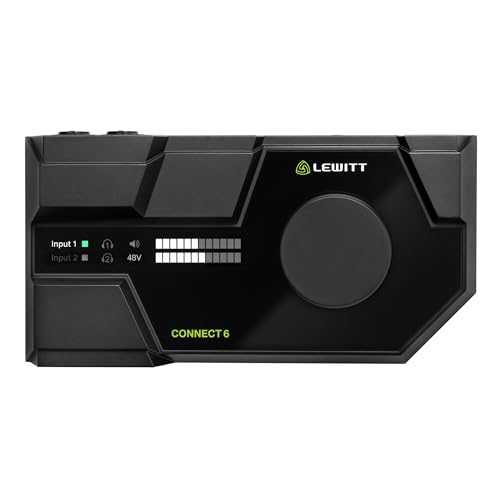
- Onboard DSP with expander, compressor, EQ, and maximizer
- Virtual channels, mixer, and loopback built in
- 72 dB gain preamps with -133 dBV EIN
Best For: desktop creators who want easy setup and onboard processing
Budget-Friendly Portable Interface

- 2-in/2-out USB-C interface for modern devices
- 24-bit/192kHz audio with zero-latency monitoring
- Includes software bundle for recording and podcasting
Best For: beginners and portable users who do not need onboard DSP
Streamer-First Dual-PC Control
BEACN Studio (Dark) USB XLR Audio Interface

- On-board DSP for EQ, compression, gate, and noise suppression
- Dual USB tech sends up to 8 channels between devices
- BEACN App and Link App simplify routing and remote control
Best For: Streamers and podcasters with dual-PC setups
Studio-Grade Multi-I/O
MOTU UltraLite-mk5 USB Audio Interface

- 18 x 22 I/O with analog, S/PDIF, and optical connections
- DSP monitor mixing with six separate mix busses
- On-board reverb, parametric EQ, and dynamics processing
Best For: Producers and studios needing flexible routing
Portable Vocal Chain Focus
Antelope Audio Zenith 2 USB-C Interface

- USB-C bus-powered and class-compliant for multiple platforms
- DSP chain includes vocal tools, loopback, and guitar amp/cab sims
- Dual headphone outputs with independent mixes
Best For: Content creators and guitarists who want portable DSP
Studio-Grade USB-C Pick

- 32-bit/192kHz USB audio with 2-in/2-out layout
- Onboard DSP monitoring with reverb, channel strip, and amp effects
- Two combo inputs, MIDI I/O, and included Steinberg software
Best For: Compact recording setups that want clean audio and latency-free monitoring
Voice-First Streaming Choice

- 80dB XLR gain with built-in voice processing
- DSP effects include enhancer, compressor, and EQ
- Touch controls, LED feedback, and Wave Link integration
Best For: Streaming and voice recording with simple onboard processing
Dual-PC Creator Hub

- On-board DSP with EQ, compression, gate, and noise suppression
- Dual USB technology sends up to 8 channels between devices
- BEACN App and Link App simplify routing and remote control
Best For: Streaming and gaming setups that need dual-PC audio control
Portable DSP-Ready Studio Hub – Antelope Audio Zen Quadro
If you want an audio interface with onboard dsp that can handle tracking, streaming, and mobile setups, the Antelope Audio Zen Quadro is built for that kind of flexible workflow. It combines four mic preamps, dual Hi-Z inputs, and real-time Synergy Core effects in a compact bus-powered design.
Best For: Creators who need a travel-friendly interface with onboard DSP effects, multiple inputs, and modern device connectivity.
Pros:
- Four Discrete 6-transistor mic preamps with up to 75 dB of gain
- 37 included real-time Synergy Core effects, with 90+ available
- Dedicated DSP and FPGA hardware for near-zero-latency processing
- Dual USB-C, loopback, and 14-in/10-out expandability
Cons:
- More features than a simple plug-and-play starter interface
- Small footprint may be overkill if you only need two inputs
Overall, this is a strong pick if you want Antelope’s conversion and clocking along with onboard processing that keeps the host CPU free. It is especially appealing for creators who move between studio, stage, and mobile recording.
Streaming Mixer with DSP Control – Yamaha AG06MK2 Black
The Yamaha AG06MK2 is a practical audio interface with onboard dsp for live streaming and simple content creation. Its 6-channel layout, loopback function, mute button, and onboard DSP effects make it easy to shape sound without relying entirely on software.
Best For: Streamers and solo creators who want a compact mixer-style interface with onboard DSP and simple controls.
Pros:
- 6-channel live streaming mixer with USB audio interface DSP effects
- Loopback function is built in for streaming workflows
- Two phantom-powered mic inputs for condenser microphones
- AG Controller software allows control of onboard DSP on Windows, Mac, and iOS
Cons:
- Only two mic inputs, so it is not ideal for larger recording setups
- DSP-focused feature set is aimed more at streaming than deep studio expansion
This is a good fit if you want hands-on control and streaming-friendly features in one compact unit. The included Steinberg software bundle adds extra value for users building a basic production or broadcast setup.
Compact DSP Interface for Small Studios – LEWITT Connect 6
If you need an audio interface with onboard dsp for a desktop studio or creator setup, the LEWITT Connect 6 keeps things focused and flexible. It offers studio-grade preamps, automatic setup tools, and onboard processing for mixing, loopback, and virtual channels.
Best For: Home studio users and multi-device creators who want DSP tools, clear preamps, and easy setup.
Pros:
- Onboard DSP includes expander, compressor, 4-band EQ, and maximizer
- DSP-based virtual channels, mixer, and loopback support
- Studio-grade preamps with 72 dB gain and -133 dBV EIN performance
- CONTROL CENTER software plus iOS and Android integration
Cons:
- 96 kHz maximum sample rate is lower than some competing interfaces
- Best suited to compact setups rather than larger multi-input studios
Overall, the Connect 6 is a strong choice when you want onboard processing without a complicated learning curve. Its auto setup and broad device integration make it especially convenient for everyday recording and streaming.
Budget-Friendly Portable Interface – M-AUDIO M-Track Duo HD
The M-AUDIO M-Track Duo HD is a straightforward 2-in/2-out interface for recording, podcasting, and live streaming, but it is not an audio interface with onboard dsp. Instead, it focuses on clean connectivity, zero-latency monitoring, and a simple workflow for modern devices.
Best For: Beginners and portable users who want an easy-to-use interface without onboard DSP processing.
Pros:
- 2-in/2-out USB-C design with direct connectivity for Mac, PC, iOS, and Android
- 24-bit/192kHz audio resolution with zero-latency monitoring
- Crystal preamps provide 55 dB of gain with +48V phantom power support
- Includes a software bundle with Ableton Live Lite, MPC Beats, and Splice
Cons:
- No onboard DSP effects or hardware processing
- Limited to two inputs, so it is not built for larger recording sessions
If your priority is simple recording and streaming rather than built-in effects, this interface makes sense. It offers solid core features and good portability, but users specifically looking for onboard DSP should consider other options in this roundup.
Streamer-First Dual-PC Control – BEACN Studio (Dark) USB XLR Audio Interface
If you want an audio interface with onboard dsp built around streaming and multi-computer control, BEACN Studio focuses on mic processing and routing rather than traditional multichannel studio I/O. It combines an XLR-to-USB-C microphone interface with onboard DSP for EQ, compression, expander/gate, noise suppression, and low-frequency enhancement, plus dual-PC USB technology for sending clean digital audio between systems.
Best For: Streamers, podcasters, and gamers who need mic shaping and simple dual-PC audio routing.
Pros:
- On-board DSP includes EQ, compression, expander/gate, noise suppression, and low-frequency enhancement.
- Dual USB technology can send up to 8 channels of clean digital audio between computers, consoles, and phones.
- BEACN App and BEACN Link App support fast routing, remote assignments, and live audio visibility across PCs.
- Built-in ultra-low-noise preamp and XLR-to-USB-C connection suit streaming and podcast mics.
Cons:
- More focused on mic chain control than on being a full multichannel recording interface.
- Requires the BEACN software ecosystem for the deepest control and workflow features.
Overall, BEACN Studio stands out when the priority is polished voice processing and straightforward dual-PC audio management. It is a practical pick if you want an interface that handles mic cleanup and routing with minimal friction.
Studio-Grade Multi-I/O – MOTU UltraLite-mk5 USB Audio Interface
MOTU UltraLite-mk5 18x22 USB Audio Interface 3 for Mac, Windows and iOS with mixing and effects
Check Price On AmazonFor buyers comparing an audio interface with onboard dsp, the MOTU UltraLite-mk5 is the most traditional studio-heavy option here. It offers 18 x 22 USB audio I/O, DSP-driven monitor mixing, and onboard effects such as reverb, 4-channel parametric EQ, and dynamics processing, making it a strong fit when you need flexible routing and low-latency monitoring.
Best For: Music producers and home studios that need lots of I/O and DSP-based monitoring mixes.
Pros:
- 18 x 22 interface with 40 simultaneous audio channels, including analog, S/PDIF, and optical I/O.
- DSP monitor mixing lets you create separate mixes for each output pair, with six separate mix busses.
- On-board effects include reverb, 4-channel parametric EQ, and dynamics processing for inputs and bus mixes.
- USB class-compliant design works with Mac, Windows, and iOS, with control through CueMix 5.
Cons:
- Its feature set is broader than a simple streaming interface, so setup may feel more complex.
- The emphasis is on monitoring and routing, not a vocal-processing-first workflow.
The UltraLite-mk5 is a strong choice if your priority is serious connectivity, flexible monitor mixes, and solid onboard processing. It is especially appealing for studios that want DSP mixing without giving up broad device compatibility.
Portable Vocal Chain Focus – Antelope Audio Zenith 2 USB-C Interface
If you are shopping for an audio interface with onboard dsp for streaming, podcasting, or guitar use, the Antelope Audio Zenith 2 is built around ready-to-use signal chains. It is USB-C bus-powered and class-compliant, offers loopback for system audio capture, and adds DSP effects for vocals and guitars, including a Smart Vocal Chain, noise gate, compression, de-essing, EQ, Air, distortion, and amp/cab simulations.
Best For: Streamers, podcasters, and guitar players who want portable, zero-latency DSP processing.
Pros:
- USB-C bus-powered and driver-free for PC, Mac, iOS, and Android compatibility.
- Built-in DSP supports vocal shaping, loopback, and guitar processing with amp/cab simulation.
- Two headphone outputs with fully independent mixes help with collaboration and monitoring.
- Standalone controls plus optional software panel allow either desk-based or device-based operation.
Cons:
- Focused more on vocal and guitar chains than on broad studio I/O expansion.
- Some advanced control depends on the optional software panel.
Zenith 2 is a compelling pick when you want polished sound shaping without relying on computer CPU power. Its mix of portable design, loopback, and onboard effects makes it especially practical for content creation and guitar recording.
Studio-Grade USB-C Pick – Yamaha URX22C
If you want an audio interface with onboard dsp that leans toward clean recording and practical monitoring tools, the Yamaha URX22C is built around a simple 2-in/2-out layout with 32-bit/192kHz support. Its DSP-powered monitoring includes REV-X reverb, Channel Strip, and Guitar Amp Classics, so you can track with effects without adding noticeable latency.
Best For: Musicians and home studios that want compact recording, MIDI, and latency-free DSP monitoring.
Pros:
- 32-bit Integer/192kHz USB audio with 2 analog inputs and 2 main outputs
- DSP monitoring with REV-X reverb, Channel Strip, and Guitar Amp Classics
- Two XLR/TRS combo inputs with D-PRE preamps and +48V phantom power
- Includes MIDI I/O and Steinberg software support
Cons:
- Only 2-in/2-out, so it is not aimed at larger tracking setups
- DSP features focus on monitoring and basic tone shaping rather than deep routing
The URX22C is a strong fit if you want a durable interface that keeps the workflow straightforward while still giving you onboard effects for confident monitoring. It offers a balanced mix of sound quality, software support, and portability for small setups.
Voice-First Streaming Choice – Elgato Wave XLR MK.2
The Elgato Wave XLR MK.2 is a focused audio interface with onboard dsp designed for streamers and voice creators who want simple control over mic tone and monitoring. It delivers up to 80dB of gain for XLR microphones, plus built-in voice enhancer, compressor, EQ, and more through the Wave FX Processor signal chain.
Best For: Streamers, podcasters, and voice-over users who want a streamlined XLR interface with onboard processing.
Pros:
- Up to 80dB gain for driving demanding XLR microphones
- Onboard DSP effects include voice enhancer, compressor, and EQ
- Ultra-low-latency monitoring with 24-bit/48kHz audio
- Touch control with LED feedback for quick level and mute adjustments
Cons:
- XLR-focused design means it is not a multi-input studio interface
- Wave Link software requirements limit compatibility to supported systems
This is a practical choice if your priority is clean vocal capture and easy realtime control rather than a broad input lineup. The MK.2 keeps the feature set centered on voice work, with DSP tools and software integration that suit modern streaming workflows.
Dual-PC Creator Hub – BEACN Studio White
If you need an audio interface with onboard dsp for a multi-device creator setup, the BEACN Studio is built around microphone control and flexible routing. Its onboard DSP includes EQ, compression, expander/gate, noise suppression, and low frequency enhancement, while proprietary dual USB technology moves up to 8 channels between computers, consoles, and phones.
Best For: Creators who want DSP mic processing and dual-PC or multi-device audio routing.
Pros:
- On-board DSP with EQ, compression, expander/gate, and noise suppression
- Proprietary dual USB design supports up to 8 channels across devices
- BEACN App and Link App add routing, remote assignments, and workflow control
- Designed for streaming, gaming, and podcasting with XLR/USB connectivity
Cons:
- Best value depends on whether you need its dual-PC features
- Feature set is centered on creator workflows rather than traditional multi-input recording
The BEACN Studio stands out when you want DSP shaping and unusually flexible routing in one compact interface. It is especially compelling for creators who work across multiple systems and want more control over what they hear and send.
How We Picked the Best Audio Interface with Onboard Dsp
We selected models that offer useful onboard processing, reliable USB or USB-C connectivity, and practical controls for real-world use. Priority went to interfaces that combine low-latency monitoring, solid driver support, and features that matter to creators, such as loopback, mixer control, mic processing, and multi-device routing.
Quick Comparison
Some options are built for simple vocal and streaming setups, while others are better suited to multi-input music production or advanced routing. If you need a straightforward podcast or voice interface, a compact model with easy DSP control may be enough. If you record instruments, multiple mics, or work across several devices, look for more inputs, better metering, and flexible software mixing.
Key Buying Factors for an Audio Interface with Onboard Dsp
DSP Features That Match Your Workflow
Not all DSP is the same. Some interfaces focus on channel strip processing, compression, and EQ for vocals, while others emphasize cue mixing, loopback, or broadcast-style control. Choose the processing tools you will actually use instead of paying for features you will leave off.
Input Count and I/O
Think about how many microphones, instruments, and playback sources you need today and in the near future. A two-input interface works well for solo creators, but music producers or streamers with multiple guests may want more headroom and routing options.
Latency and Monitoring
An Audio Interface with Onboard Dsp can help deliver near-zero-latency monitoring, especially when tracking vocals or live streaming. Make sure the interface supports direct monitoring or hardware-based mixing if timing matters in your workflow.
Software and Compatibility
Good DSP hardware should be paired with stable software. Check whether the control app is easy to use, whether it supports your operating system, and whether the interface plays nicely with your DAW, streaming software, or dual-PC setup.
Who Should Buy Which Audio Interface with Onboard Dsp?
Choose a compact, easy-to-use model if you are mostly recording voice, streaming, or making content from a single mic. Pick a more advanced unit if you need richer mixing, multiple inputs, or hardware effects for music production. If you work across two computers or want more detailed routing control, prioritize interfaces built for that kind of setup. For most buyers, the best choice is the one that matches their input needs, monitoring style, and software workflow rather than the one with the longest feature list.