If you need flexible routing, scalable I/O, and reliable networked audio, an audio interface with Dante can simplify complex setups fast. It is a smart upgrade for studios, live rigs, broadcast chains, and installed systems.
Below, we have rounded up 10 of the best options for 2026, with picks that fit everything from compact desktop workflows to high-channel-count professional systems.
Best 10 Audio Interface with Dante Picks for 2026
Flagship Multiroom Dante Recording
Apollo x16D Dante Rackmount Interface

- 16 x 16 Dante I/O with AES67 support
- HEXA Core Processing for near-zero-latency UAD mixing
- 24-bit/192 kHz with Dual-Crystal Clocking
Best For: High-end studios and engineers needing Dante plus onboard UAD processing
High-Channel Dante Bridge
RME Digiface Dante Compact Interface

- 128-in/128-out Dante, MADI, and USB 3.0
- Bus-powered with headphone output
- 24-bit/192 kHz and word clock I/O
Best For: Compact high-channel Dante workflows and portable network audio
Four-Input Network Front End
Shure ANI4IN-XLR Dante Interface
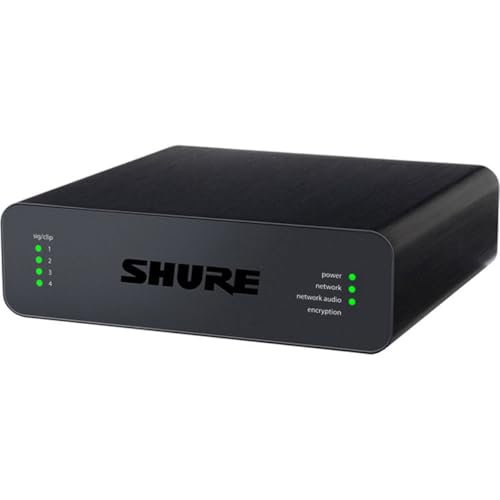
- 4 mic/line XLR inputs
- Dante networking for AV integration
- Works with Crestron and AMX systems
Best For: Installed AV and conferencing systems with four analog sources
Simple Analog-to-Dante Adapter
Audinate Dante AVIO 2-Channel Adapter
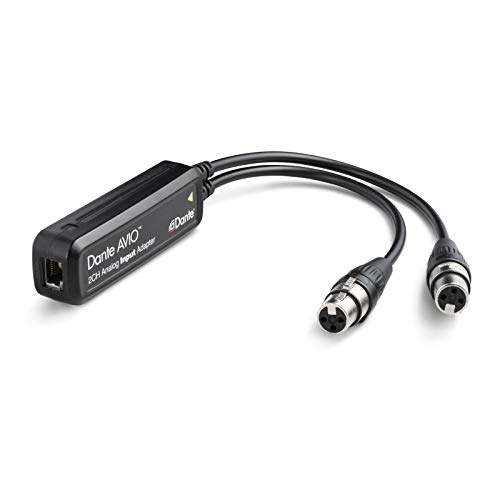
- 2-channel analog input conversion to Dante
- Works with mixers, DI boxes, keys, and receivers
- Compact RJ45 network adapter
Best For: Adding two analog sources to a Dante network
Stage Box Expanders
Yamaha Tio1608-D2 Dante-Enabled Stage Box Audio I/O Rack

- 16 inputs and 8 outputs
- 96kHz Dante stage box design
- Recallable D-PRE preamps
Best For: Yamaha mixer users needing compact Dante I/O expansion
Input Bridges
Allen & Heath DT20-X Dante Input Interface

- 2-channel XLR Dante input bridge
- PoE-powered installation
- 96kHz support
Best For: Compact installed systems needing a small Dante input bridge
USB Network Adapters
ToVi Dante USB to Network Audio Adapter

- 2-channel USB-to-Dante bridge
- 24-bit AES67-compliant audio
- Includes USB cable and manual
Best For: Compact USB-to-Dante bridging for studio and live workflows
Studio-Grade Network Backbone
Focusrite RedNet PCIeNX 128-Channel Dante PCIe Audio Interface

- 128x128 Dante channels at 24-bit/192kHz
- Ultra-low latency with optional 256x256 upgrade
- Dual RJ-45, AES67, and SMPTE ST 2110 support
Best For: High-channel-count studio and broadcast systems on Windows or Mac
Hybrid Rack Companion
Yamaha RUio16-D Dante/USB Audio Interface

- 16-in/16-out Dante/USB interface
- Includes VST Rack Pro with 30+ plug-ins
- Two mic inputs and two line-level outputs
Best For: Compact Dante and USB workflows with bundled effects tools
Compact Reference Tool
ESI planet 22c Reference Quality Dante Audio Interface

- Dante interface with 24-bit/96kHz converters
- Supports major DAWs on Windows and macOS
- Lightweight 0.5 kg design for portable use
Best For: Small recording, live sound, and measurement setups
Flagship Multiroom Dante Recording – Apollo x16D Dante Rackmount Interface
Universal Audio Apollo x16D Essentials+ 18 x 20 Audio Interface with Dante I/O and UAD DSP
Check Price On AmazonIf you want an audio interface with dante that can sit at the center of a serious studio or live setup, the Apollo x16D is built for exactly that role. It combines 16 x 16 Dante network I/O with Thunderbolt 3 connectivity, plus onboard HEXA Core processing so you can run UAD plug-ins at near-zero latency while tracking or mixing.
Best For: Engineers and producers who need a high-end Dante interface with integrated UAD processing and pro digital I/O.
Pros:
- 16 x 16 Dante network I/O, with AES67 mode support at 48 kHz
- Onboard HEXA Core Processing for low-latency UAD plug-in mixing
- Dual-Crystal Clocking and 24-bit/192 kHz resolution for high-end performance
- Includes monitor outs, word clock I/O, and stereo AES I/O for pro integration
Cons:
- Rackmount design is more studio-focused than portable
- Likely more interface than smaller rigs need
- Requires a Thunderbolt 3 workflow to get full use of its host connectivity
This is a premium choice when Dante networking and UAD processing both matter. The Apollo x16D is best suited to users building a flexible, high-performance digital audio hub rather than a simple two-channel interface.
High-Channel Dante Bridge – RME Digiface Dante Compact Interface
The RME Digiface Dante is a compact audio interface with dante for users who need a large networked channel count without a bulky rack unit. It offers 128-in/128-out Dante/MADI/USB 3.0 connectivity, plus a headphone output and bus-power design that makes it easier to place in portable or space-conscious setups.
Best For: Users who need a compact high-channel Dante interface for Mac or PC workflows.
Pros:
- 128-in/128-out routing for large Dante, MADI, and USB 3.0 workflows
- Bus-powered design supports a more portable setup
- Includes a headphone output for direct monitoring
- 24-bit/192 kHz support with word clock I/O
Cons:
- Notes list Windows support, so confirm compatibility for your system
- Does not emphasize onboard DSP or mixing features
- Channel-rich design may be overkill for simple recording needs
If your priority is moving lots of Dante channels rather than adding onboard processing, this model stands out. It is a practical bridge between network audio and USB-based production, especially when you want serious I/O in a small footprint.
Four-Input Network Front End – Shure ANI4IN-XLR Dante Interface
The Shure ANI4IN-XLR is a focused audio interface with dante for bringing four analog mic or line sources onto a network. With XLR inputs and compatibility listed for professional audio devices, Crestron, and AMX, it fits neatly into installed or integrated AV systems where clean network conversion matters more than multitrack recording features.
Best For: Installed AV and conferencing systems that need four XLR sources on Dante.
Pros:
- 4 mic/line XLR inputs for analog source capture
- Dante networking for system integration
- Compatible with professional audio devices, Crestron, and AMX
- Compact form factor suited to rack or install environments
Cons:
- Only four channels, so it is not meant for larger recording setups
- No mention of onboard DSP or monitoring features
- Designed more as a network interface than a traditional studio interface
This is a straightforward choice when you need a reliable network front end for analog microphones or line sources. It is less about creative production and more about clean, dependable Dante integration in fixed systems.
Simple Analog-to-Dante Adapter – Audinate Dante AVIO 2-Channel Adapter
The Audinate Dante AVIO 2-Channel Analog Input Adapter is a compact audio interface with dante for converting analog gear into a networked setup. It is made for practical use with mixers, DI boxes, keyboard instruments, wireless mic receivers, powered speakers, and similar non-networked audio devices that need RJ45-based Dante connectivity.
Best For: Adding two channels of analog audio into a Dante system.
Pros:
- 2-channel analog input conversion to Dante
- Works with a wide range of analog audio devices
- Compact adapter format for easy integration
- RJ45 connectivity fits standard network audio setups
Cons:
- Input-only design, so it does not handle output conversion
- Only two channels, which limits larger routing needs
- Not a full-featured interface for recording or mixing
This model is best viewed as a utility piece rather than a centerpiece interface. If you need a simple way to bring two analog sources onto Dante, it offers a direct and efficient path.
Stage Box Expanders – Yamaha Tio1608-D2 Dante-Enabled Stage Box Audio I/O Rack
If you need an audio interface with dante for a Yamaha-based setup, the Tio1608-D2 is built to add a lot of I/O without taking much rack space. It offers 16 inputs and 8 outputs, runs at up to 96kHz, and supports QUICK CONFIG Mode for DM3 and TF series workflows.
Best For: Yamaha mixer users who want a compact Dante stage box with reliable expansion and recallable preamps.
Pros:
- 16 inputs and 8 outputs in a 3U rack format
- 96kHz operation for high-resolution digital audio
- Recallable D-PRE preamplifiers for Yamaha workflows
- QUICK CONFIG Mode supports DM3 and TF series setup
Cons:
- Designed specifically around Yamaha and Dante ecosystems
- More of a stage box I/O rack than a general-purpose USB interface
This is a strong choice when the priority is clean Dante expansion with Yamaha integration rather than a simple desktop interface. If your system already centers on compatible Yamaha mixers, it brings practical channel count and straightforward deployment.
Input Bridges – Allen & Heath DT20-X Dante Input Interface
The DT20-X is a focused audio interface with dante for adding two XLR inputs into a Dante system. With PoE power and 96kHz support, it fits neatly into AHM systems, Dante systems, and mixer-based installs where a small input bridge is all you need.
Best For: Installed audio users who need a compact 2-channel Dante input interface with PoE.
Pros:
- 2-channel Dante input interface with XLR input support
- PoE power keeps installation simple
- Supports 96kHz operation
- Works with AHM systems, Dante systems, and mixers
Cons:
- Only provides 2 channels, so it is not for larger I/O needs
- Windows support is listed, but the device is mainly aimed at system integration
For installations that need a small, reliable Dante input point rather than a full interface, the DT20-X is straightforward and purpose-built. Its strength is simplicity: power over Ethernet, XLR connectivity, and a compact 2-channel footprint.
USB Network Adapters – ToVi Dante USB to Network Audio Adapter
If you want an audio interface with dante that bridges a computer to an audio-over-IP network, this ToVi adapter is aimed at exactly that job. It acts as a 2-channel USB audio interface, supports 24-bit audio, and is AES67 compliant for use in Dante ecosystems.
Best For: Users who need a compact USB-to-Dante bridge for studio, broadcast, or live sound workflows.
Pros:
- 2-channel USB transceiver for Dante network audio
- 24-bit audio with 44.1kHz and 48kHz support
- AES67 compliant for audio-over-IP interoperability
- Includes USB cable and user manual
Cons:
- Only 2 channels, so it is not for larger multichannel routing
- Sample-rate support is centered on 44.1kHz and 48kHz in the notes
This is a practical pick when your main need is to connect USB audio devices to a Dante network without a lot of complexity. It is best viewed as a compact bridge for interoperability rather than a full-featured studio interface.
Studio-Grade Network Backbone – Focusrite RedNet PCIeNX 128-Channel Dante PCIe Audio Interface
If you need an audio interface with Dante for a high-channel-count studio or broadcast setup, the Focusrite RedNet PCIeNX is built for serious I/O. It delivers 128×128 channels at up to 24-bit/192kHz, with ultra-low round-trip latency and optional paid expansion to 256×256 for larger systems.
Best For: Engineers and facilities that need a high-capacity Dante PCIe interface for Windows or Mac workflows.
Pros:
- 128×128 Dante channels at up to 24-bit/192kHz.
- Ultra-low round-trip latency for responsive monitoring and tracking.
- Dual RJ-45 connections support switched or redundant mode.
- Supports AES67 and SMPTE ST 2110 compliance with DDM.
Cons:
- 256×256 operation requires an optional paid upgrade.
- PCIe x4 design may be best suited to dedicated workstation installs.
Overall, this is the most expansive option in the group and is aimed at users who value channel count, network flexibility, and compatibility across modern Dante-based systems. The included 3-year warranty and 24/7/365 support add confidence for professional use.
Hybrid Rack Companion – Yamaha RUio16-D Dante/USB Audio Interface
The Yamaha RUio16-D is a practical audio interface with Dante for users who want a bridge between network audio and USB-based recording or playback. It offers 16-in/16-out Dante/USB operation, two line-level outputs, two mic inputs, and includes VST Rack Pro software with 30+ plug-ins.
Best For: Musicians, engineers, and small studios that want Dante plus USB in one compact interface.
Pros:
- 16-in/16-out Dante/USB audio interface.
- Includes VST Rack Pro software with 30+ plug-ins.
- Two line-level outputs and two mic inputs.
- Compatible with macOS and Windows.
Cons:
- Maximum sample rate is 96 kHz, not higher.
- Channel count is smaller than higher-capacity Dante interfaces.
This model makes sense if you want a straightforward hybrid interface with useful onboard I/O and bundled processing tools. It is less about massive routing and more about giving you a compact, versatile Dante-to-USB solution.
Compact Reference Tool – ESI planet 22c Reference Quality Dante Audio Interface
If you are shopping for an audio interface with Dante for recording, live sound, or measurement work, the ESI planet 22c is a compact reference-style option. It uses Dante connectivity, 24-bit/96kHz converters, and supports major DAWs on Windows and macOS.
Best For: Small setups that need a lightweight Dante interface for recording, live sound, or audio measurement.
Pros:
- Reference-quality Dante interface with 24-bit/96kHz converters.
- Supports major DAWs.
- Works with Windows and macOS.
- Very light at 0.5 kg.
Cons:
- Only 4 channels, so it is not built for large rigs.
- Uses TRS input connectivity, which may limit flexibility for some setups.
The planet 22c is best viewed as a compact, focused Dante interface rather than a full-scale production hub. Its value lies in straightforward network audio access, solid converter specs, and broad DAW compatibility backed by a 2-year warranty.
How We Picked the Best Audio Interface with Dante
We focused on practical buyer priorities: sound quality, Dante implementation, channel count, connection types, latency, expandability, software support, and how well each unit fits real-world workflows. Because an Audio Interface with Dante can serve very different use cases, we also weighed whether the product is better suited for studio recording, live sound, broadcast, or networked installation.
Quick Comparison
The list spans a wide range of needs. At one end are compact adapters and simple input devices for adding a few channels to a Dante network. At the other are rackmount and PCIe-based solutions built for large systems, low-latency production, and heavy I/O demands. If you want portability, look for USB or small-format units; if you need maximum stability and channel count, rack or PCIe options are usually the better fit.
Key Buying Factors for an Audio Interface with Dante
Channel Count and I/O Type
Start with the number of inputs and outputs you actually need today, then add room for growth. Some units are designed for single-purpose expansion, while others handle multichannel recording, monitor routing, or stage inputs. Also check whether you need analog line inputs, mic preamps, AES67 compatibility, or digital expansion.
Host Connection and Workflow
USB, Thunderbolt, and PCIe each serve different purposes. Thunderbolt and PCIe typically offer the lowest latency and strongest performance for demanding production environments. USB can be more convenient for mobile or hybrid setups. If you are building a permanent Dante system, network integration may matter more than the host connection alone.
Latency, Clocking, and Reliability
For live or broadcast use, stable clocking and predictable latency are essential. Look for devices with robust sync behavior, proven firmware support, and clear integration with Dante Controller or companion software. An Audio Interface with Dante should feel like part of a larger system, not a fragile add-on.
Software and Routing Control
Good software can save a lot of setup time. Features like easy patching, low-latency monitoring, recallable routing, and clear network management are especially valuable in multi-device systems. If your workflow depends on plugins or virtual routing, factor that in before buying.
Who Should Buy Which Audio Interface with Dante?
Choose a compact adapter or input interface if you mainly need to add a few channels to an existing Dante network. Pick a rackmount interface if you want a more complete centerpiece for studio or live sound. Go with PCIe if you need the highest channel counts and the most workstation-integrated performance. For hybrid users, a USB or Thunderbolt model can be the most flexible option.
In short, the best choice depends on your system size, connection standard, and how much routing control you need. Match the interface to your workflow first, then compare features and expandability.