Choosing a 64-pad MIDI controller can make live launching, finger drumming, and DAW control faster and more intuitive. The best models balance pad response, software compatibility, and workflow features that match how you actually create.
In this roundup, we focus on the strongest options for performers, producers, and beginners who want an efficient grid controller without wasting money on features they will not use.
Best 10 64-Pad Midi Controller Picks for 2026
Launchpad Pro MK3
Ableton-Ready 64-Pad Grid Controller
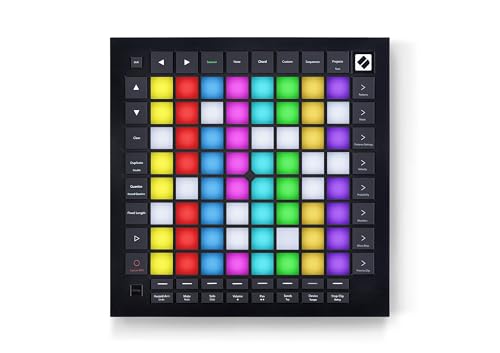
- Deep Ableton Live integration
- Velocity- and pressure-sensitive pads
- 4-track sequencer with MIDI I/O
Best For: Ableton-centric producers and live performers
SmartPAD II
Lightweight Ableton Performance Pad

- Ableton Live performance focus
- Compact and lightweight build
- Mixing, touch cycle, and effects control
Best For: Portable Ableton users who want simple hands-on control
TempoPAD Z-1
RGB Beat Maker for Mobile Production

- 64 RGB silicone pads with custom lighting
- iPhone/iPad support via lightning or USB
- Broad DAW compatibility and chord mode
Best For: Beginners and mobile beat makers
APC Mini MK2

- Pre-mapped Ableton Live integration
- 64 RGB clip-launch pads
- 8 faders plus master fader
Best For: Ableton performers who want compact clip launching
Standalone RGB Pad Controller
64-Pad MIDI Controller with Built-In Sound Module

- 64 RGB velocity-sensitive pads
- Built-in 128 MB sound module
- USB MIDI plus MIDI IN/OUT connectivity
Best For: Producers and performers needing standalone monitoring and 64-pad control
Ableton Performance Grid
Novation Launchpad X 64-Pad Grid Controller

- 64 RGB velocity- and pressure-sensitive pads
- Deep Ableton Live integration
- Four custom MIDI modes
Best For: Ableton and Logic performers who want expressive grid control
Portable Pad-and-Knob Controller
Akai LPD8 Compact MIDI Drum Pad Controller

- 8 RGB MPC-style drum pads
- 8 assignable knobs for DAW control
- USB-powered plug-and-play setup
Best For: Laptop producers who want a tiny controller with pads and knobs
Compact Launchpad for Ableton Beginners
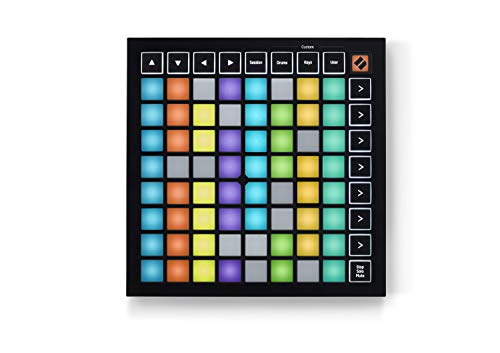
- 64 RGB pads for clip and scene launching
- Three Custom Modes for MIDI remapping
- Slim, bus-powered design for travel
Best For: Portable Ableton Live users who need a compact grid controller
Playable Performance Bundle

- Velocity- and pressure-sensitive RGB pads
- Polyphonic aftertouch for expressive control
- Includes headphones and a 4-port USB hub
Best For: Ableton users who want a more expressive Launchpad bundle
Essential Ableton Grid Controller

- 64 velocity- and pressure-sensitive RGB pads
- No-driver USB setup for quick use
- Includes 4-port USB hub
Best For: Ableton Live users who want an essential responsive grid controller
Launchpad Pro MK3 – Ableton-Ready 64-Pad Grid Controller
If you want a 64-pad midi controller built for fast clip launching and expressive performance, the Novation Launchpad Pro MK3 is one of the most complete options here. It pairs deep Ableton Live integration with velocity- and pressure-sensitive RGB pads, plus onboard sequencing and MIDI I/O for hybrid software and hardware setups.
Best For: Ableton users and hybrid producers who want advanced grid control, sequencing, and MIDI hardware integration.
Pros:
- Deep Ableton Live integration for clips, scenes, mixer, transport, and device control
- 64 RGB pads are both velocity- and pressure-sensitive for expressive playing
- 4-track, 32-step sequencer with polyphony, pattern chaining, probability, and mutation
- MIDI In, Out, and Out 2/Thru support custom modes and hardware rigs
Cons:
- Best suited to Ableton-centric workflows rather than general-purpose use
- No traditional keyboard-style layout for players wanting piano-style input
This is the most feature-rich 64-pad midi controller in the group if you need performance depth, sequencing, and tight DAW control in one grid.
SmartPAD II – Lightweight Ableton Performance Pad
The MIDIPLUS SmartPAD II is a compact 64-pad midi controller made for Ableton Live performance and quick hands-on control. Its appeal is straightforward: it keeps the footprint small while adding mixing control, touch cycle functions, and effects-oriented performance tools for Windows and Mac users.
Best For: Ableton Live users who want a lightweight, compact controller for performance and basic mixing.
Pros:
- Designed for performance with Ableton Live
- Compact and lightweight at 262 x 270 x 40 mm
- Includes mixing control, touch cycle, and effects functions
- Works with Windows and Mac
Cons:
- Fewer advanced details are listed compared with higher-end controllers
- Less suited to users who need onboard sequencing or deep hardware routing
As a practical 64-pad midi controller, the SmartPAD II focuses on portability and Ableton-friendly control rather than extra features. That makes it a solid pick for players who want a simple performance pad they can carry easily.
TempoPAD Z-1 – RGB Beat Maker for Mobile Production
The Synido TempoPAD Z-1 is a feature-packed 64-pad midi controller aimed at beginners, casual musicians, and mobile creators. It combines responsive RGB silicone pads, broad DAW support, and iPhone/iPad connectivity, making it a flexible option for beat making on the go.
Best For: Beginners and mobile producers who want a colorful, portable pad controller with broad software compatibility.
Pros:
- 64 responsive RGB silicone pads with customizable lighting modes
- Supports iPhone and iPad connection via lightning or USB cable
- Works with many mainstream DAWs including Ableton Live, Logic Pro, FL Studio, and more
- Includes fixed chord mode, 4 velocity sensitivity, and several performance modes
Cons:
- MIDI pads do not make sound by themselves
- Feature set may feel broad if you only need basic clip launching
This model stands out when you want a 64-pad midi controller that supports creative beat making without locking you into one workflow. It is especially attractive for users who value portability, visual feedback, and beginner-friendly operation.
APC Mini MK2 – Compact Ableton Clip Launcher
The Akai Professional APC Mini MK2 is a compact 64-pad midi controller built around clip launching and Ableton Live control. With RGB pads, assignable faders, and drum and note modes, it gives you a focused layout for arranging, mixing, and triggering ideas quickly in the studio or on stage.
Best For: Ableton Live users who want a compact clip launcher with mixing controls and strong pre-mapped integration.
Pros:
- Pre-mapped 1-to-1 integration with Ableton Live 11.2.7 onward
- 64 RGB pads for launching clips with visual feedback
- 8 assignable faders plus 1 master fader for hands-on mix control
- Drum and Note modes support sample triggering and melody playing
Cons:
- Designed primarily around Ableton Live rather than broad standalone use
- USB-powered layout is compact, but not as performance-focused as larger grid controllers
If your priority is clip launching, mixer control, and fast Ableton workflow, this 64-pad midi controller is a strong practical choice. It trades extra complexity for a streamlined, portable control surface.
Standalone RGB Pad Controller – 64-Pad MIDI Controller with Built-In Sound Module
If you want a 64-pad midi controller that can handle beat-making, clip launching, and basic standalone monitoring, this model gives you a lot of control in a compact footprint. The 64 RGB velocity-sensitive pads are the main draw, while USB MIDI plus MIDI IN/OUT support lets it fit into a range of production setups.
Best For: Producers and performers who want 64 RGB pads, built-in sound monitoring, and broad device compatibility.
Pros:
- 64 RGB velocity-sensitive pads for finger drumming, clip launching, and production tasks
- Built-in 128 MB sound module for direct headphone or speaker monitoring
- USB MIDI, MIDI IN, and MIDI OUT connections for computers, mobile devices, and DAWs
- 24 dedicated function buttons for quick access to common controls
Cons:
- Single included software mention is Ableton Live, so deeper workflow fit may depend on your setup
- Heavier than some compact pad controllers at 1.02 kg
- Function-rich layout may take some time to learn if you only need basic pads
This is a practical choice if you want a feature-packed 64-pad midi controller with flexible connectivity and enough onboard control for rehearsals, home studios, or live sets.
Ableton Performance Grid – Novation Launchpad X 64-Pad Grid Controller
The Novation Launchpad X is a strong pick if you want a 64-pad midi controller built around clip launching, performance control, and tight DAW integration. Its 64 RGB velocity- and pressure-sensitive pads, plus mixer and transport-style functions, make it well suited to hands-on Ableton-style workflows.
Best For: Ableton and Logic users who want expressive 64-pad performance control with custom mapping options.
Pros:
- 64 RGB velocity- and pressure-sensitive pads for expressive playing
- Deep Ableton Live integration for clips, scenes, mixer, device, and transport control
- Four custom modes for personalized MIDI mappings
- Note and scale modes help with basslines, melodies, chords, and drum racks
Cons:
- Compatibility details are centered on PC and Mac rather than broad mobile support
- No dedicated knobs or faders are listed beyond the pad-focused controls
- Best features depend on software workflows like Ableton, Logic, or HUI support
For users who value performance feel and DAW integration over extra hardware controls, this is one of the most focused 64-pad midi controller options here.
Portable Pad-and-Knob Controller – Akai LPD8 Compact MIDI Drum Pad Controller
If you need a compact midi controller for beat-making and DAW control rather than a full 64-pad layout, the Akai LPD8 keeps things simple and portable. It offers 8 RGB MPC-style pads, 8 assignable knobs, and plug-and-play USB operation for quick setup on Mac or PC.
Best For: Mobile producers and laptop users who want a small pad controller with knobs and easy setup.
Pros:
- 8 RGB-backlit MPC drum pads for samples, loops, and virtual instruments
- 8 assignable knobs for mapping to DAW parameters and effects
- 4 programmable preset slots for fast recall of custom mappings
- USB-powered plug-and-play operation with no driver installation
Cons:
- Only 8 pads, so it is not a true 64-pad midi controller
- No standalone sound module or extra MIDI hardware connections listed
- Best suited to compact workflows rather than large performance grids
This is a smart buy if portability and hands-on knob control matter more than pad count, especially for beat makers who travel with a laptop.
Compact Launchpad for Ableton Beginners – Novation Launchpad Mini MK3
If you want a 64-pad midi controller that stays small without feeling stripped down, the Novation Launchpad Mini MK3 is built for fast clip launching and hands-on session control. Its 64 RGB pads mirror your Ableton Live set, while the three Custom Modes let you remap the grid for other MIDI tasks when you need more flexibility.
Best For: Portable Ableton Live users who want a lightweight grid controller with easy setup and simple customization.
Pros:
- 64 RGB pads give clear visual feedback for clips and scenes
- Dedicated Stop, Solo, and Mute controls make performance control more tactile
- Three Custom Modes in Novation Components allow flexible MIDI mapping
- Bus-powered, slim design is easy to travel with and saves space
Cons:
- Focused on grid control rather than a deep mixer-style workflow
- Plastic build may not feel as substantial as larger controllers
The Launchpad Mini MK3 is a practical entry point if your priority is compact Ableton control and portability. It gives you the core performance tools you need in a straightforward package, especially if you value lightweight hardware that is easy to set up and carry.
Playable Performance Bundle – Novation Launchpad X Bundle
This 64-pad midi controller bundle is aimed at players who want a more expressive Launchpad for Ableton sessions. The Launchpad X adds velocity- and pressure-sensitive RGB pads, polyphonic aftertouch, and quick access to clip and scene launching, while the included headphones and USB hub make the package more complete out of the box.
Best For: Ableton users who want a more expressive Launchpad with bundled accessories for immediate setup.
Pros:
- 64 velocity- and pressure-sensitive RGB pads for more expressive playing
- Polyphonic aftertouch adds responsive performance control
- Quick clip and scene launching keeps live workflows fast
- Bundle includes closed-back headphones and a 4-port USB hub
Cons:
- Bundle extras may be unnecessary if you already own headphones and a hub
- Primarily built around Ableton Live use
If you want a Launchpad that feels more playable than a basic pad grid, this bundle is a strong fit. The pressure-sensitive pads and performance controls make it a better match for expressive live use, and the added accessories reduce what you need to buy separately.
Essential Ableton Grid Controller – Novation Launchpad X Bundle
The Novation Launchpad X is a straightforward 64-pad midi controller for Ableton Live users who want fast access and no-fuss setup. Its 64 velocity- and pressure-sensitive RGB pads, USB-powered design, and essential performance controls make it a practical choice for launching clips, triggering scenes, and adjusting key mix actions from the grid.
Best For: Ableton Live users who want an essential, plug-and-perform grid controller with responsive pads.
Pros:
- 64 velocity- and pressure-sensitive RGB pads support expressive performance
- Essential controls for stop, solo, mute, record arm, and mix parameters
- USB-powered with no drivers required, so setup is simple
- Includes a 4-port USB hub in this bundle
Cons:
- Built specifically around Ableton Live rather than broad DAW versatility
- Bundle format may be more than some buyers need
This version of the Launchpad X focuses on the essentials: responsive pads, quick access to performance controls, and simple plug-and-play operation. It makes the most sense if you want a capable Ableton grid controller without adding extra complexity.
After comparing the top options, the right 64-Pad Midi Controller usually comes down to workflow rather than pad count alone. Some buyers want tight Ableton integration and clip launching, while others need better pad feel, aftertouch, or flexible MIDI mapping for studio production.
How We Picked the Best 64-Pad Midi Controller
We prioritized pad response, DAW compatibility, build quality, bus-powered convenience, and feature sets that improve real-world use. We also looked for models that work well for both performance and production, not just one narrow use case.
Quick Comparison
For live clip launching, controllers with strong Ableton support and dedicated session controls are the easiest to use. For beat making and expressive playing, velocity-sensitive or pressure-sensitive pads are more important. If you need a compact travel option, size and portability may matter more than extra performance controls.
Key Buying Factors for a 64-Pad Midi Controller
Pad Feel and Sensitivity
Look for velocity sensitivity at minimum. If you want more expressive control, pressure sensitivity or polyphonic aftertouch can make a noticeable difference for finger drumming and melodic performance.
DAW and Software Compatibility
A good 64-Pad Midi Controller should integrate smoothly with your main DAW. Ableton Live users often benefit from deeper session and clip-launching features, while Logic and other DAWs may rely more on custom mapping and note modes.
Workflow Features
Extra modes such as note, scale, mixer, and custom mappings can expand what the controller does beyond pad triggering. These features are especially useful if you want one device for composition, performance, and control.
Connectivity and Power
USB bus power is convenient for mobile setups, but MIDI I/O can be valuable in hybrid hardware rigs. Check whether you need standalone routing, deeper integration, or just a simple plug-and-play connection.
Size and Portability
Some 64-pad controllers are compact and easy to carry, while others add dedicated controls and a larger footprint. Choose based on your desk space and whether the controller will travel with you.
Who Should Buy Which 64-Pad Midi Controller?
If you are an Ableton-centric performer, choose a controller built around clip launching and session workflow. If you are mainly making beats, prioritize pad feel, sensitivity, and performance modes. If you are new to MIDI, a simpler model with solid software compatibility is often the best value. Power users who want expressive control and flexible routing should look for advanced features like pressure sensitivity, MIDI I/O, and customizable modes.
In short, the best 64-Pad Midi Controller is the one that matches your workflow, your DAW, and the way you like to play.