Choosing the right 61-key MIDI keyboard controller can make composing, arranging, and performing feel far more natural. The best options balance key feel, hands-on controls, software support, and DAW integration.
In this roundup, we focus on models that suit beginners, producers, and performers who want enough range for two-handed playing without taking over the desk.
Best 10 61-Key Midi Keyboard Controller Picks for 2026
Creative DAW Controller
Arturia KeyLab Essential mk3 61 Key MIDI Controller

- 61 velocity-sensitive keys with pads, encoders, and faders
- Scale, Chord, and Arpeggiator modes for faster sketching
- Includes Analog Lab V and other bundled software
Best For: songwriters and producers who want software plus hands-on control
Simple NI Workflow Pick
Native Instruments Komplete Kontrol A61

- 61 semi-weighted keys with a focused control layout
- OLED display and 8 touch-sensitive knobs
- USB bus-powered controller for streamlined setups
Best For: keyboard players who mainly use virtual instruments
Modern Performance Controller

- 61 semi-weighted keys with pitch/mod wheels
- 16 FSR pads and 9 faders for performance control
- Scale, Chord, and arp tools with broad DAW integration
Best For: producers who want pads, keys, and DAW control in one board
Expressive MIDI Workhorse
Nektar Impact GXP61 61-Key Controller

- 61 semi-weighted keys with velocity sensitivity and aftertouch
- Pitch/mod wheels plus pedal sockets and 5-pin MIDI out
- Nektar DAW integration and Nektarine plugin control
Best For: players who need expressive keys and classic MIDI connectivity
Budget USB Workhorse
midiplus i61 USB MIDI Keyboard controller

- 61 full-size sensitive keys
- USB-powered with pitch/mod wheels
- Two MIDI out interfaces and sustain input
Best For: Affordable basic MIDI control in a simple studio setup
Feature-Rich Creator Board
Arturia KeyLab Essential mk3 61-key Keyboard Controller - Aquamarine

- 61 full-size semi-weighted keys
- 8 RGB pads plus 9 faders and 9 encoders
- Bundled software and deep virtual instrument integration
Best For: Creative producers who want pads, faders, and software integration
Production-Focused Performer
M-AUDIO Oxygen 61 MKV MIDI Keyboard Controller
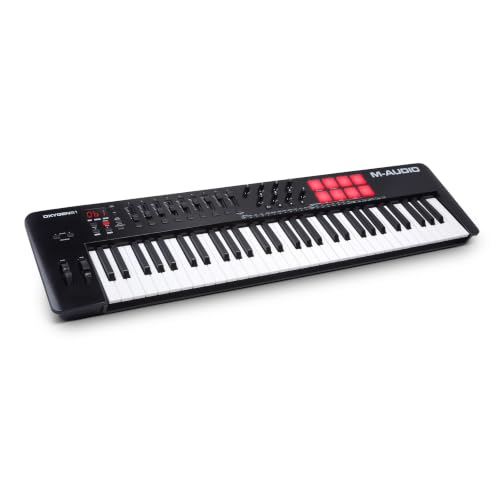
- 61 velocity-sensitive full-size keys
- 16 beat pads with Note Repeat
- 8 knobs, 9 faders, and NKS integration
Best For: Beat-driven producers who want performance controls and software bundling
Studio Starter Pick

- 61 semi-weighted velocity-sensitive keys
- USB-powered plug-and-play setup
- Includes software and online lessons
Best For: Beginners and home-studio users who want an easy 61-key controller
Hands-On Beatmaker
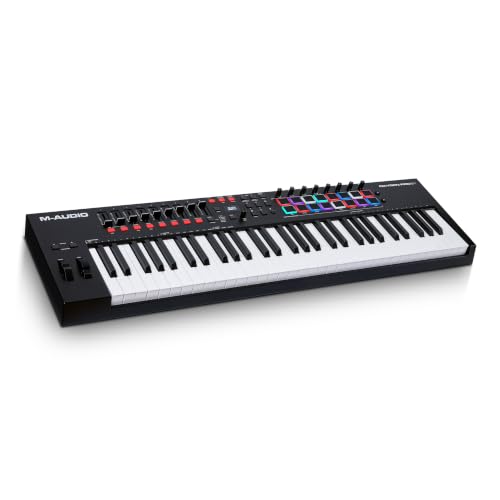
- 61 semi-weighted keys with aftertouch
- 16 RGB pads plus faders and knobs
- NKS integration and production tools
Best For: Producers who want pads, faders, and advanced control in one controller
Premium Controller Choice

- 61 semi-weighted keys with aftertouch
- 12 performance pads and 9 encoders
- 3.5 color screen with Analog Lab Pro
Best For: Players who want a premium-feeling controller with expressive controls
Creative DAW Controller – Arturia KeyLab Essential mk3 61 Key MIDI Controller
If you want a 61-key midi keyboard controller that leans into songwriting and beat-making, the Arturia KeyLab Essential mk3 gives you a practical mix of keys, pads, faders, and deep software control. It adds Scale Mode, Chord Mode, and an arpeggiator to help speed up ideas, while the included Analog Lab V library expands your sound palette well beyond basics.
Best For: Producers and songwriters who want hands-on DAW control plus a broad software bundle.
Pros:
- 61 velocity-sensitive keys with 8 RGB pads, 9 encoders, and 9 faders for flexible control.
- Scale Mode, Chord Mode, and Arpeggiator make composing and beat-making more immediate.
- Custom scripts support deeper integration with Ableton Live, Logic Pro X, FL Studio, and more.
- Includes Analog Lab V plus extra software such as pianos, Loopcloud, and Melodics.
Cons:
- It is a USB controller, so it does not generate sounds on its own.
- The feature set may feel more complex than a bare-bones keyboard.
Overall, this is a strong fit if you want a feature-rich controller that blends creative tools with software integration. The extra pads, faders, and included instruments make it easy to move from idea to arrangement on a 61-key layout.
Simple NI Workflow Pick – Native Instruments Komplete Kontrol A61
The Native Instruments Komplete Kontrol A61 is a straightforward 61-key midi keyboard controller for users who mainly work with virtual instruments and effects. Its semi-weighted custom NI keybed, OLED display, and 8 touch-sensitive knobs keep the layout focused on navigation and performance rather than extra performance pads or deep hardware features.
Best For: Players who want a simple, focused controller for virtual instruments and compatible DAWs.
Pros:
- 61 semi-weighted keys provide a more expressive feel than basic synth-action boards.
- OLED display helps with at-a-glance navigation.
- 8 touch-sensitive control knobs give hands-on parameter control.
- USB bus power keeps the setup simple.
Cons:
- It is geared toward keyboard-and-knob control, with no pad-heavy performance section.
- Older model year compared with newer 61-key controllers.
In practice, the A61 makes sense if you want a clean controller that stays out of the way while browsing and shaping software instruments. It is not the most feature-packed option here, but that simplicity is part of the appeal.
Modern Performance Controller – Novation Launchkey 61 MK4
The Novation Launchkey 61 MK4 is a 61-key midi keyboard controller built for hands-on production and DAW use. It combines semi-weighted keys, 16 FSR pads with polyphonic aftertouch, 9 faders, an OLED display, and creative tools like Scale and Chord modes plus an arpeggiator, making it a versatile choice for modern music workflows.
Best For: Producers who want an all-in-one controller for DAW work, finger drumming, and chord-based writing.
Pros:
- 61 semi-weighted keys with pitch/mod wheels for expressive playing.
- 16 responsive FSR pads support drumming, clip launching, sequencing, and chord triggering.
- Scale Mode, Chord Mode, and arpeggiator help with fast idea generation.
- Strong DAW integration plus a software bundle that includes Ableton Live Lite and Cubase LE.
Cons:
- Feature-rich layouts can take time to learn if you only need basic MIDI input.
- Plastic construction may not feel as premium as some higher-end studio controllers.
This is a strong all-around controller if you want performance pads and DAW shortcuts in one 61-key unit. The Launchkey 61 MK4 stands out for creative workflow features and broad software support.
Expressive MIDI Workhorse – Nektar Impact GXP61 61-Key Controller
The Nektar Impact GXP61 is a practical 61-key midi keyboard controller focused on expressive playing and broad MIDI compatibility. It offers semi-weighted full-size keys with aftertouch, pitch bend and modulation wheels, octave and transpose buttons, plus sustain and expression pedal sockets and a 5-pin MIDI out for flexible studio connections.
Best For: Players who want expressive keys and traditional MIDI connectivity in a no-nonsense controller.
Pros:
- 61 premium semi-weighted keys with velocity sensitivity and aftertouch.
- Pitch/mod wheels, octave and transpose buttons, and pedal inputs support performance control.
- Includes 5-pin MIDI out for hardware integration beyond USB-only setups.
- Nektar DAW integration and Nektarine plugin control add software convenience.
Cons:
- No built-in pad grid or large display is listed in the supplied details.
- It is more focused on core keyboard performance than creative extras.
If you want a controller that emphasizes feel, MIDI flexibility, and compatibility, the GXP61 is easy to justify. It covers the essentials well and adds traditional MIDI out for setups that go beyond the computer.
Budget USB Workhorse – midiplus i61 USB MIDI Keyboard controller
If you want a straightforward 61-key midi keyboard controller for writing parts, the midiplus i61 keeps the focus on the basics. It offers full-size sensitive keys, USB power, pitch and modulation wheels, plus a few useful extras like a data entry wheel and dual MIDI out ports for a simple studio setup.
Best For: Players who want an affordable, no-frills 61-key controller for basic MIDI input and laptop-based music production.
Pros:
- 61 full-size sensitive keys with support for 61 notes output simultaneously
- USB-powered design with USB-B connection for MIDI and power
- Pitch and modulation wheels plus a data entry wheel
- Sustain pedal input and two MIDI out interfaces
Cons:
- No built-in pads, knobs, or faders for deeper hands-on control
- Basic feature set compared with more production-focused controllers
- Best suited to simple keyboard duties rather than advanced DAW control
Overall, the midiplus i61 is a practical pick if you mainly need dependable 61-key input and simple connectivity. Its feature list is modest, but the included MIDI outputs and USB power make it an easy fit for compact setups.
Feature-Rich Creator Board – Arturia KeyLab Essential mk3 61-key Keyboard Controller – Aquamarine
The Arturia KeyLab Essential mk3 is a feature-packed 61-key midi keyboard controller aimed at producers who want more control from a single board. It combines 61 full-size semi-weighted keys, 8 RGB backlit pads, 9 rotary encoders, and deep virtual-instrument integration, making it well suited to hands-on music creation.
Best For: Producers and keyboard players who want a controller with pads, faders, encoders, and bundled software for creative workflows.
Pros:
- 61 full-size semi-weighted keys with velocity sensitivity
- 8 velocity- and pressure-sensitive RGB pads
- 9 faders and 9 encoders for tactile control
- Includes bundled software and virtual instrument integration
Cons:
- More complex than a basic keyboard-only controller
- May be more than needed if you only want simple MIDI input
- Designed around software workflows rather than standalone use
For users building tracks in a DAW, this controller offers a strong balance of playability and hands-on control. The included software suite and integration features add value if you want a more complete production surface.
Production-Focused Performer – M-AUDIO Oxygen 61 MKV MIDI Keyboard Controller
The M-AUDIO Oxygen 61 MKV is a 61-key midi keyboard controller built for beat making and DAW control. Along with velocity-sensitive full-size keys, it adds beat pads, assignable knobs and faders, Smart Chord and Scale modes, an arpeggiator, and NKS integration for Native Instruments libraries.
Best For: Producers who want a 61-key controller with performance tools, pad control, and bundled software for studio work.
Pros:
- 61 velocity-sensitive full-size piano-style keys
- 2 banks of 8 backlit velocity-sensitive beat pads with Note Repeat
- 8 assignable knobs and 9 assignable faders for DAW and plugin control
- Smart Chord, Smart Scale, arpeggiator, and NKS integration
Cons:
- Windows-focused in the supplied specs
- Heavier feature set may be more than a basic player needs
- Requires setup to take full advantage of the software bundle and mappings
As a production tool, the Oxygen 61 MKV stands out for mixing performance features with practical control surfaces. If you want one controller to cover keys, pads, and software navigation, it offers a lot in a single package.
Studio Starter Pick – M-AUDIO Keystation 61 MK3
If you want a straightforward 61-key midi keyboard controller for getting ideas into your DAW quickly, the Keystation 61 MK3 keeps the focus on the essentials. It offers full-size velocity-sensitive semi-weighted keys, simple transport and direction controls, and plug-and-play USB connection for Mac, PC, and even iOS with the proper adapter.
Best For: Beginners and home-studio users who want a simple, playable 61-key controller with included software.
Pros:
- 61 full-size velocity-sensitive semi-weighted keys for a natural playing feel
- Volume fader, transport buttons, octave controls, and pitch/mod wheels
- USB-powered plug-and-play setup with no drivers or power supply required
- Includes software and free lesson resources to help you start producing
Cons:
- No pads, knobs, or faders beyond the basic control set
- Does not include a sustain pedal in the package
- iOS use requires the Apple USB Camera Adapter, sold separately
The Keystation 61 MK3 is a practical choice if you want a clean, reliable controller without extra complexity. It leans more toward simple keyboard performance and DAW navigation than deep hands-on sound shaping.
Hands-On Beatmaker – M-AUDIO Oxygen Pro 61
The Oxygen Pro 61 is built for users who want a more performance-focused 61-key midi keyboard controller with deeper hands-on control. Along with semi-weighted keys and aftertouch, it adds 16 RGB pads, 8 assignable knobs and buttons, 9 assignable faders, Smart Chord and Smart Scale modes, and an arpeggiator for fast production workflows.
Best For: Producers who want pads, faders, and advanced control features in a 61-key controller.
Pros:
- 61 velocity-sensitive semi-weighted keys with aftertouch and assignable zones
- 16 RGB backlit pads for beat production, clip launching, and triggering
- 8 assignable knobs/buttons plus 9 assignable faders for tactile DAW control
- NKS integration and included software package expand workflow options
Cons:
- Heavier and larger than simpler keyboard-only controllers
- Many features may be more than needed for basic playing
- 5-pin MIDI output is included, but the core focus is still USB-based control
For players who want a more complete production surface, the Oxygen Pro 61 offers a lot of control in one board. It stands out when you need pads, faders, and mapped software access alongside a responsive keybed.
Premium Controller Choice – Arturia KeyLab 61 mk3 Black
The Arturia KeyLab 61 mk3 Black is aimed at players who want a premium 61-key midi keyboard controller with more expressive performance features and a modern control layout. Based on the supplied details, it includes 61 semi-weighted keys with aftertouch, 12 pressure-sensitive performance pads, 9 encoders, a 3.5 color screen, and USB-C power.
Best For: Players who want a premium-feeling 61-key controller with aftertouch, pads, and a color screen.
Pros:
- 61 semi-weighted keys with aftertouch for expressive playing
- 12 pressure-sensitive performance pads for extra triggering control
- 3.5 color screen plus 9 encoders for clearer hands-on workflow
- Analog Lab Pro software is included
Cons:
- Fewer detailed control specs are listed than on some competing models
- No fader count is provided in the supplied notes
- Best suited to users who will take advantage of its extra control features
This model looks like the most feature-forward option in the group for expressive players and software control. If you want a 61-key controller with a more polished interface, it deserves a close look.
How We Picked the Best 61-Key Midi Keyboard Controller
We prioritized controllers with reliable build quality, responsive keys, practical transport and performance controls, and software bundles that add real value. For a 61-Key Midi Keyboard Controller, versatility matters most, so we favored models that work well for sketching ideas, playing parts live, and controlling a DAW without constant menu diving.
Quick Comparison
As you compare options, think in terms of playing style and workflow. Some controllers emphasize synth-style speed and portability, while others offer semi-weighted keys, deeper MIDI mapping, and more tactile controls for production. If you use a DAW heavily, integration features can matter as much as the keyboard itself.
Key Buying Factors for a 61-Key Midi Keyboard Controller
Key Action
Synth-action keys are lighter and faster, which suits drum programming and lead lines. Semi-weighted keys feel closer to an acoustic instrument and are often better for piano parts and expressive playing.
Control Layout
Look for knobs, faders, pads, mod and pitch wheels, and transport controls if you want fewer trips to the mouse. The best layout depends on whether you mainly perform, produce, or both.
DAW and Software Integration
Some controllers are designed to map tightly to popular DAWs, saving setup time and improving navigation. Bundled software can also be a major value-add, especially if you are building a setup from scratch.
Connectivity and Size
Most models in this category use USB bus power, which keeps setup simple. Still, make sure the footprint fits your desk or live rig, especially if you want room for a mouse, pad controller, or audio interface.
Who Should Buy Which 61-Key Midi Keyboard Controller?
If you want the most straightforward writing tool, choose a controller with a clean layout and strong software package. If you need a more expressive playing feel, semi-weighted keys are worth the upgrade. Producers who rely on hands-on mixing and clip launching should lean toward models with pads, faders, and DAW-friendly controls. If portability and simplicity are your priorities, a lighter synth-action 61-Key Midi Keyboard Controller is usually the smartest choice.
For most buyers, the best option is the one that fits your workflow today and still leaves room to grow as your studio expands.