Looking for a compact way to trigger drums, launch clips, and build beats anywhere? The best portable MIDI pad controller can turn a laptop, tablet, or mobile setup into a flexible performance rig.
In this roundup, we focus on small, travel-friendly options with responsive pads, useful software features, and enough control for producers, beatmakers, and live performers.
Best 10 Portable Midi Pad Controller Picks for 2026
Portable Clip-Launching Starter
Novation Launchpad Mini MK3 for Ableton
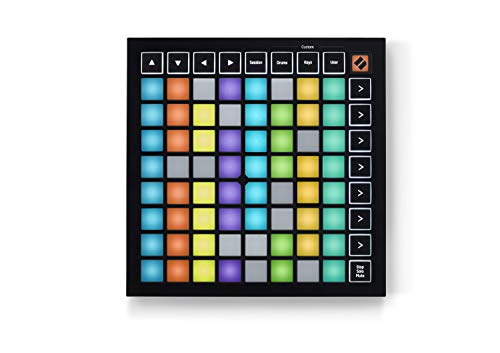
- 64 RGB pads for clear clip visibility
- Ableton Live clip, scene, stop, solo, and mute control
- Slim, lightweight, bus-powered design
Best For: Ableton users who want a compact clip launcher
MPC Drum Pad Workhorse

- 16 thick MPC pads for beat making
- 48 total pad assignments across three banks
- 18 assignable knobs plus note repeat and full level
Best For: Beat makers who want a simple portable MPC-style controller
Portable Keyboard Hybrid

- 25 mini velocity-sensitive keys plus 8 MPC pads
- 8 knobs, color screen, and DAW integration
- USB-C with full-size MIDI Out for flexible setups
Best For: Creators who want a compact all-in-one keyboard and pad controller
Wireless Travel Pad
Mini Wireless MIDI Controller Pad for Mobile Production

- Bluetooth MIDI and USB MIDI for cable-free or wired use
- 16 RGB velocity pads with aftertouch for expressive control
- Up to 15 hours of battery life with app customization
Best For: mobile beat makers, DJs, and travel-friendly studio setups
Classic MPC Mini
Akai LPD8 Compact USB Pad Controller

- 8 RGB MPC pads plus 8 assignable Q-Link knobs
- USB plug-and-play with no driver installation required
- Compatible with major DAWs like Ableton Live and FL Studio
Best For: laptop producers who want a compact, reliable USB pad controller
Wireless Beat Desk
M-VAVE 16-Pad Bluetooth Controller

- 16 RGB velocity pads with aftertouch and note repeat
- 8 assignable rotary encoders for hands-on adjustment
- Bluetooth MIDI with rechargeable battery for portable use
Best For: beat makers and songwriters who want wireless pads plus extra controls
Clip Launching Control
Akai APC Mini MK2 USB MIDI Pad Controller

- 64 RGB pads for clip launching with visual feedback
- 9 assignable faders for mixer and device control
- USB-powered, plug-and-play for Mac and PC
Best For: Ableton Live users who want compact clip launching and mixer control
Beat Maker Control
Donner STARRYPAD 16-Pad MIDI Controller

- 16 backlit pads expand to 48 assignable pads with 3 banks
- Adds 2 faders, 2 knobs, and 3 buttons for control
- USB-C class-compliant design plus MIDI in/out support
Best For: Producers wanting a compact pad controller with extra control surfaces
Ultra-Portable Pad Control
Donner STARRYPAD MINI Wireless MIDI Controller

- Pocket-size 4.53 x 5.71 inch body for easy portability
- Wireless MIDI plus USB-C plug-and-play connectivity
- 16 RGB velocity-sensitive pads with Note Repeat and battery power
Best For: Mobile creators who want a pocketable wireless pad controller
Portable Clip-Launching Starter – Novation Launchpad Mini MK3 for Ableton
If you’re shopping for a portable midi pad controller built around clip launching, the Launchpad Mini MK3 is a compact way to control Ableton Live and Logic Pro Live Loops. Its 64 RGB pads make it easy to see your session at a glance, while the lightweight, bus-powered design keeps it simple for travel and tight setups.
Best For: Ableton-focused producers and performers who want a slim, travel-friendly clip launcher.
Pros:
- 64 RGB pads reflect your Ableton Live session clearly
- Strong Ableton Live integration with clip, scene, stop, solo, and mute control
- Three Custom Modes let you remap MIDI control in Novation Components
- Slim, lightweight, bus-powered design is easy to carry
Cons:
- Best suited to clip launching rather than keyboard-style playing
- Customization depends on using Novation Components
Overall, this is a focused controller for users who want a compact, hands-on way to launch clips and shape performances. If your workflow centers on Ableton Live and portability matters, it covers the essentials without taking up much space.
MPC Drum Pad Workhorse – Akai MPD218 Pad Controller
The MPD218 is a straightforward portable midi pad controller for beat making, sample triggering, and hands-on DAW control. It combines 16 thick MPC pads, three pad banks, and assignable knobs, making it a practical choice when you want a compact controller that focuses on drum performance and flexible mapping.
Best For: Producers and DJs who want an ultra-portable MPC-style pad controller with simple hands-on control.
Pros:
- 16 thick, touch-sensitive MPC pads for drums, samples, and effects
- Three pad banks expand control to 48 assignable pads
- 18 assignable knobs across three banks for DAW and plugin parameters
- MPC note repeat and full level controls support expressive performance
Cons:
- Does not include built-in keys or a keyboard-style layout
- Best if you mainly want pad-based control rather than deeper screen-based workflow
For creators who value the classic MPC pad feel, the MPD218 stays focused on performance and programming. It is a strong fit when portability, USB power, and a pad-first workflow matter more than extra hardware features.
RGB Pad Creator Pick – Synido TempoPAD MIDI Pad Controller
The Synido TempoPAD is a portable midi pad controller aimed at producers who want responsive pads, easy setup, and a carry case for mobile sessions. Its 16 velocity-sensitive RGB pads, three banks, and assignable knobs make it useful for drum programming, sample triggering, and quick effect tweaks without digging through menus.
Best For: Beginner-friendly beat makers and mobile producers who want colorful pads and simple plug-and-play use.
Pros:
- 16 velocity-sensitive RGB pads for dynamic playing and clear visual feedback
- Three banks provide 48 total pad assignments
- Four assignable knobs support quick control over effects and parameters
- USB-C plug-and-play design and included carry case suit travel setups
Cons:
- Pad 14 does not light up in Keyboard Mode
- Does not produce sound on its own and needs DAW software
TempoPAD is a solid fit if you want a compact controller that keeps setup simple and gives you immediate tactile access to beats. It is especially appealing for users who move between studio, dorm, and on-the-go writing sessions.
Portable Keyboard Hybrid – Akai MPK Mini IV Controller
The MPK Mini IV is a portable midi pad controller and keyboard hybrid for creators who want pads, keys, knobs, and DAW control in one compact unit. With 25 mini velocity-sensitive keys, 8 RGB MPC pads, a color screen, and USB-C connectivity, it is built for hands-on production, songwriting, and travel-friendly setups.
Best For: Beginners and producers who want a compact all-in-one controller with keyboard and pad performance.
Pros:
- 25 mini velocity-sensitive keys for melody, chords, and synth parts
- 8 velocity- and pressure-sensitive MPC pads with RGB feedback
- 8 assignable 360-degree knobs plus color screen and encoder for direct control
- USB-C, full-size MIDI Out, and plug-and-play support for Mac, PC, and mobile
Cons:
- Only 8 pads, so it is less pad-heavy than larger drum-focused controllers
- Designed for controller workflow, not standalone sound generation
This is a strong choice if you want more than pads alone and prefer a controller that can handle keys, beats, and parameter tweaking together. It stands out as a flexible, portable option for modern production setups.
Wireless Travel Pad – Mini Wireless MIDI Controller Pad for Mobile Production
If you want a portable midi pad controller that works without locking you to a desk, this mini wireless option is built around Bluetooth MIDI and USB MIDI. The 16 RGB velocity pads with aftertouch give you expressive triggering for beats, samples, and DAW control, while the compact body and app-based customization make it easy to tailor the workflow to your setup.
Best For: Musicians, DJs, and mobile creators who want cable-free beat making with customizable pad mapping.
Pros:
- Bluetooth MIDI and USB MIDI support for wireless or wired use
- 16 RGB velocity-sensitive pads with aftertouch for expressive performance
- Up to 15 hours of battery life, with ECO mode for longer standby
- PC and mobile app customization for pad mapping, velocity curves, and lighting
Cons:
- Compact design may feel limited if you prefer larger pad layouts
- Best results depend on using the companion software for setup
Overall, this is a strong pick if portability and wireless flexibility matter more than a full-size control surface. It gives you enough hands-on control for mobile production, live triggering, and beginner beat making without adding much bulk to your bag.
Classic MPC Mini – Akai LPD8 Compact USB Pad Controller
The Akai Professional LPD8 is a practical portable midi pad controller for producers who want simple, hands-on control in a slim USB-powered design. Its 8 RGB MPC pads and 8 assignable Q-Link knobs make it useful for triggering samples, shaping parameters, and working across popular DAWs without needing a bulky setup.
Best For: Laptop producers, beat makers, and DJs who want a compact, plug-and-play control surface.
Pros:
- 8 RGB-backlit MPC drum pads for samples, loops, and virtual instruments
- 8 assignable knobs for tactile control of DAW parameters and effects
- USB plug-and-play operation with no driver installation required
- Works with major DAWs including Ableton Live, FL Studio, Logic, and more
Cons:
- Only 8 pads, so it offers less pad space than 16-pad controllers
- USB-only design means no wireless or battery-powered use
This is a straightforward choice if you want a reliable compact controller that slots easily into a laptop workflow. It focuses on essential pad and knob control, making it easy to carry and quick to integrate with common music software.
Wireless Beat Desk – M-VAVE 16-Pad Bluetooth Controller
The M-VAVE is a feature-rich portable midi pad controller aimed at beat makers who want wireless control plus extra hands-on adjustments. With 16 RGB velocity-sensitive pads, 8 rotary encoders, note repeat, and Bluetooth MIDI, it covers both performance and editing tasks in a compact, rechargeable package.
Best For: Songwriters and beat makers who want wireless pads, knobs, and note repeat in one portable unit.
Pros:
- 16 RGB velocity-sensitive pads with aftertouch for expressive playing
- 8 assignable 360-degree rotary encoders for fine-tuning parameters
- Bluetooth MIDI and rechargeable battery for portable use
- Compatible with major DAWs and multiple platforms including Windows, Mac, Android, and iOS
Cons:
- Feature set may be more than casual users need
- Silicone button design may not appeal to those who prefer harder pad surfaces
For creators who want more than just pads, this model adds useful controls without giving up portability. It is a good fit if you value wireless workflow, expandable adjustment options, and a design built for travel-friendly music production.
Clip Launching Control – Akai APC Mini MK2 USB MIDI Pad Controller
If you want a portable midi pad controller built around Ableton workflows, the Akai APC Mini MK2 is designed for fast clip launching, mixer control, and hands-on performance. Its 8×8 RGB pad grid, assignable faders, and drum and note modes make it practical for studio work or live sets.
Best For: Ableton Live users who want compact clip-launching control with visual feedback and mixer access.
Pros:
- 64 RGB pads provide clear visual feedback for launching clips, loops, vocals, and samples.
- 9 assignable faders, including a master fader, support mixer control and device mapping.
- Drum Mode and Note Mode help with drum racks and melody playing.
- USB-powered, plug-and-play design keeps setup simple on Mac or PC.
Cons:
- Built primarily for Ableton Live integration rather than broad standalone use.
- Does not include battery power or wireless operation.
The APC Mini MK2 is a strong choice if your priority is quick, tactile control over clips and mix functions in a small footprint. It stays focused on performance and Ableton integration rather than trying to be a general-purpose controller.
Beat Maker Control – Donner STARRYPAD 16-Pad MIDI Controller
The Donner STARRYPAD is a portable midi pad controller aimed at beat-making, finger drumming, and simple hands-on production control. With 16 backlit silicone pads, 3 pad banks, faders, knobs, and button controls, it gives you more ways to shape sounds without taking up much desk space.
Best For: Producers who want an affordable pad controller with extra fader, knob, and MIDI connectivity options.
Pros:
- 16 soft silicone backlit pads expand to 48 assignable pads across 3 banks.
- Includes 2 faders, 2 knobs, and 3 buttons for added control.
- Class-compliant USB-C plug-and-play setup works with multiple platforms.
- MIDI in/out support lets you connect external synthesizers or vintage MIDI gear.
Cons:
- The editor is for pad settings and does not handle music recording or arranging.
- Requires DAW software to produce sound.
STARRYPAD is a practical middle-ground option if you want more hands-on control than a basic pad grid offers. Its extra MIDI connections and flexible pad banks make it useful for beat creation and small studio setups.
Ultra-Portable Pad Control – Donner STARRYPAD MINI Wireless MIDI Controller
For a portable midi pad controller you can carry almost anywhere, the Donner STARRYPAD MINI stands out for its tiny footprint, wireless MIDI support, and rechargeable battery. It still gives you 16 velocity-sensitive RGB pads, Note Repeat, and USB-C connectivity, so it stays useful for sketching ideas, travel production, or quick performance ideas.
Best For: Mobile creators who want a pocketable pad controller with wireless and USB-C options.
Pros:
- Very compact 4.53 x 5.71 inch size fits easily into a pocket or bag.
- 16 RGB velocity-sensitive pads include polyphonic aftertouch and Note Repeat.
- Wireless MIDI and USB-C plug-and-play support flexible setups.
- Built-in rechargeable battery offers up to 10 hours of use.
Cons:
- Requires DAW software to sound.
- Smaller format may be less comfortable for users who prefer larger pads.
The STARRYPAD MINI is the most travel-friendly option in this group, especially if you value wireless operation and battery power. It is best viewed as a sketchpad for ideas and mobile production rather than a full-size control surface.
How We Picked the Best Portable Midi Pad Controller
We prioritized portability, pad response, software compatibility, and control layout. A strong Portable Midi Pad Controller should be easy to carry, quick to set up, and useful for both studio work and live performance.
We also looked for practical features like velocity sensitivity, RGB feedback, assignable controls, and connection options such as USB or Bluetooth for more flexible workflows.
Quick Comparison
Some models are best for clip launching and Ableton-style performance, while others lean toward finger drumming, beat programming, or hybrid keyboard-and-pad control. Smaller pad-only units usually win on size, while models with knobs, faders, or extra mode controls offer more hands-on workflow options.
Key Buying Factors for Portable Midi Pad Controller
Pad Count and Feel
More pads can improve performance flexibility, but pad quality matters more than raw quantity. Look for velocity sensitivity, solid rebound, and consistent triggering if you plan to finger drum seriously.
Connectivity and Power
USB-only controllers are simple and reliable, while wireless support can be a major advantage for mobile setups. If you plan to use tablets or phones, confirm device compatibility before buying.
Control Extras
Knobs, faders, note repeat, full level, and custom modes can expand what a Portable Midi Pad Controller can do. These tools help when you want to shape sounds, manage clips, or perform without reaching for the mouse.
Software and Workflow
Some controllers are tuned for clip launching, others for drum programming, and some do both. Choose the layout that matches your main software and how you actually create music.
Who Should Buy Which Portable Midi Pad Controller?
If you want the smallest travel option, choose a compact pad-only unit. If you need a more performance-oriented setup, look for RGB feedback, extra assignable controls, and fast access to repeat or launch functions.
Producers who split time between studio and stage should favor a model that balances size with control depth. Beginners may prefer a straightforward layout, while experienced users often benefit most from a Portable Midi Pad Controller with flexible mapping and stronger workflow features.